
Lieferung heute & morgen

Qualitätsgarantie

Willkommens-Angebote freischalten: KOSTENLOSE Lieferung | Bis zu 80 % RABATT | Kostenlose 30-Tage-JoyPlus-Testphase
App herunterladen
For ambitious gamers, especially in FPS titles like Valorant or CS2, milliseconds can be the difference between victory and defeat. A Rapid Trigger keyboard promises a tangible edge with its extremely fast response times. However, the market is flooded with technical jargon and marketing promises that make an informed decision difficult. This guide will help you understand the crucial features and avoid common purchasing mistakes.
By Joybuy Product Recommendation Officer, August 30, 2026
Before we dive into the technical details, it's important to be aware of two common pitfalls that often lead to disappointment and unnecessary expense.
To make an informed choice, you should closely examine three technical specifications. These define the true speed and precision of a modern gaming keyboard.
The core feature of a fast FPS gaming keyboard is the Rapid Trigger function. This is made possible by Hall effect keyboards that use magnetic switches. Unlike mechanical contacts, sensors measure the exact position of the key throughout its entire travel distance.
The polling rate indicates how often the keyboard reports its status to the computer per second. A higher rate means lower input delay.
For gamers who play with low mouse sensitivity, desk space is crucial. A compact gaming keyboard provides more room for mouse movement.
Here are some recommendations tailored to specific user profiles that meet the criteria mentioned above.
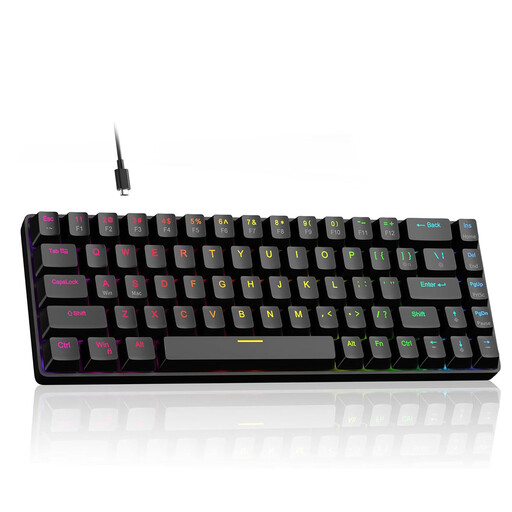
Why it's a good fit: This model offers all the core technologies for competitive gaming—Rapid Trigger, adjustable actuation, and an 8000 Hz polling rate—in an accessible package. The compact 60% form factor with dedicated arrow keys is a thoughtful compromise for gamers who need maximum mouse freedom but don't want to sacrifice essential navigation keys.
Focuses on performance-critical features instead of pure aesthetics and uses Hall effect technology to overcome the drawbacks of traditional mechanical switches.
Delivers a complete high-performance package (Rapid Trigger, 8000 Hz) at an attractive price point, making it a solid choice for entering the world of magnetic switches.
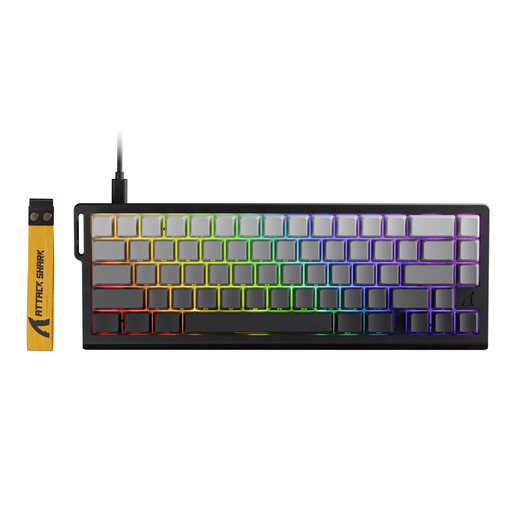
Why it's a good fit: For users seeking a high-performance Wooting alternative who refuse to compromise. This model offers extremely fine-grained adjustment of key sensitivity and an 8000 Hz polling rate for minimal latency. Advanced software features like Dynamic Keystrokes (DKS) enable complex actions with a single keypress.
Prioritises technical performance and customisation. Its specifications (0.01 mm RT accuracy, 8000 Hz) are designed for maximum competitive advantage, not superficial gimmicks.
Offers extensive configurability through web-based drivers and on-board memory, allowing for precise tuning to your individual playstyle without constantly running background software.
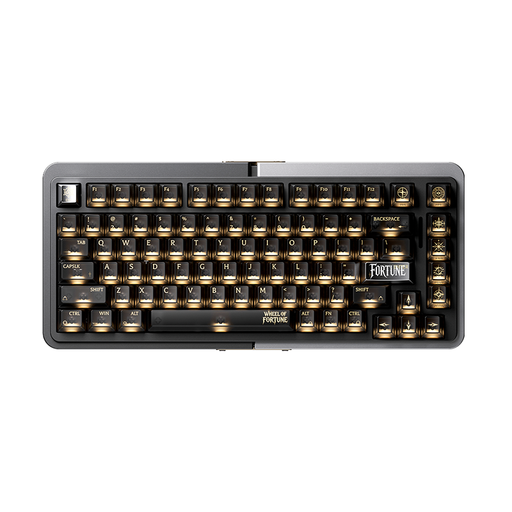
Why it's a good fit: Ideal for users who want a high-performance gaming keyboard with magnetic switches but also value premium build quality and a versatile layout. The 75% layout retains all essential keys, while the aluminium case provides excellent stability and a premium feel. It's an excellent choice for a clean desk setup used for both gaming and productivity.
Combines Rapid Trigger functionality with a robust aluminium case and a well-designed 75% layout. This avoids the trade-off between pure gaming performance and everyday usability.
The combination of a 75% layout and a high-quality aluminium case offers a balance of compactness, functionality, and premium feel that is missing from many pure esports keyboards.
We have compiled a complete, up-to-date list of products that fully meet these strict selection criteria and German safety regulations.
Configuration is done through the manufacturer's software. For FPS games, a very low actuation point (e.g., 0.2 mm to 0.5 mm) is recommended for a fast response. For general typing, a higher value (e.g., 1.5 mm to 2.0 mm) may be more comfortable to prevent typos. Experiment with different values to find the setting that works best for you.
For casual gamers, the difference between 1000 Hz and 8000 Hz is barely perceptible. However, for competitive players operating at the highest level, reducing latency from 1 ms to 0.125 ms can make a noticeable difference in the precision and fluidity of inputs. Whether the extra cost is worth it depends on your personal standards and sensitivity to input lag.
Since gaming keyboards with magnetic switches actuate without physical contact, they experience significantly less wear and tear. While traditional mechanical switches are often rated for 50 to 100 million keystrokes, manufacturers often specify a lifespan of well over 100 million keystrokes for magnetic switches. They are more durable by design.