
Lieferung heute & morgen

Qualitätsgarantie

Willkommens-Angebote freischalten: KOSTENLOSE Lieferung | Bis zu 80 % RABATT | Kostenlose 30-Tage-JoyPlus-Testphase
App herunterladen
For competitive gamers, especially in FPS and rhythm games, the responsiveness of your gear can mean the difference between victory and defeat. The Rapid Trigger keyboard is one of the most significant developments in recent years. However, the market is flooded with marketing buzzwords and technical specs that confuse more than they clarify. Many gamers invest in expensive models only to find that the promised performance advantage never materialises.
As your Joybuy Product Recommendation Officer, I'm here to help you cut through the noise. We'll break down the most common pitfalls and show you which technical parameters truly matter, ensuring your next mechanical gaming keyboard is a worthwhile investment.
Before you make a decision, you should be aware of two common marketing traps that often lead to disappointment:
To gain a real performance advantage, you should focus on the following three technical features. They are the foundation of any high-performance gaming keyboard.
The heart of a true Rapid Trigger keyboard is its switches. While traditional mechanical switches rely on physical contact to trigger a signal, modern technologies use more advanced methods:
These two features work hand-in-hand to deliver unparalleled responsiveness:
Here are three recommendations tailored to different needs, all of which avoid the pitfalls mentioned above.
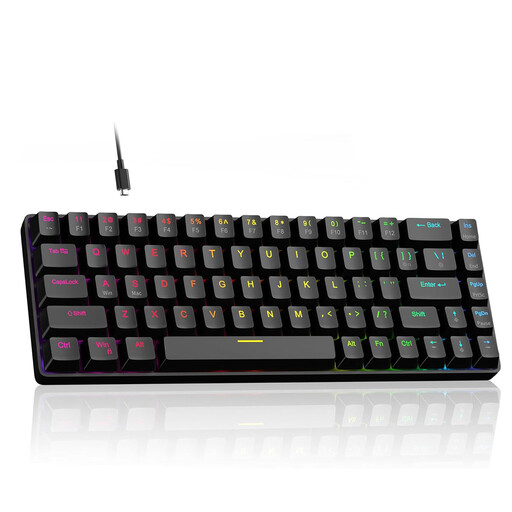
Why This Fits Their Persona: Perfect for gamers who want to leverage the benefits of Hall effect technology without breaking the bank. It offers the core features of more expensive models in a compact 60% form factor.
This model combines an 8000Hz polling rate with genuine Hall effect switches. The customisation is also authentic, with an adjustment range from 0.1 mm to 4.0 mm, making it more than just a marketing gimmick.
Offers full-fledged Rapid Trigger functionality and is a hot-swap keyboard, which is a rarity in this price range. The compact 60% layout retains dedicated arrow keys.
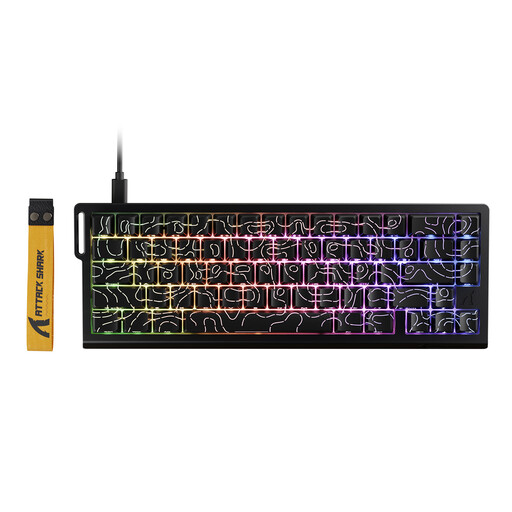
Why This Fits Their Persona: For players where every millisecond counts. This model is designed for maximum performance, offering extremely precise control for demanding gaming keyboard for FPS scenarios.
The specs are on point: the 8000Hz polling rate is fully utilised with a Rapid Trigger precision of 0.01 mm and a wide adjustment range (0.1-3.4 mm). This keyboard delivers on performance, it doesn't just promise it.
Offers advanced software features like Dynamic Keystrokes (DKS) and Mod-Tap. Control is managed via a convenient web driver that allows for real-time adjustments.
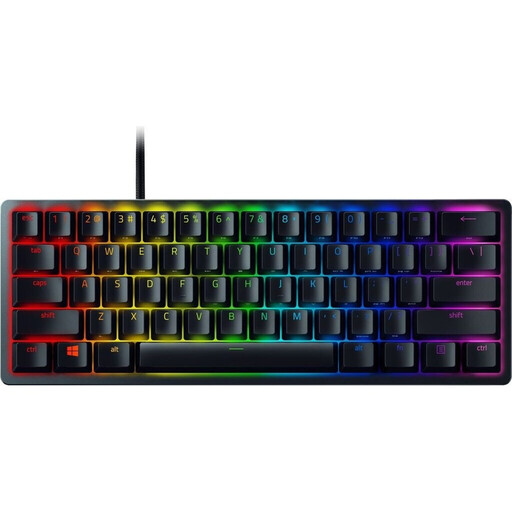
Why This Fits Their Persona: An option for gamers who prefer an established brand with a focus on speed and a minimalist desk setup. Ideal for those who appreciate the proven performance of optical switches.
Instead of relying on a single marketing buzzword, this keyboard delivers a cohesive overall package. The optical switches provide an inherently fast and delay-free actuation, reducing the need for complex software tricks.
Razer's linear optical switches are renowned for their speed and durability. High-quality doubleshot PBT keycaps ensure a wear-resistant and long-lasting surface.
We have compiled a complete, real-time list of products that fully meet these strict selection criteria.
For casual gamers who mainly play single-player titles or less competitive games, the advantage of Rapid Trigger is less pronounced. The technology shines in games that demand fast and precise repeated keystrokes. However, Hall effect keyboards often provide a very smooth and pleasant typing feel that can also be beneficial for everyday use. For a purely casual setup, a traditional mechanical gaming keyboard might offer better value for money.
Although they are often mentioned together, they describe two different functions. The adjustable actuation point determines how deep a key must be pressed to trigger an action (e.g., at 0.5 mm). Rapid Trigger, on the other hand, ensures the key is reset the instant it starts moving upward, rather than having to wait for a fixed reset point. This combination makes it possible to press a key in extremely quick succession.
Typically, yes. While basic keyboard functions usually work plug-and-play, the manufacturer's software is required to configure the core features—such as setting the precise actuation point, adjusting Rapid Trigger sensitivity, or assigning key profiles. Without this software, you're only using a fraction of the keyboard's potential.