
Lieferung heute & morgen

Qualitätsgarantie

Willkommens-Angebote freischalten: KOSTENLOSE Lieferung | Bis zu 80 % RABATT | Kostenlose 30-Tage-JoyPlus-Testphase
App herunterladen
A wireless desk promotes order and focus. But the search for the right rechargeable keyboard and mouse set can quickly become overwhelming. Many products promise more than they deliver, leading to frustration instead of productive work. As your Joybuy Product Recommendation Officer, I'll help you identify the crucial features and avoid common purchasing pitfalls, so you can make an informed decision for your office or home office.
Before we dive into the recommended features, it's important to know the most common flaws that often only become apparent after purchase.
quiet keyboard is crucial in an office or home office to avoid disturbing colleagues and family members. Many manufacturers market their products as quiet, but in practice, the keystrokes are clacky and loud, indicating an inferior key mechanism.To avoid these pitfalls, you should focus on three core technical features. These define the quality and longevity of a wireless set.
A high-quality wireless desktop set should ensure a stable and secure connection. The most common technology is 2.4 GHz wireless via a dedicated USB receiver. This connection is typically more stable and responsive than Bluetooth alone. For use in a corporate environment, AES-128 encryption is also an important feature, as it protects transmitted data from unauthorised access.
The type of key mechanism determines the typing experience and noise level. For a quiet and precise typing feel, scissor-switch technology has established itself as the standard. Unlike loud mechanical or mushy membrane keyboards, scissor switches offer short, defined travel and a dampened keystroke sound. Models like those from CHERRY with their SX technology are a well-known benchmark for quality.
A modern home office set must be long-lasting and versatile. Look for a battery life measured in weeks or months, not days. The charging port is just as crucial. A USB-C keyboard is the standard today. This port not only enables fast charging but, in most cases, also allows for seamless continued use of the devices while they are connected to the computer.
Based on the criteria above, we have identified several products that are a suitable solution for different user profiles.
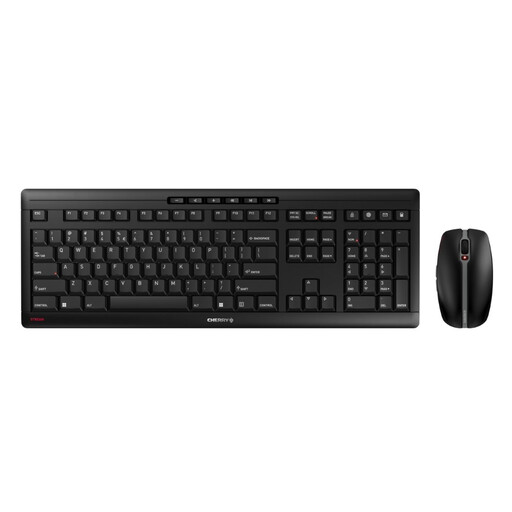
Why This Fits Their Persona: This set is designed for professional users in the office or home office who value reliability, quiet keystrokes, and sustainability. It's a workhorse that performs without compromise.
The stable 2.4 GHz wireless connection with AES-128 encryption prevents dropouts. The NiMH batteries last for months and can be charged via USB-C during use. The CHERRY SX scissor-switch keyboard ensures a demonstrably quiet and precise typing experience.
Perfectly matched keyboard and mouse for uninterrupted productivity. The integrated metal plate ensures high stability and durability.
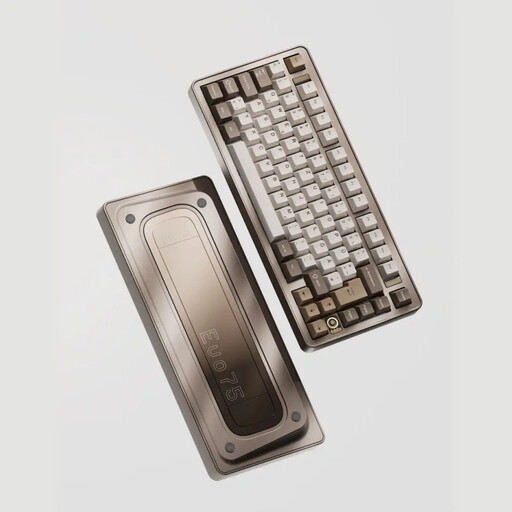
Why This Fits Their Persona: For users who type for many hours daily and seek a customisable, high-quality typing instrument. This is a premium keyboard for enthusiasts who value haptics, sound, and material quality.
The Tri-Mode connectivity (Bluetooth, 2.4 GHz, USB-C) offers maximum flexibility. The massive 8000 mAh battery provides extremely long runtime. High-quality mechanical switches offer a precise typing feel that is far superior to standard keyboards.
A solid aluminium case and hot-swap capability for changing switches without soldering offer unparalleled customisation and longevity. This is an investment in your primary typing tool.
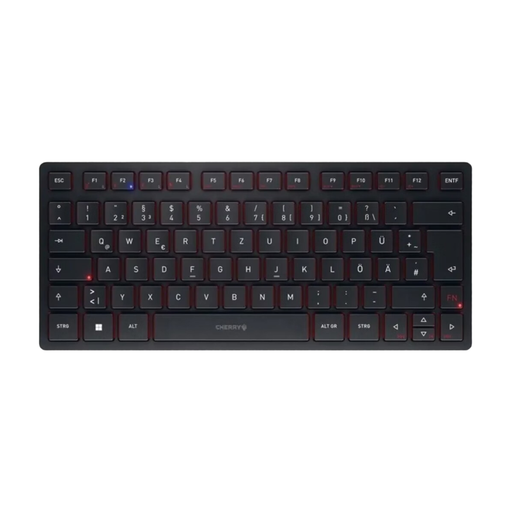
Why This Fits Their Persona: Ideal for users who seamlessly switch between a PC, laptop, tablet, and smartphone. Its compact design saves desk space and is easy to transport without sacrificing a professional typing experience.
Four connection channels (2x Bluetooth, 1x wireless, 1x cable) ensure maximum compatibility and stable connections. The battery lasts for weeks, and the CHERRY SX scissor switches guarantee quiet, precise work in any environment.
The ability to switch between four devices at the touch of a button is a huge efficiency boost. The compact format and the included carrying case underscore its mobility.
We have compiled a complete, real-time updated list of products that fully meet these strict selection criteria and German safety regulations.
1. How long does the battery last in a rechargeable keyboard and mouse set? The battery life varies greatly depending on the model and usage. Basic sets often last only a few days, while high-quality models like the CHERRY STREAM DESKTOP RECHARGE can last for several months on a single charge. Pay attention to the manufacturer's specifications for battery capacity (in mAh) and expected runtime.
2. Can I continue to use the devices while they are charging? Yes, with most modern sets featuring a USB-C port, this is easily possible. The device then functions like a wired peripheral while the battery is charging. This is a crucial advantage over models with outdated ports or those that must be turned off to charge.
3. Is a wireless keyboard secure for data transmission in an office environment? For personal use, most wireless connections are sufficiently secure. However, if you are handling sensitive corporate data, you should look for AES-128 encryption. This technology encrypts the wireless signals between the set and the receiver and is used, for example, in the CHERRY STREAM DESKTOP RECHARGE to ensure a high security standard.