
Lieferung heute & morgen

Qualitätsgarantie

Willkommens-Angebote freischalten: KOSTENLOSE Lieferung | Bis zu 80 % RABATT | Kostenlose 30-Tage-JoyPlus-Testphase
App herunterladen
A tidy desk, free from cable clutter, is often the first step towards greater focus and productivity. A rechargeable wireless keyboard and mouse set promises just that: freedom from cables and the constant need to replace batteries. However, pitfalls in the selection process can quickly disrupt your workday. False promises about noise levels, impractical charging functions, or unstable connections often lead to frustration.
As your Joybuy Product Recommendation Officer, I'll help you navigate these hurdles. We will focus on the crucial features that define a good wireless desktop set, ensuring your investment pays off in the long run.
Many products on the market advertise attractive features, but the devil is in the details. Pay close attention to these three points to avoid making a bad purchase:
quiet wireless keyboard can turn out to be distractingly loud. Instead of trusting vague marketing terms, it's better to pay attention to the underlying key mechanism.To avoid the problems mentioned above, you should check three core technical aspects before buying. These define the quality and real-world usability of a keyboard and mouse combo for the office and home office.
The type of battery and the charging capability are crucial for uninterrupted use.
The mechanism under the keys determines how typing feels and how loud it is.
A stable and secure connection is essential for professional work.
Based on the criteria mentioned above, we have identified some products that are well-suited for different user requirements.
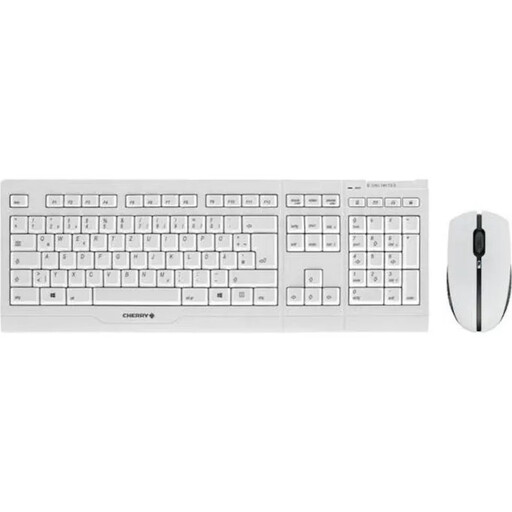
Why This Fits Their Persona: Ideal for users in German offices or home offices who are looking for a durable, straightforward, and complete wireless QWERTZ keyboard set for continuous daily use.
It bypasses the charging trap, as the keyboard and mouse remain fully functional via USB cable while charging. The key lettering is laser-etched for abrasion resistance, preventing premature wear.
Proven scissor mechanism for quiet typing; complete package with German key layout (QWERTZ); AES-128 encryption for secure data transmission.
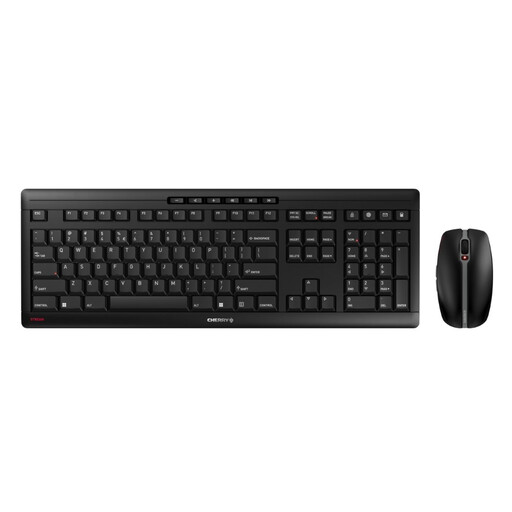
Why This Fits Their Persona: Suitable for tech-savvy users in modern work environments who value a slim design, modern connections like USB-C, and exceptionally quiet operation.
This set escapes the "quiet myth" by using CHERRY's SX scissor technology and a mouse with silent clicks. These are objective features for low noise emission.
Charging via a modern USB-C port; very quiet mouse; adjustable mouse resolution (DPI). Note: This model comes with a US keyboard layout (QWERTY).
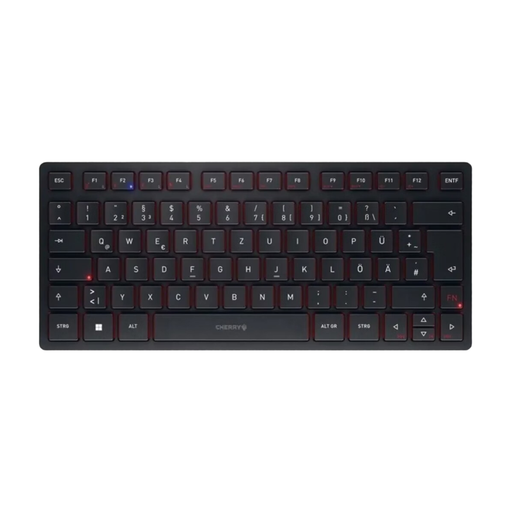
Why This Fits Their Persona: Perfect for mobile professionals or users who need to switch seamlessly between multiple devices (e.g., PC, tablet, laptop) and are looking for a high-quality, portable keyboard.
This model solves the problem of unstable connections by offering four different connection options (2x Bluetooth, 1x 2.4 GHz wireless, 1x cable). This ensures a stable connection in any situation.
Extremely compact and portable; can be connected to up to 4 devices simultaneously; high-quality SX scissor mechanism. Note: Keyboard only, no mouse included. Layout is QWERTY (UK).
We have compiled a complete, real-time list of products that fully satisfy these strict selection criteria and UK safety regulations.
Battery life varies greatly depending on the model, battery capacity, and usage intensity. For the CHERRY keyboard and mouse set models presented here, manufacturers often state runtimes of several weeks or even months per charge. The use of NiMH batteries with a low self-discharge rate helps ensure the devices remain ready for use even after infrequent use.
Yes, with many high-quality models this is possible and is an important purchasing criterion. Sets like the CHERRY B.UNLIMITED 3.0 or the STREAM DESKTOP RECHARGE are designed to be charged via the included USB cable while you continue to work without interruption.
Ergonomics are highly individual. A product labelled as an ergonomic keyboard and mouse set is not automatically the right choice for everyone. Factors like hand size, posture, and personal preferences play a significant role. However, features such as a symmetrical mouse (suitable for both left- and right-handed users), a flat keyboard profile, or rubberised side grips can objectively increase comfort for many users. It is advisable to look for such specific design features rather than relying solely on the general term "ergonomic."