A compact desktop may be all you need to lay out a recipe book across two screens, provided the specific configuration supports both monitors at the same time through suitable outputs and the layout software you need is compatible with its operating system. If you edit lots of photos at once or want the option to upgrade later, check the actual RAM and SSD storage installed, as well as documented upgrade options, rather than judging by the size of the case alone.
Which desktop is right for you?
Recipe book designers using two monitors
If you want the layout and recipe text on one screen, with photos or edits on the other, the outputs on the specific computer need to work with both monitors. Plan the connections for the exact combination you’ll be using.
Designers working with lots of food photos
If you edit photos alongside your page layout, check the installed RAM and available SSD storage against the requirements of your software. Adobe recommends 16 GB of RAM for InDesign and 16 GB or more for Photoshop.
Designers preparing books for print
PDF export settings and colour management also matter when preparing a file for print. Adobe explains how to export PDFs for print and recommends choosing a colour profile to suit the output device; the printer’s requirements should always take precedence.
What should you look for when buying?
Windows mini PC
A good fit if: desk space is limited and the layout software and both monitors work with the specific configuration. For example, MSI lists two HDMI outputs for the Cubi NUC 1M.
The trade-off: Having the right ports doesn’t, by itself, confirm that your monitors can be used at the same time or that the RAM and SSD configuration is suitable.
Compact macOS desktop
A good fit if: the programmes and files you need work with macOS and you want a compact workstation. Apple says the Mac mini M6 supports multiple external displays.
The trade-off: Choose the right RAM and SSD configuration, and make sure the connection for the second monitor is suitable, including any adapter you may need.
Larger Windows desktop
A good fit if: you have enough desk space and the specific configuration offers the features you need. HP lists 32 GB of RAM and connections for two monitors for the OmniDesk M03-0790ng.
The trade-off: The case range and size don’t guarantee that another variant will have the same ports or spare expansion slots.
| Buying priority |
What to check |
Who should pay particular attention |
| Two usable screens |
Check that both monitors can be connected at the same time, that their resolutions are supported, and that you have the right cables or adapters. |
If I want the layout and recipe text on one screen and photos or edits on the other, both displays need to work independently; around 36% of consumers prioritise using two screens. |
| Layout and photo editing |
Check the operating system, software version, installed RAM and SSD storage. Adobe recommends 16 GB of RAM for InDesign 21.3+ and at least 16 GB for Photoshop 27.x. |
If you keep your layout and image-editing software open at the same time, check the installed RAM and make sure there’s enough SSD storage; around 29% of consumers prioritise this kind of multitasking. |
| Preparing files for print |
Check the PDF export settings and colour profile against the printer’s requirements; PC specifications alone don’t tell you how colours will look on your monitor. |
If I need to assess colours and prepare a book file for print, I want to agree the export settings and colour profile with the printer; around 21% of consumers prioritise print preparation. |
| Space and upgrades |
Check the dimensions, the storage actually installed and any documented RAM or SSD upgrade slots on the specific variant. |
If desk space is limited or I’m planning to upgrade later, I want to check the footprint and the upgrade options actually available; around 14% of consumers prioritise space or upgradability. |
Avoiding buying pitfalls
-
Assuming two ports automatically mean two compatible monitors
The ports and support for using multiple screens at once depend on the model and configuration. Apple, MSI and HP list different connection options for their respective devices or models.
Before buying, confirm an output on the specific computer configuration for each monitor, then check that it matches the monitor’s input.
Depending on your monitors’ inputs, you may need suitable cables or adapters.
-
Confusing a PC with a complete print-production workstation
The computer’s specifications don’t determine the colour reproduction of your existing monitors or the right settings for a print-ready PDF.
Check the PDF export settings and colour profile against the printer’s requirements, and treat the monitor and software as separate parts of your workflow.
-
Assuming every model in a product range has the same specifications
Manufacturer details for RAM, SSDs and upgrade options can vary between configurations; the range name alone doesn’t necessarily describe the device on offer.
Check the full model number, installed RAM, SSD, operating system and documented upgrade slots against the specific variant.
Key brands to consider
Apple
The Mac mini M6 is a compact macOS option if the layout programmes you need run on macOS.
- Apple lists support for multiple external displays and configurable storage capacities.
- Check monitor connections and the storage configuration for the model you choose.
Lenovo
The ThinkCentre M75q Gen 5 is a compact Windows desktop range for workstations with two monitors.
- Lenovo lists two standard monitor ports and upgrade options that vary by model.
- Specifications and regional availability can vary by configuration.
MSI
The Cubi NUC 1M is a compact range designed for workstations with limited desk space.
- MSI lists two HDMI outputs and RAM and SSD slots for the range.
- Range specifications don’t show how much storage is installed in a particular model on sale.
HP
The OmniDesk Desktop AI M03 is a larger desktop range, with the M03-0790ng being a specifically listed configuration.
- HP lists 32 GB of RAM, a 2 TB SSD and connections for two monitors for the M03-0790ng.
- These specifications don’t automatically apply to other M03 variants.
GEEKOM
The A5 Pro 2026 Edition with Ryzen 5 7530U is a preconfigured, compact Windows alternative.
- GEEKOM lists 16 GB of RAM, a 1 TB SSD and support for multiple displays for this configuration.
- Claims about noise and performance are manufacturer statements, not independently verified test results here.
Joybuy products for compact macOS workstations
The following Joybuy offers are for compact Mac mini desktops running macOS. For a two-monitor workstation, the ports on the specific configuration must work with both monitors, and the layout software you need must run on macOS.
 No image available
Apple Mac mini M6, 12-Core CPU, 12-Core GPU, 16 GB Unified Memory, 256 GB SSD
A compact macOS option if the layout software you need is compatible with macOS. Apple says the Mac mini M6 supports up to three external displays; check the connections for your two monitors.
Configuration: 16 GB Unified Memory and 256 GB SSD.
Joybuy
No image available
Apple Mac mini M6, 12-Core CPU, 12-Core GPU, 24 GB Unified Memory, 512 GB SSD
A compact macOS option if the layout software you need is compatible with macOS. Apple says the Mac mini M6 supports up to three external displays; check the connections for your two monitors.
Configuration: 24 GB Unified Memory and 512 GB SSD.
Joybuy
 No image available
Apple Mac mini MHQL4_CTO_8 (A3534), M6, 12-Core CPU, 12-Core GPU, 24 GB Unified Memory, 1 TB SSD
A compact macOS option if the layout software you need is compatible with macOS. Apple says the Mac mini M6 supports up to three external displays; check the connections for your two monitors.
Configuration: 24 GB Unified Memory and 1 TB SSD.
Joybuy
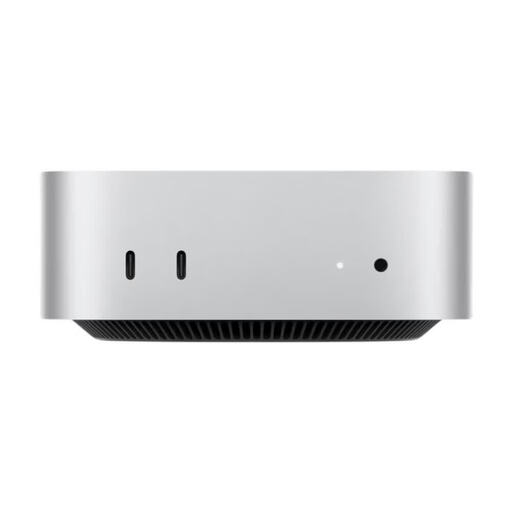 No image available
Apple Mac mini MHQM4_CTO_8 (A3534), M6, 12-Core CPU, 12-Core GPU, 32 GB Unified Memory, 1 TB SSD
A compact macOS option if the layout software you need is compatible with macOS. Apple says the Mac mini M6 supports up to three external displays; check the connections for your two monitors.
Configuration: 32 GB Unified Memory and 1 TB SSD.
Joybuy
Frequently asked questions
How do I set up two monitors in Windows?
Connect both screens to suitable video outputs and open Display settings. From there, you can identify the detected displays and arrange them to match their positions on your desk. If a screen isn’t detected, use the detection feature. Microsoft explains these options for Windows.
Do I need a separate graphics card for two screens?
Not just because you’re using two screens. First check whether the specific configuration supports both displays at the same time and has ports that match your monitors. If you plan to use Photoshop 27.x, also check the chosen computer against Adobe’s stated GPU requirements.
Can the computer alone guarantee a print-ready recipe book PDF?
No. InDesign offers PDF export for print, but the export settings and colour management need to suit the printing process and the printer’s specifications.
What are my rights when buying a desktop PC online from a trader?
Under EU rules, consumers who buy from a trader at a distance generally have a 14-day right to cancel from the date of delivery, although exceptions apply. You also have a legal guarantee of at least two years from the seller. A voluntary manufacturer’s warranty does not replace these rights.


