If you mainly update your recipe catalogue at a fixed desk, a laptop with a suitable connection for your existing monitor should be enough. Two built-in displays are most useful if you often need both screens when you’re out and about. Before buying, check that your recipe software is compatible, that the video connection works with your specific monitor, and what’s included with the exact laptop configuration.
Which set-up is right for you?
Recipe archivists working at a desk
If you usually add recipes in the same place, check whether your laptop can connect to your existing monitor and whether the two screens suit the way you work. Microsoft Support explains how to arrange detected monitors in Windows display settings.
Recipe collectors on the move
If you organise recipes in different places and want both views with you, a laptop with two built-in displays could be a good option. ASUS and Lenovo offer specific dual-display models, so compare the exact configuration and how it works.
Organised catalogue keepers
If you work with lots of sources and entries for extended periods, first check that your specific recipe software runs on the operating system. Then look at the screen, keyboard and storage on the configuration you’re considering. Specifications for one model don’t automatically apply to other versions.
What should you look for when buying?
Laptop with an external monitor
A good fit if: You usually update your catalogue at a fixed desk and already have a monitor, or can set one up there. Microsoft Support explains how to arrange detected screens in Windows.
Things to consider: The monitor needs space and a suitable connection. Lenovo advises that the specific laptop configuration must be compatible with the monitor input.
Laptop with two built-in displays
A good fit if: You often want to view your recipe source and catalogue side by side in different places, without carrying a separate monitor. ASUS describes the Zenbook DUO UX8407 and Lenovo the Yoga Book 9i Gen 10 as models with two displays.
Things to consider: Compare the precise design and keyboard of the version you’re considering. For example, Lenovo says the Yoga Book 9i Gen 10 comes with a magnetic keyboard. Manufacturer specifications aren’t independent evidence of a productivity benefit.
One display with two windows
A good fit if: You’d like to find out whether you really need your recipe source and catalogue visible at the same time before investing in extra screen hardware.
Things to consider: Both windows share the available screen space, so test how easy your actual recipes and files are to read.
| Consideration |
What to check before buying |
Who is this especially important to? |
| Second work surface |
Check the video output on the specific laptop, the monitor input and the cable you’ll need. Microsoft Support explains how to arrange displays in Windows. |
At a fixed desk, I want to see my recipe source and catalogue separately and use my existing monitor. Around 36% of consumers prioritise having the right connection for a second work surface. |
| Two displays on the move |
Compare the arrangement of both displays and what’s included with the exact version. Lenovo says the Yoga Book 9i Gen 10 comes with a magnetic keyboard. |
When I’m adding recipes in different places, I want both views with me without carrying a separate monitor. Around 29% of consumers prioritise two displays in a portable set-up. |
| Updating your catalogue over longer periods |
Test your recipe files with the software you plan to use, and check the keyboard, display and memory on the exact configuration. Lenovo lists these specific features for the ThinkPad E14 Gen 7, part number 21SX003SGE. |
When I’m entering recipes for a long time, I want to be able to read and type comfortably and use my chosen catalogue software. Around 21% of consumers place particular importance on ongoing catalogue management. |
| Complete set-up |
Check what’s included with your version and what additional connection accessories you’ll need. ASUS says the Zenbook DUO UX8406CA-QL331W doesn’t come with a power adapter. |
I want to know in advance what I still need for a complete workspace, rather than looking at the laptop alone. Around 14% of consumers focus on the total cost, including accessories. |
Common buying misconceptions
-
Every USB-C port can connect to a monitor
The name of a port alone doesn’t tell you whether the specific laptop configuration supports the video signal you need. The monitor input must also be compatible with the connection.
Check the video output on the exact model and the monitor input before choosing a cable or adapter.
Depending on your set-up, you may need a suitable cable or adapter.
-
Specifications are interchangeable across Zenbook DUO versions
ASUS lists two 14-inch OLED displays for the UX8407. The display specifications differ on the older, specifically named UX8406CA-QL331W. ASUS also says this version doesn’t come with a power adapter.
Compare the full model name, display configuration and contents of the box for the same version.
-
The laptop alone gives you a complete workspace
If you’re using an external screen, you’ll also need to factor in the monitor and a suitable connection. Some models may not include a power adapter either: ASUS says this is the case for the Zenbook DUO UX8406CA-QL331W.
For either type of set-up, check what you already own and what’s included with the specific product.
A separate monitor and the connections you need take up extra space and must be suitable for your planned set-up.
An overview of relevant brands
ASUS
ASUS describes the Zenbook DUO UX8407 as a laptop with two built-in displays.
- ASUS lists two 14-inch OLED displays for the UX8407.
- This is a manufacturer claim, not independent evidence of improved productivity. The UX8406CA-QL331W has different display specifications; according to ASUS, this version doesn’t include a power adapter.
Lenovo
Lenovo offers both the Yoga Book 9i Gen 10 with two displays and traditional ThinkPad models for use with an external monitor.
- Lenovo describes the Yoga Book 9i Gen 10 as having two OLED displays and a magnetic keyboard included in the box. For the ThinkPad E14 Gen 7, part number 21SX003SGE, Lenovo lists a matte 14-inch display and a German keyboard.
- The ThinkPad specifications apply to this specific version and not automatically to other E14 configurations. If you’re using an external monitor, check the ports on the model you’ve chosen.
Apple
The MacBook Air with M5 is a macOS alternative for use with an external display, provided your recipe software runs on macOS.
- Apple lists DisplayPort support over Thunderbolt 4 and support for external displays.
- It doesn’t have a second built-in screen. Check your application’s compatibility, the cable you’ll need and the configuration you’re considering.
HP
HP offers traditional Windows notebooks in the ProBook 4 G1i range, including versions with HDMI.
- For the AD2N3ET#ABD version, HP lists a 14-inch WUXGA display, 24 GB of memory and a 512-GB SSD.
- An HDMI filter for a model range isn’t a substitute for checking the video output and monitor support on the specific device.
Joybuy products for your recipe catalogue
The Joybuy selection includes 2-in-1 laptops for managing your recipe catalogue. The HP OmniBook X Flip 16 also lists HDMI 2.1 and Thunderbolt 4 for external displays. Check the applicable CE marking and required accompanying information for the specific version.
 Image unavailable
Ninkear YBook15 2-in-1 laptop
A 2-in-1 could be a good option if you want to organise your recipe catalogue on one device and use the touchscreen.
The product name lists a 15.6-inch FHD touchscreen, 8 GB DDR4 memory, a 512-GB SSD, a 360° rotating touchscreen and a backlit keyboard.
Before buying, check the CE marking and accompanying information required for this specific version.
View at Joybuy
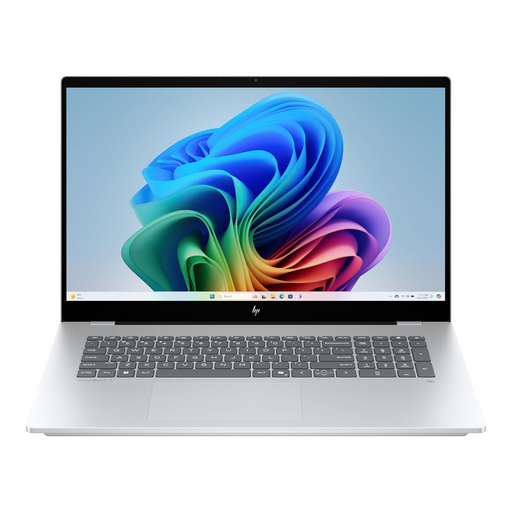 Image unavailable
HP OmniBook X Flip 16
This model could suit a workspace with an external monitor, provided the ports on the specific configuration are compatible with your screen.
The product name lists a 16-inch WUXGA touchscreen, an Intel Core Ultra, 16 GB of memory, a 512-GB SSD and Windows 11. The product description lists HDMI 2.1 and Thunderbolt 4 for external displays.
Before buying, check the CE marking and accompanying information required for this specific version.
View at Joybuy
Frequently asked questions
How do I set up an external screen in Windows?
Connect the screen to your laptop or dock, then arrange the detected displays in Windows display settings. If you have a problem, Microsoft Support recommends checking the connection and using the detection feature.
Can I start with two windows instead of a second monitor?
Yes, if the split screen on your existing display gives you enough room to read and enter information. Try it with an actual recipe source and your catalogue before investing in extra hardware.
What should I check about the power adapter and accessories?
Check what’s included with the exact version. ASUS says the Zenbook DUO UX8406CA-QL331W doesn’t come with a power adapter and specifies a compatible USB-C power adapter rated at 45 to 65 W for this model. Don’t assume this applies to other models.
Who should I contact if my laptop is faulty?
For a consumer purchase in Germany, the seller is responsible for your statutory rights, not automatically the manufacturer. The Verbraucherzentrale distinguishes these rights from a voluntary warranty.
What compliance information should I check for a laptop?
Check the CE marking and required accompanying information for the specific version. For affected devices, the Bundesnetzagentur describes checks including the marking, traceability and manufacturer information. A brand name or German product page alone doesn’t prove that the specific device complies.


