If you can hear room echo, first test a consistently close microphone position and the actual recording spot with a sample recording: a headset can’t completely eliminate reflections in the room. Then choose based on your recording device and workflow – for example, a compatible USB headset, a headset for a combined 3.5 mm input or a broadcast headset with separate connectors. Manufacturers’ claims about noise cancellation or polar patterns are no substitute for listening to your finished narration.
Who is this selection for?
Speakers recording in a room with noticeable echo
If your recipe recording sounds noticeably echoey, check the microphone distance, position and recording spot before choosing a different headset. Shure points out that a microphone can’t improve the room’s acoustics.
Those cooking hands-free
If you speak while preparing food, the fit, boom position and cable routing should suit your movements. Audio-Technica describes the BPHS2a as having an adjustable microphone boom; a sample recording will show whether its position works for you while cooking.
Voice-over artists recording on a computer
If you record your commentary on a computer afterwards, check that the specific USB or headset input matches the version you’ve selected. Logitech offers the H390 in separate USB-A and USB-C versions.
What should you look for when buying?
When recording a recipe in an echoey room, it’s worth starting with a listening test using different microphone positions; Shure explains that a microphone can’t fix room acoustics. Then make sure the connection, recording workflow and monitoring setup suit your equipment.
| What you need |
What to check before buying |
Who is this especially important for? |
| Record your voice clearly despite room echo |
Make sure you can position the boom close to your voice; compare short recordings made in the intended spot. |
If I can hear echo in my recipe recording, I want to test the microphone distance and recording spot before changing headsets. Around 36 % of consumers put reducing echo first. |
| Speak hands-free while cooking |
Check the fit and boom position as you move your head; test the cable routing in your cooking space. |
If I speak while preparing food, the microphone needs to stay practical with my usual movements. Around 29 % of consumers prioritise speaking hands-free while cooking. |
| Choose the right connection |
Check the recording device’s microphone input and headphone output against the exact headset version and what’s included in the box. |
If I record on a computer or another device I already own, I want to avoid extra connection solutions I hadn’t planned for. Around 21 % of consumers prioritise connection and setup. |
| Monitor your recording and wear your headset comfortably |
Check the available headphone connection, as well as the fit and comfort for your planned recording time. |
If I want to listen back to my narration during or after recording, a suitable monitoring setup and a comfortable fit matter to me. Around 14 % of consumers prioritise monitoring and comfort. |
Common misconceptions
-
Assuming “noise cancellation” guarantees protection from room echo
Noise cancellation described for calls doesn’t prove that it will improve a finished narration in an echoey room. Reflections also depend on the room and microphone position.
Make a sample recording in the actual recording spot and listen to the sound, rather than relying on a feature name alone.
-
Assuming every “headset” has the same universal plug
USB, a combined TRRS connection, and separate XLR and headphone plugs are different signal paths. For the DT 109, beyerdynamic notes that a connection cable isn’t included.
Before buying, compare your recording device’s sockets with the connectors and what’s included with the exact version.
Depending on your recording device, you may need a compatible audio interface, adapter or connection cable.
-
Confusing a directional microphone with a soundproof recording room
A manufacturer’s claim about focusing on your voice doesn’t prove that room reflections will disappear in your kitchen.
First, test the microphone position and recording spot. Use your sample recording to decide whether switching models makes sense for your workflow.
Relevant brands and model ranges
Audio-Technica
The BPHS2a is a broadcast headset with separate microphone and headphone connections.
- Audio-Technica lists a dynamic hypercardioid microphone, an adjustable boom and an included XLR/6.3 mm cable for this model.
- The manufacturer’s description for noisy environments isn’t an independent test of how it handles kitchen echo. The connections need to match your recording device.
RØDE
The NTH-100M combines headphones with a detachable boom microphone for a compatible 3.5 mm headset connection.
- According to RØDE’s instructions, the included TRRS cable is required for the microphone function.
- Separate connections or an XLR microphone input are subject to additional connection and power requirements from the manufacturer. The sound description isn’t a comparison test in a kitchen.
Logitech
The H390 range includes wired computer headsets, with USB-A and USB-C available as separate versions.
- Logitech lists an adjustable microphone boom and in-line controls.
- The advertised noise cancellation for calls doesn’t prove that it will reduce audible room echo in a recipe recording.
beyerdynamic
The closed-back DT 109 is a broadcast and intercom option. Plan to choose the headset and connection cable together.
- beyerdynamic lists a dynamic hypercardioid microphone for the DT 109 range.
- The manufacturer notes that versions are supplied without a connection cable. Make sure the version and cable you need are compatible.
Headsets for compatible recording setups
The following wired headsets are options for voice recordings using a compatible 3.5 mm or USB connection. Before choosing, check the microphone input on your recording device and assess the sound with a sample recording.
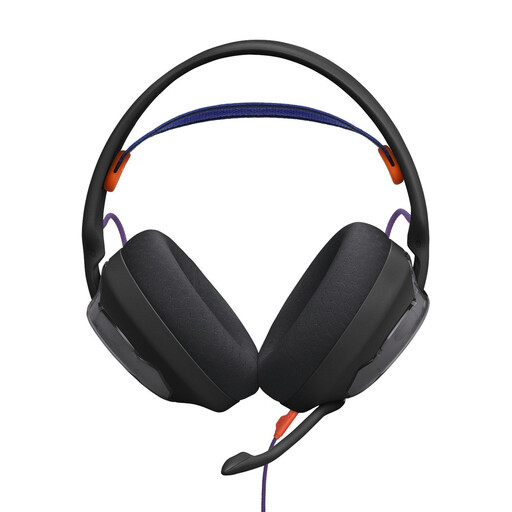 Image unavailable
JBL Quantum 250 wired over-ear headset, black
An option if your recording device has a compatible 3.5 mm headset connection and you want to position the microphone close to your voice.
The listed connection is 3.5 mm; the microphone is described as detachable and unidirectional.
View at Joybuy
 Image unavailable
Logitech 960 stereo headset, USB, 2.4 m cable
An option for recording on a computer if your device has a compatible USB connection.
The microphone boom is described as adjustable; the listed features also include a 2.4 m cable, volume control and mute.
View at Joybuy
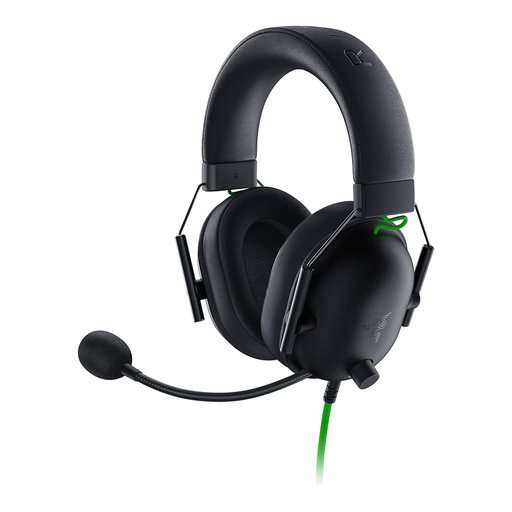 Image unavailable
Razer BlackShark V2 X wired headset, black
An option if your recording device has a compatible 3.5 mm headset input.
The microphone is described as cardioid. A Y-splitter for separate PC sockets is also listed; check that it’s compatible with your recording device.
View at Joybuy
 Image unavailable
Logitech H151 stereo headset, 3.5 mm
An option if your recording device has a compatible 3.5 mm audio connection for both the microphone and headphones.
The model is described as having an adjustable microphone and in-line volume and mute controls.
View at Joybuy
 Image unavailable
Logitech H570e mono headset, USB-A
An option for computer recordings if your device has a compatible USB-A connection and a mono headset suits your monitoring setup.
The flexible microphone boom is described as being positionable close to your voice; the listed distance is approximately 2–3 cm.
View at Joybuy
Frequently asked questions
Can a headset microphone completely eliminate echo in my kitchen?
No. Shure explains that a microphone can’t effectively separate direct speech from reflected speech or improve room acoustics. Compare short test recordings with different microphone positions and, if possible, in another recording spot.
Can I connect a broadcast headset directly to my laptop’s USB port?
Not simply because it’s called a “headset”. For the BPHS2a, Audio-Technica lists separate XLR and 6.3 mm plugs, so you’ll need compatible inputs or a suitable connection solution. The right option depends on your recording device.
What should I set up before recording a longer recipe?
Select the microphone input and headphone output, position the boom, then listen to a short passage with quiet and emphatic speech as well as typical kitchen sounds. Shure recommends adjusting the microphone position and room sound based on what you hear; the specific setup depends on your device.


