Which features are right for you?

For hard-to-read recipe originals

If you regularly compare small or faded handwriting with the original, look for a sharp, suitably large display. Microsoft Support notes that OCR accuracy depends on image quality and that recognised text should be checked.

For people with lots of recipe files

If you work with your scan, index and file storage at the same time, you’ll benefit from a well-organised workspace and a reliable way to access the original file. Microsoft explains that attaching a file in OneNote saves a copy of it in your notes.

For laptop users with a permanent workstation

If you often connect a laptop to a monitor, check that both devices support video output and charging, and that you can adjust the screen to a comfortable position. A USB-C port alone doesn’t tell you whether video output or the required charging power is supported.

What should you look for when buying?

27-inch 4K for checking details

Best for: Regularly comparing small areas on a scan and OCR drafts with an enlarged view of the original.

The trade-off: The finer resolution is only helpful if the text size and scaling remain comfortable for you to read.

27-inch QHD for working with multiple windows

Best for: Keeping your scan and index clearly visible side by side, rather than prioritising maximum detail.

The trade-off: QHD has fewer pixels for fine details in a scan than the 4K models mentioned here, so you may need to zoom in more often.

What you’re looking for What to check before buying Who values this?
Checking handwritten text View your own scan from your usual seating distance; check the model’s resolution and text scaling. If I want to compare small or faded areas reliably with the recognised text, a clear, easy-to-read view of the details matters to me. This is the top priority for around 33% of consumers.
Viewing a scan and index side by side Open both windows in the software you use; test a link to the original file. If you work with your scan, index and file storage at the same time, you’ll want to see the right entry and access the correct source file from there. Around 27% of consumers say working with multiple files is their top priority.
Connecting a laptop Check video output, monitor input, the charging power required and the cables needed for both devices. If I regularly use my laptop with a monitor, I need a suitable connection for both video and power. Around 20% of consumers say connecting a laptop is their top priority.
Adjusting the screen to suit your setup Check the adjustment range, desk space, viewing distance and readability with your own document. When checking documents for longer periods, I want to be able to adjust the screen height and distance to suit my workspace. Around 20% of consumers say an adjustable setup is their top priority.

What mistakes should you avoid?

  • Assuming 4K guarantees reliable handwriting recognition

    A monitor’s resolution won’t automatically improve a blurred or hard-to-read image. Microsoft Support notes that OCR accuracy depends on image quality and that recognised text should be checked.

    Before indexing a large collection, test several typical originals, including hard-to-read ones, and check ingredients and quantities against the scan.

    Allow time to check and correct recipe details that have been recognised incorrectly.

  • Assuming a file attachment is a permanent link to the original

    According to Microsoft, a file attached in OneNote is a copy. Linking to a saved file works differently and may depend on its storage location and access permissions.

    Decide which file is the original, then reopen the index link after making changes.

    If you use copies, you may need to check them against each other to ensure changes don’t get out of sync.

  • Assuming a USB-C port makes a complete docking station without checking your devices

    Both the monitor and the connected laptop need to support video and charging. USB-C specifications vary by model.

    Check the display mode, required charging power and cable against the specifications for both devices.

    Depending on your devices’ connections, you may need an additional charger or a suitable adapter.

Which manufacturers and models are worth considering?

ASUS

The ProArt PA279CRV is a 27-inch 4K option for detailed viewing, an adjustable setup and laptop connectivity.

  • ASUS lists a resolution of 3,840 × 2,160 pixels, pivot and height adjustment, and 96 W USB-C Power Delivery for this model.
  • Whether it can charge your laptop depends on the device; the resolution doesn’t prove that OCR will be more accurate.

BenQ

The DesignVue PD2705U is a 27-inch 4K option for displaying text and visual references.

  • BenQ lists 4K, USB-C, 99% sRGB and 99% Rec. 709 for the PD2705U.
  • These colour specifications come from the manufacturer and aren’t automatically a deciding factor for a recipe index alone.

Philips

The B-Line 276B9/00 is a 27-inch QHD office monitor for working with multiple windows and a laptop workstation.

  • Philips lists a resolution of 2,560 × 1,440 pixels, an adjustable SmartErgo stand, and video output and charging via USB-C.
  • QHD has fewer pixels for fine details in a scan than the 4K models mentioned here; check laptop compatibility and charging requirements separately.

Dell

The Pro P2725D is a 27-inch QHD office monitor for when an adjustable workspace matters more than 4K detail.

  • Dell lists a resolution of 2,560 × 1,440 pixels and height adjustment for the P2725D.
  • You can’t assume that the ports and charging features of other P2725 models also apply to the P2725D.

Joybuy monitors for scanning and indexing

The Joybuy models below offer a generous workspace for using multiple windows, as well as 27-inch 4K or QHD options for working with scans and an index. For models with USB-C, check compatibility with your laptop and the charging power you need.

INNOCN 40C1U 40-inch 5K monitor

INNOCN 40C1U, 40 inches, 5K

Could be a good fit if you want to view a scan, index and other content side by side on a wide screen.

The product name lists a 40-inch screen, 5K resolution at 5120 × 2160 pixels, IPS, 21:9, USB-C with 65 W Power Delivery, and PIP and PBP. An adjustable-height stand is also listed.

Joybuy

INNOCN CB27U1 27-inch 4K monitor

INNOCN CB27U1, 27 inches, 4K UHD

Worth considering for checking fine details on scans and viewing a scan and index side by side.

The product name lists a resolution of 3,840 × 2,160 pixels, IPS, 120 Hz, USB-C with 90 W Power Delivery, and PIP and PBP. An adjustable-height stand is also listed.

Joybuy
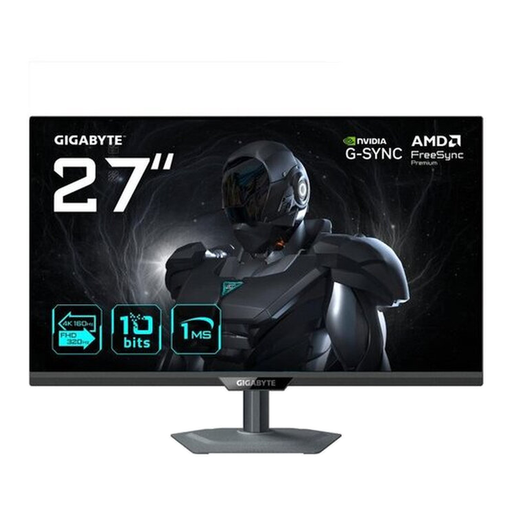
GIGABYTE G27UP 27-inch 4K UHD monitor

GIGABYTE G27UP, 27 inches, 4K UHD

A 27-inch 4K option if you want to check recipe scans on a monitor with high detail resolution.

The product name lists a resolution of 3,840 × 2,160 pixels and an IPS panel.

Joybuy
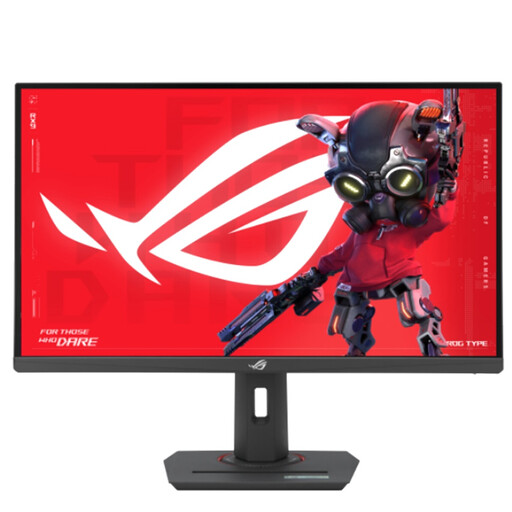
ASUS ROG Strix XG27UCS 27-inch 4K UHD monitor

ASUS ROG Strix XG27UCS, 27 inches, 4K UHD

A good fit for viewing recipe scans in detail on a 27-inch 4K screen.

The product name lists a resolution of 3,840 × 2,160 pixels, Fast IPS and USB-C with 15 W Power Delivery.

Joybuy

Philips 276B9 27-inch QHD monitor

Philips 276B9, 27 inches, QHD

Could be enough if viewing a scan and index side by side matters more than the detail offered by a 4K model.

The product name lists a resolution of 2,560 × 1,440 pixels, IPS, 75 Hz, USB-C with 65 W Power Delivery and a USB hub. An adjustable-height stand is also listed.

QHD has fewer pixels for fine details in a scan than the 4K models mentioned here.

Joybuy

Frequently asked questions

Can a 4K monitor automatically index handwritten recipes?

No. The monitor displays the scan; software handles text recognition and indexing. Microsoft Support notes that OneNote OCR depends on image quality and readability, and that recognised text should be checked.

How can you keep the index linked to the right source file?

Keep a clearly identified original file and test the link to it. According to Microsoft, a file attached in OneNote is a copy; linking to a saved file works differently and requires the right access permissions. Check how it works in the version of the software you use.

Does OCR work in OneNote for the web?

Microsoft says OneNote for the web can’t use the OCR feature described here, and recommends using the desktop app instead. Test recognition with a few of your own recipes before processing a large collection.

What should you consider when choosing the screen size and setup?

Adjust the height, viewing distance and text scaling so the scan looks sharp and is large enough to read comfortably. The BAuA ASR A6 rule sets out requirements for screen-based workstations within its scope; it doesn’t apply generally to private use.

Are a manufacturer’s guarantee and your statutory rights the same thing?

No. When you buy from a trader as a consumer, you generally have statutory rights against the seller for at least two years from the date you receive the goods. A voluntary manufacturer’s guarantee doesn’t replace these rights, so check its terms separately.