What should you look for when buying?
Wired USB headset
Best if: you record voice-overs at your computer and want to connect both the microphone and headphones via USB.
Consider: the cable may restrict movement between worktops. Check whether your specific device has a USB-A or USB-C port.
Broadcast headset
Best if: you want to monitor your recording carefully and have separate microphone and headphone connections available in your set-up.
Consider: the Audio-Technica BPHS1 needs XLR for the microphone and a 6.3 mm jack for the headphones; it cannot be connected directly via USB.
Wireless headset
Best if: you really do move between worktops while speaking and can test the connection to your recording equipment beforehand.
Consider: you’ll also need to think about the connection and battery. Wireless technology alone doesn’t tell you how well a quiet voice will be recorded.
Base your decision on three things: microphone positioning, connection to your recording equipment and a listening test in the conditions you’ll actually be recording in.
| Priority |
What to check when buying |
Who it matters most to |
| Clarity when speaking quietly |
Position the microphone boom and record a test sentence spoken quietly; check the recording level during quieter sections and make sure it isn’t clipping. |
If I speak quietly, I want to control the distance to the microphone and hear my voice clearly; around 31% of consumers prioritise clarity when speaking quietly. |
| Kitchen noise |
Listen back to a test recorded with the actual sounds you’ll encounter; if there’s room echo, first check the recording location and microphone distance. |
If I speak while preparing food, I want to know whether my voice remains clear over the noise; around 25% of consumers focus on reducing unwanted noise in their recordings. |
| Connection and set-up |
Check whether the specific model’s USB-A or USB-C connection matches your device; for broadcast models, check the separate inputs. |
If you want to record on your existing computer without extra adaptors or connections, check its ports in advance; around 19% of consumers prioritise an easy connection. |
| Monitoring during multiple takes |
Check the fit and listening comfort; with single-sided models, consider whether you want to be able to hear sounds in the room. |
If I record several takes, I want to monitor my voice clearly and wear the headset comfortably; around 13% of consumers prioritise monitoring and comfort. |
| Freedom to move |
Test the wireless connection with your recording equipment; for longer takes, consider battery life and connection reliability. |
If I move around the kitchen while speaking, I don’t want to feel restricted by a cable; around 12% of consumers prioritise freedom to move. |
Headsets at Joybuy
This selection includes wired USB headsets for recording at your computer, as well as a wireless Bluetooth headset for greater freedom to move. Check the connection to your recording equipment and listen to a test recording before you begin.
 No image available
Logitech H540 USB Stereo Headset
This wired USB model is an option for recording voice-overs at your computer if you want to position the microphone boom and listen back to your voice straight away.
The product name specifies an adjustable noise-cancelling microphone, an integrated equaliser and on-ear controls.
Check that the USB connection works with your device; the cable may restrict your freedom to move.
View at Joybuy
 No image available
Logitech 960 USB Stereo Headset
This wired USB model may suit recording at your computer if you want to position the microphone boom and listen back to a test sentence spoken quietly.
The product name specifies a noise-cancelling microphone and a 2.4 m cable; according to the title, it’s designed for PC, Mac and laptop.
The noise-cancelling claim is no substitute for a test recording with the sounds at your recording location.
View at Joybuy
 No image available
Logitech H151 Stereo Headset
This wired headset may suit recording on a computer or mobile device if your recording device has a compatible 3.5 mm connection.
The product name specifies an adjustable noise-cancelling microphone, plus volume and mute controls on the cable.
Check in advance whether your device’s 3.5 mm connection can be used as a suitable microphone input.
View at Joybuy
 No image available
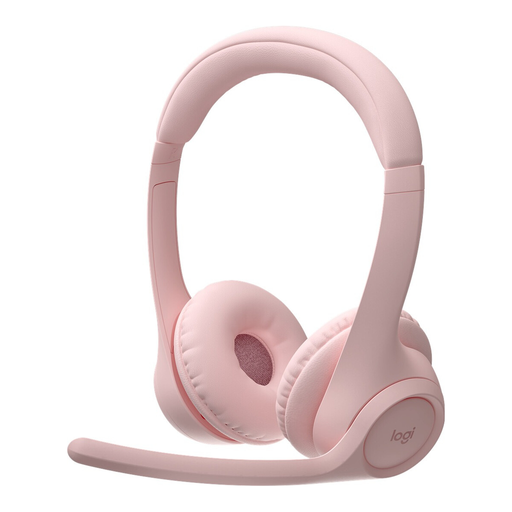
Logitech Zone 300 Wireless Bluetooth Headset, Pink
If you move around the kitchen while speaking, the wireless Bluetooth connection can give you more freedom to move; test the entire connection to your recording equipment before you start recording.
The product name specifies a microphone and noise cancellation. A claim of this kind doesn’t prove how kitchen noise will sound in your recording.
The battery needs to be charged for wireless use.
View at Joybuy
 No image available
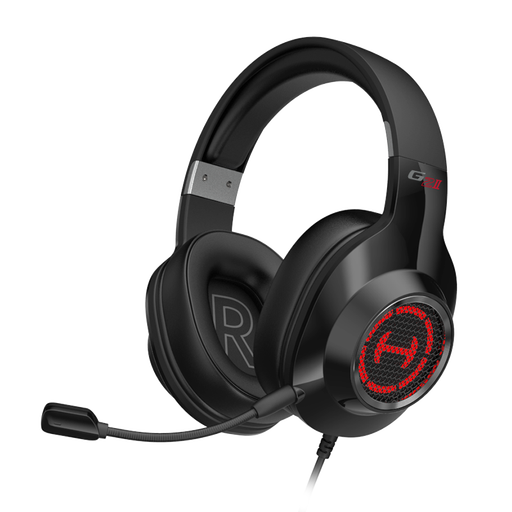
Edifier G2II USB Gaming Headset
This wired USB model is an option for recording on a PC or Mac, as long as its connection is compatible with your device.
The product name specifies a noise-cancelling microphone and 7.1 virtual surround sound.
The noise-cancelling claim doesn’t prove that kitchen noise will disappear when recording a quiet recipe voice-over.
View at Joybuy
Frequently asked questions
How should I set up a headset for recording a quiet recipe voice-over?
Position the microphone boom close to the side of your mouth, rather than directly in the airflow. Record a sentence at your usual speaking volume, listen back and check that the level isn’t clipping. If you can’t adjust the recording volume using the control on a USB connection, check your system settings.
Can I plug the Audio-Technica BPHS1 straight into a USB port?
No. The documented BPHS1 has an XLR connection for the microphone and a 6.3 mm jack for the headphones. You’ll need a suitable way to record and monitor the audio, so check that the connections work with your set-up before buying.
What should I check if my headset develops a fault after purchase?
For a business purchase in Germany, the statutory guarantee you have against the seller is separate from any voluntary warranty. The European Union explains that the statutory guarantee lasts for at least two years from the date you receive the goods. If there’s a fault, the first options to consider are a free repair or replacement.
Can I use any wireless microphone headset on any radio frequency in Germany?
No. For dedicated wireless microphone systems, the German Federal Network Agency’s Order 37/2026 specifies frequency bands and technical conditions of use. This doesn’t grant blanket approval for every version of every device; check the frequency and operating mode of the specific system against the current requirements.
Is the CE mark an independent quality mark for voice recording?
No. The German Federal Network Agency describes CE marking as the manufacturer’s declaration that a product meets the applicable requirements. It isn’t a quality rating of how clearly a quiet recipe voice will be recorded.


