When recording recipe voiceovers in a small booth, start with the room acoustics and your speaking position, rather than focusing on the type of microphone alone. USB connects directly to your computer; for XLR, you’ll need a suitable input on an interface or mixer. Compare models with a test recording while the ventilation is running, and check the mount, monitoring options and what’s included. A microphone can’t guarantee to eliminate echo or background noise.
Which microphone is right for you?
Speakers with audible booth ventilation
If ventilation or reflections are noticeable in your takes, maintaining a close, consistent speaking position is important. Shure notes that positioning a microphone closer can help bring your voice forward against noise and reflections, but it won’t remove room echo.
Beginners with a simple recording setup
If you want to record recipe scripts straight to your computer, check that the connection and supplied stand or arm will fit in your small booth. A USB microphone can let you record directly, without needing a separate audio interface.
Voiceover creators who want control over their sound
If you want to monitor takes while recording or switch your connection setup later, check the headphone monitoring options and connections on the specific model. The RØDE PodMic USB and Shure MV7+ are USB/XLR models that, according to their manufacturers, offer both connection options.
What to consider when buying
For recipe voiceovers in a small booth, the key considerations are background noise, a practical speaking position and your preferred recording setup. Shure explains that placing a microphone closer can improve the balance between your voice and noise or reflections. A test recording is still important, as it shows how the microphone sounds in your actual setup.
Close-miked dynamic microphone
A good fit if: ventilation or reflections are audible and you can keep the microphone consistently close to your mouth.
Consider: the setup and speaking direction need to be right; digital noise-reduction features can’t take the place of improving the room acoustics.
USB condenser microphone
A good fit if: your booth is quiet enough and you want to record directly to your computer.
Consider: reflections, breathing and mouth noises may stand out, so assess a recording made from your intended speaking position.
USB/XLR hybrid microphone
A good fit if: you want to start recording via USB and may later use an interface or mixer via XLR.
Consider: check the features and what’s included for each connection option; an extra connection on its own won’t improve your recording.
| Priority |
What to check before buying |
Who it matters most to |
| Clear voice despite booth noise |
Polar pattern and speaking direction; whether the arm or stand allows you to position the microphone as needed. |
If ventilation or reflections are audible in my take, I want to keep my voice clear by maintaining a close, stable position. Around 36% of consumers put background noise first. |
| Simple connection and minimal space needed |
Computer connection and cable; space required, and whether a stand or arm is included. |
If I want to record straight to my computer without a separate interface, the connection and mount need to fit in my booth. Around 29% of consumers prioritise a straightforward setup. |
| Natural detail in the spoken voice |
Compare short test recordings from the same speaking position; listen for clarity, plosives and room sound. |
If ingredients and steps need to be easy to understand, I want to assess how my voice sounds in the actual booth. Around 21% of consumers put vocal detail first. |
| Monitoring and future expansion |
Headphone connection and required controls; if you plan to expand your setup, check that it has a genuine XLR output. |
If I want to monitor takes straight away or use an interface later, I need the right controls and connections. Around 14% of consumers prioritise monitoring and expandability. |
Common buying mistakes
-
Assuming noise reduction is the same as a soundproofed booth
Ventilation and reflections from the walls may still be audible, even with the right microphone. Shure explains that reflections can affect your voice even in quiet rooms.
Test the microphone with the ventilation running and from your intended speaking position before making a digital filtering feature the deciding factor.
-
Comparing microphones alone instead of complete, ready-to-use setups
The connection, mount and what’s included all affect whether you can set up the microphone in your small booth.
Check whether your setup needs an interface, cable, arm or stand, and whether these are included with the specific product.
Depending on the connection and what’s included, you may need additional equipment such as an interface, cable or suitable mount.
-
Assuming similarly named models or kits are identical
Connections, mounts and accessories can vary between model versions and bundles. Details for the Shure MV6 don’t automatically apply to the MV7+; nor should you assume that a FIFINE K688 microphone is the same as the K688CT kit.
Check the full model name and kit contents before relying on a feature or accessory.
Brands to help you choose
Shure
Shure describes the MV7+ as a dynamic voice microphone with USB-C and XLR connections; the MV6 is a separate USB model.
- Shure lists headphone monitoring and digital voice features for the MV7+.
- These features don’t guarantee that echo or ventilation noise will disappear in your booth; check the model and the mount you need separately.
RØDE
The manufacturer describes the PodMic USB as a dynamic voice microphone with USB-C and XLR connections.
- RØDE lists direct headphone monitoring and a supplied external pop filter.
- The DSP features described apply to the digital USB output; assess the sound of your own recording.
Sennheiser
The Profile USB is a condenser option for voiceovers recorded directly to a computer.
- Sennheiser lists gain, mix and headphone controls, plus a desk stand in the box.
- This isn’t a USB/XLR hybrid; check that the desk stand lets you achieve the right speaking position in your booth.
Audio-Technica
The AT2020USB-X is a USB condenser microphone; the AT2040USB is a separate dynamic USB option with a hypercardioid polar pattern.
- According to the manufacturer, both models offer direct monitoring; the AT2020USB-X comes with a desk stand.
- The specifications for these models don’t guarantee a particular sound or protection from room noise.
FIFINE
FIFINE describes the AmpliTank K688CT as a dynamic USB/XLR kit with a microphone arm for close-miked speech.
- The manufacturer describes a directional pickup pattern and a supplied arm.
- Manufacturer claims about reducing fan noise aren’t independent test results for your booth; don’t assume the K688CT kit is the same as other K688 bundles.
Microphones and kits at Joybuy
The range includes dynamic USB and USB/XLR microphones, USB condenser models and a wireless kit. Check that the connection type and supplied mount suit your recording space.
 No image available
FIFINE K688CT USB/XLR Dynamic Microphone Kit
For close-miked solo vocals, with the option of recording directly via USB-C or connecting via XLR to a suitable input.
The description recommends a speaking distance of 2 to 6 inches and lists a microphone arm, headphone jack and pop filter. The XLR cable isn’t included; the desk clamp is specified for desks less than 2 inches thick.
View at Joybuy
 No image available
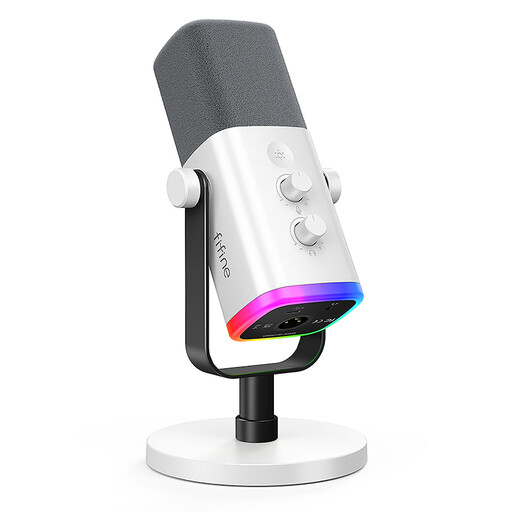
FIFINE AM8 White XLR/USB Dynamic Microphone
An option for recording directly to a computer via USB, or switching to an XLR setup later with a suitable input.
The description recommends a recording distance of 2 to 6 inches and lists a supplied desk stand. According to the description, the gain control and headphone jack only work in USB mode; the microphone arm and XLR cable aren’t included.
View at Joybuy
 No image available
Razer Seiren V3 Mini White
For recording directly to a computer via USB-C, if a compact microphone with an adjustable angle suits your setup.
The product description lists a supercardioid polar pattern, an adjustable tilting stand and tap-to-mute functionality.
View at Joybuy
 No image available
DJI Mic Mini 2S (2 TX + 1 RX + Charging Case)
A wireless kit to consider if attaching a transmitter to the speaker suits your recording setup.
The product name lists two transmitters, one receiver and a charging case. The description lists PC compatibility and clip or magnetic attachment; noise-reduction claims are from the manufacturer, not independent test results.
View at Joybuy
 No image available
USB Condenser Microphone, 7-Piece Kit
For recording directly to a computer, if the listed connections and kit contents suit your setup.
The description lists a USB connection, a Type-C adapter, a headphone jack for monitoring and a mute button.
View at Joybuy
Frequently asked questions
Do I need a dynamic microphone for a small booth?
No. A USB condenser microphone can also work if your booth is quiet enough. If you can hear ventilation or reflections, compare a close-miked, directional dynamic model in your actual setup; a short test recording can help you decide.
How should I set up a microphone for recipe scripts?
Point the intended speaking side towards your mouth and keep your position as consistent as possible across takes. Listen back with the booth ventilation running, and check for plosives and desk vibrations when speaking close to the microphone. Whether a pop filter and suitable mount are included depends on the model.
Do I need an audio interface for USB or XLR?
For the direct USB recording setup on the USB and USB/XLR models described here, you don’t need a separate audio interface. For XLR recording, however, you’ll need a suitable input, for example on an audio interface or mixer. Check the cable and what’s included with the specific model, too.
What are my rights in Germany if a new microphone is faulty?
For a consumer purchase, the seller is generally responsible for your statutory rights in respect of faulty goods. For movable goods, the standard limitation period under § 438 BGB is two years from delivery; this is separate from any voluntary manufacturer’s guarantee. The Federal Ministry of Justice publishes the legislation, and the Verbraucherzentrale explains the difference between statutory rights and a guarantee.
Is CE marking required for a microphone sold in Germany?
CE marking is only required if harmonised EU rules that require it apply to the specific microphone model. The European Union explains that the manufacturer declares conformity and that no central EU body issues CE approvals or certificates. CE marking isn’t an official endorsement of sound quality or safety.


