For recording recipe scripts in an untreated room, a directional dynamic microphone positioned close to your mouth is a sensible starting point, but it won’t solve reverberation. USB is ideal for plugging straight into your computer; USB/XLR leaves you the option to switch to an interface later, while XLR requires a suitable interface to connect to your computer.
Who these microphones may suit
Voice-over artists recording in a reverberant room
If you’re recording recipe scripts in an untreated room, being able to position the microphone accurately and maintain a consistent speaking distance matters. Shure points out that a microphone can’t improve the room’s acoustics.
Beginners recording on a computer
If you’re recording voice on your own without a separate interface, a direct USB connection is a practical feature to look for. For the specific model, also check whether you can monitor your recording through headphones.
Voice-over artists planning to upgrade
If you want to start recording via USB but might use an interface later, a model with USB and XLR outputs could suit your needs. You’ll need a suitable interface to connect the XLR output to your computer.
What to look for when buying
First, check how you can position the microphone close to you and keep it stable in your actual recording space. Then decide whether a direct USB connection is enough or whether you want to plan for XLR. Shure stresses that microphone positioning won’t eliminate the sound of the room, while RØDE recommends testing the distance in your own recording space.
| Buying consideration |
What to look for |
Who it matters most to |
| Clarity in a reverberant room |
Check the polar pattern and how easily the microphone can be repositioned. Record a sample script in your recording space and listen back, keeping your distance consistent. |
If you want to record ingredients and instructions clearly in a reverberant room, a directional microphone that’s easy to position is important. Around 36% of consumers put room acoustics first. |
| Easy set-up and monitoring |
Check the connection works with your computer, and whether the specific model has a headphone output and the monitoring you want. |
If you’re recording on your own at your computer and want to hear any issues as you record, an easy connection is especially important. Around 29% of consumers prioritise an easy set-up. |
| Connections for future upgrades |
Check the full model name for USB and XLR outputs, and find out whether you’ll need a cable and interface for your planned set-up. |
If you want to record directly on your computer now but keep open the option of switching to an interface later, connection flexibility matters. Around 21% of consumers prioritise this option. |
| Plosives and desk noise |
Check whether a pop filter and mount are included. Record a sample script while making the usual movements at your recording desk. |
If you want to speak close to the microphone while avoiding bursts of air and desk noise, a pop filter and a suitable set-up are particularly important. Around 14% of consumers put these recording noises first. |
Common misconceptions
-
Noise cancellation can’t replace good microphone positioning
Room reflections can be picked up along with your voice. Shure points out that a microphone can’t improve the room’s acoustics.
Start by testing a consistent, close speaking distance in your chosen spot. Listen back to a sample script before deciding whether processing features are right for you.
An unsuitable position could mean spending extra time re-recording or changing your recording space.
-
XLR doesn’t automatically connect straight to your computer
An analogue XLR output doesn’t provide a digital connection to your computer by itself. You’ll need a suitable way to convert the signal to digital for recording on a computer.
If you don’t already have an interface, consider a suitable USB model or budget for an interface and the necessary cables for your complete XLR set-up.
An audio interface and suitable cables may be needed for an XLR set-up.
-
A desk stand doesn’t guarantee a noise-free recording
A stand keeps the microphone in place, but it won’t necessarily stop desk movements from being picked up or prevent plosives.
Check what’s included and record a sample script at the desk you’ll actually be using.
Depending on the result, you may need a different mount or an additional pop filter.
Key brands at a glance
Shure
The MV7+ is a USB-C/XLR microphone for close-range recording.
- Shure lists both connection options for the MV7+.
- The voice isolation described by the manufacturer doesn’t guarantee that kitchen or room noise will disappear; microphone positioning still matters.
RØDE
The PodMic USB combines USB and XLR for voice recording.
- RØDE says the PodMic USB has a headphone output, built-in pop filter and swing mount.
- These features apply to the PodMic USB, not all microphones from the brand. You’ll still need to consider positioning and room noise.
Audio-Technica
The ATR2100x-USB is a dynamic handheld microphone with USB and XLR connections.
- Audio-Technica Europe lists headphone monitoring and included cables for this model.
- These details refer to the ATR2100x-USB. Check that a handheld microphone and the included accessories suit your recording space.
Samson
The Q2U is a dynamic USB/XLR model for a single recording position.
- Samson lists a desk stand, windscreen and cables as part of the package.
- The included accessories alone don’t tell you whether the stand will be stable on your desk or isolate movement sufficiently.
Logitech G
The Yeti GX is a dynamic USB model for voice recording, with software features to consider.
- Logitech lists a supercardioid polar pattern and features for level and noise processing.
- The noise-processing claims come from the manufacturer and don’t prove how well the microphone will work for recording recipes in an untreated room. G HUB features require the relevant software.
Joybuy product selection
The options below range from USB and USB/XLR desk microphones to wireless sets and lavalier microphones. For recording recipe scripts in an untreated room, positioning the microphone in your own recording space remains key.
 No image available
FIFINE AM8 USB/XLR microphone
An option if you’re looking for a microphone for voice recording and want USB connectivity, with the option of switching to XLR later.
The product name specifies USB/XLR and a desk stand. According to the product details, connecting via XLR to a computer requires a separate cable and a suitable interface or mixer.
Joybuy
 No image available
DJI Mic Mini 2S (2 TX + 1 RX + Charging Case)
This wireless set may suit you if you need freedom of movement while recording or want to attach a microphone to your clothing, rather than use a desk microphone.
The product name specifies two transmitters, one receiver and a charging case. Check that the listed device compatibility matches the recording equipment you plan to use.
Joybuy
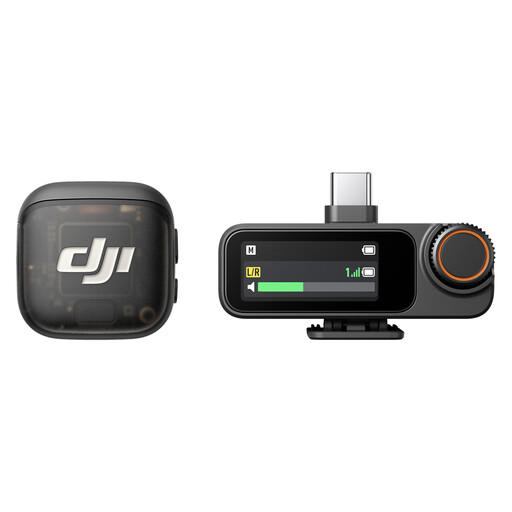 No image available
DJI Mic 3 (2 TX + 1 RX + Charging Case)
This wireless set could be useful for recording voice while moving around. If you’re recording a recipe at a fixed desk, consider whether you really need that flexibility.
The product name specifies two transmitters, one receiver and a charging case. Check that the set’s connections are suitable for your recording equipment.
Joybuy
 No image available
Razer Seiren V3 Mini White
This USB microphone is an option for a fixed computer set-up if you’re looking for a compact desk model.
As a condenser microphone, it may pick up room reflections. Test the sound in your chosen recording space before relying on processing features.
Joybuy
 No image available
SYNCO S8 lavalier microphone
A clip-on microphone may suit you if you want to attach it to your clothing and your device is compatible with the connection provided.
The stated polar pattern is omnidirectional. For one person recording in a reverberant or noisy room, this differs from a directional recording pattern.
Joybuy
Frequently asked questions
How should I position a microphone for recording recipe scripts?
Record a sample script in your chosen spot and adjust the distance and angle until you’re happy with the balance of your voice, room sound and plosives. RØDE recommends 6–10 cm as a starting point for many of its microphones, but this isn’t a one-size-fits-all distance.
Can voice isolation replace treating an untreated room?
No, you shouldn’t rely on it to do that: a microphone won’t improve the room’s acoustics. First, try different recording spots and speaking positions, then assess processing features using a test recording of your own.
What else do I need for XLR?
To connect an analogue XLR microphone to a computer, you need a suitable way to convert the signal to digital, usually an audio interface. If you want to monitor your voice as you speak, check that the specific microphone or interface has a headphone socket and the monitoring feature you need.
How can I monitor a recording as I speak?
Check whether the specific microphone or interface has a headphone socket with the monitoring feature you want. Also record a sample script in your actual recording space so you can assess room reverberation, plosives and unwanted background noise.
Can I record conversations involving other people?
Section 201 of the German Criminal Code (StGB) covers the unauthorised recording of another person’s private spoken words. If other people are speaking in the recording room, get their agreement before recording them, or record your narration without their conversations.


