If you need to hear both voices in a seated learning dialogue, a recorder with built-in stereo microphones is a natural place to start. The key is to make a test recording from the actual seating positions. If you’ll be practising by repeating passages, playback features also matter. A lavalier microphone is better suited to recording one person specifically, and won’t automatically capture the second voice just as clearly.
Who are the different approaches suited to?
Recording conversations around a table
If you want to understand both contributions later during an exercise with everyone seated in fixed places, and don’t want to use a clip-on microphone, consider a recorder with built-in stereo microphones. A test recording will show whether the quieter or more distant voice is still clear.
Practising pronunciation through repetition
If you want to listen to short passages repeatedly and say them back, features such as variable playback speed or Shadowing may suit your learning routine.
Recording one seated person specifically
If one voice is the focus and wearing a microphone on clothing is practical, a recorder with a lavalier microphone may be a good option. If both voices matter equally, you’ll need to plan separately for capturing the second person.
What should you look for when choosing?
Tabletop recorder with built-in microphones
A good fit if: both people sit in known positions and you want to record without microphone cables.
The trade-off: The microphones will pick up voices differently depending on distance and the room, so check the results with a test recording.
Recorder with learning playback features
A good fit if: you want to listen to dialogues again and again and use passages to practise speaking.
The trade-off: Learning features don’t prove that the original recording will sound better with a particular seating arrangement.
Recorder with a lavalier microphone
A good fit if: you mainly want to record one seated person specifically and they can wear the microphone.
The trade-off: A lavalier microphone for one person won’t automatically capture two equally important voices in a dialogue.
| Priority |
What to check before buying |
Who is it important to? |
| Clarity of both voices |
Check for built-in stereo microphones and whether the recorder can be placed between the speakers; listen to a test recording made from the planned seating positions. |
If I want to understand both sides of the conversation later, I pay particular attention to the quieter or more distant speaker. Around 36% of consumers prioritise recording both voices in a dialogue. |
| Repeating and speaking along |
Check whether the specific model version offers slowed playback, repeat or Shadowing. |
If I want to listen to and repeat short passages in German several times, playback features that suit my practice routine are important. Around 29% of consumers prioritise playback and speaking along. |
| Recording one voice specifically |
Check whether a lavalier microphone is included, whether it can be attached securely and whether the second voice also needs to be recorded. |
If one seated person is the focus, a wearable microphone may suit me; if a second voice is also important, I’ll need a suitable recording set-up too. Around 21% of consumers prioritise recording one voice specifically. |
| Longer practice sessions and file transfer |
Check the recording format, storage, power supply and transfer method for the specific model together. |
If I record longer sessions and want to use the files afterwards, I need suitable battery life and a practical way to export them. Around 14% of consumers put this need first. |
Which assumptions should you avoid?
-
32-bit float doesn’t replace the right microphone position
The Tascam DR-05XP’s 32-bit float mode relates to level processing. It doesn’t ensure that both voices will be captured equally well from your chosen recording position.
First decide whether both speakers or just one person should be the focus, then check a test recording. Treat the recording mode as an additional feature.
-
A lavalier microphone won’t record both people equally
Zoom describes the F2 as using a lavalier microphone worn by the person being recorded. That doesn’t mean a second voice will be captured just as clearly.
Before you buy, decide whether one voice is the focus or both contributions matter equally. Recording another person specifically may require additional equipment suited to your recording set-up.
-
Cloud transcription isn’t an entirely local feature
Philips says that the DVT4115’s automatic transcription involves uploading recordings to Sembly. This is different from recording and processing that takes place entirely on the device.
If you want to use transcription, check the service’s terms and your privacy requirements separately from the recorder. You don’t need to rely on this feature if you only want to listen back to recordings.
Which brands are worth considering for this use?
OM SYSTEM
The WS-883 combines stereo recording with features specifically listed for language study and Shadowing.
- OM SYSTEM lists variable playback, built-in USB data transfer and 8 GB of internal storage.
- Learning features aren’t an independent comparison of recording quality from different seating positions.
Tascam
The DR-05XP is a handheld recorder with built-in stereo microphones and additional recording options.
- Tascam lists a 32-bit float mode, MP3 and an external microphone input.
- The manufacturer’s information about recording modes doesn’t replace checking microphone distance and room noise.
Zoom
The F2 is designed to record one person using a lavalier microphone; the H1essential is a separate handheld option with built-in X/Y microphones.
- Zoom lists an included lavalier microphone for the F2 and says the H1essential can be mounted on a tripod for seated conversations.
- The F2’s single-microphone set-up won’t automatically suit you if both voices in a dialogue are equally important.
Philips VoiceTracer
The DVT2110 is described as suitable for interviews and small meetings. The DVT4115 is a different model, with three built-in microphones and optional cloud transcription.
- Philips lists MP3 and PCM recording and internal storage for the DVT2110.
- According to Philips, the DVT4115’s automatic transcription requires recordings to be uploaded to Sembly, so it isn’t an entirely local recording feature.
Sony
The ICD-PX470 is a voice recorder with a built-in stereo microphone and playback features.
- Sony lists A-B repeat, speed control and a microphone input.
- The stated maximum recording times vary by format, so the same maximum doesn’t apply to every setting.
Recorders at Joybuy
This selection includes voice recorders for conversations around a table and longer practice sessions. Before you buy, check which microphone set-up and features suit your seating arrangement.
 No image available
PLAUD Note Pro Voice Recorder, 64 GB
An option if you’re looking for a recorder with several built-in microphones and enough storage for longer practice sessions.
64 GB storage, four MEMS microphones and up to 30 hours of continuous recording; the stated audio recording range is up to 5 m. Compatible with Android and iOS.
View at Joybuy
 No image available
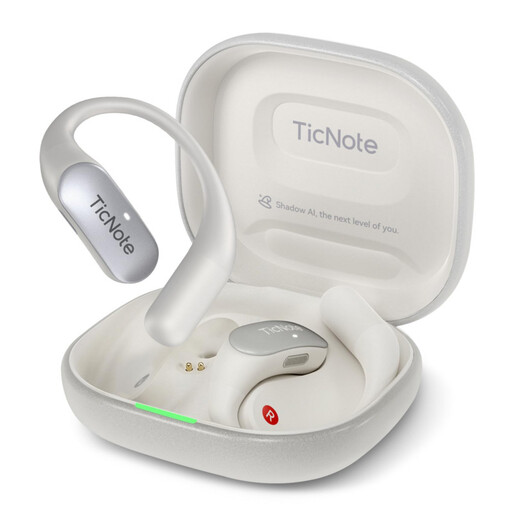
Mobvoi TicNote Pods 4G AI Voice Recorder, 32 GB, Pearl White
An option for recording longer conversations if a dual-microphone array suits your recording needs.
32 GB storage, a stated battery life of 5 hours and a recording range of up to 10 m. Cloud upload and synchronisation require a cloud connection.
View at Joybuy
 No image available
Digital Voice Recorder, 64 GB, with transcription function
An option for recording conversations if you’re looking for a multi-microphone system and enough storage for longer sessions.
64 GB storage, a stated battery life of up to 36 hours and a multi-microphone system; the stated recording range is up to 15 m.
View at Joybuy
 No image available
Rexsun L15 Digital Voice Recorder, 64 GB
An option for conversations around a table if you want to monitor the recording directly through headphones.
Two omnidirectional microphones and a stated 360° recording direction. The removable 64-GB TF card, USB-C and playback through headphones are also listed.
View at Joybuy
 No image available
AI Voice Recorder with case, 32 GB
An option for indoor recording if a multi-microphone set-up suits your conversation.
32 GB storage, a stated recording time of up to 30 hours and a four-microphone set-up; an indoor recording mode is also listed.
View at Joybuy
Frequently asked questions
How should you position a recorder for two people having a conversation while seated?
Start by positioning a recorder with built-in microphones where it can capture both people. Record a short dialogue from the actual seating positions and listen carefully to the quieter voice. The number of microphones alone won’t tell you where to place the recorder.
Does the Zoom F2 need extra equipment for a learning dialogue?
Zoom says the F2 comes with a lavalier microphone. It’s intended for the person wearing it. If both voices in the dialogue matter equally, decide how you’ll record the second voice before you buy.
How can you tell whether the storage and power supply will last through a longer session?
Compare the planned session length with the specific model’s figures for your chosen recording format, and check the power supply. Sony lists different maximum recording times for MP3 and L-PCM on the ICD-PX470, so one maximum figure won’t apply to every setting.
Can you record someone else’s conversation in Germany without their knowledge?
Under Section 201(1) of the German Criminal Code (StGB), recording another person’s privately spoken words without authorisation is a criminal offence. Before recording, make sure you’re authorised to do so or have the necessary consent; any subsequent use or sharing should be considered separately. If personal data falls under the GDPR, its processing also requires an applicable legal basis. Consent is one possible basis, but not the only one.


