What should you look for?
First decide whether you need to capture one person speaking or several people talking at the same time. Then you can narrow down the right microphone connection for your recording device.
| What matters |
What to look for |
Who should pay particular attention? |
| One quiet main speaker |
Check the microphone boom and fit; listen to a trial recording made at the planned speaking volume. For the HSP Essential, Sennheiser recommends positioning it 2 to 3 cm from the corner of the mouth. |
If I mainly want to capture one quiet speaker, I want to adjust the microphone distance precisely and listen to a test recording. Around 29% of consumers prioritise making this main voice easy to understand. |
| Several voices |
Decide who will be speaking at the same time, then test the microphone setup with those people. The University of Leicester’s Oral History Archive advises considering two microphones if the second voice is too quiet. |
If I want quiet replies and interjections to be included in the recording, I don’t want to rely on just one microphone worn by one person. Around 29% of consumers prioritise capturing several important voices. |
| Connection and power |
Check the exact model, microphone input and power requirements; if you’re using a separate microphone, also check whether you’ll need headphones. |
If I want to keep using a computer, recorder or transmitter I already own, the microphone needs to work with its input. Around 24% of consumers prioritise device compatibility. |
| Fit and recording location |
Check the fit, cable routing and noise at the recording location; listen to a short test recorded with the actual seating arrangement. |
For longer stories, I want a comfortable setup and a recording that remains clear in the place where it will be used. Around 18% of consumers prioritise comfort and recording conditions. |
Joybuy products for computer recording
This selection includes headsets for recording one person speaking on a computer. A worn microphone won’t automatically pick up other quiet voices evenly, so test the recording with the planned seating arrangement.
 No image available
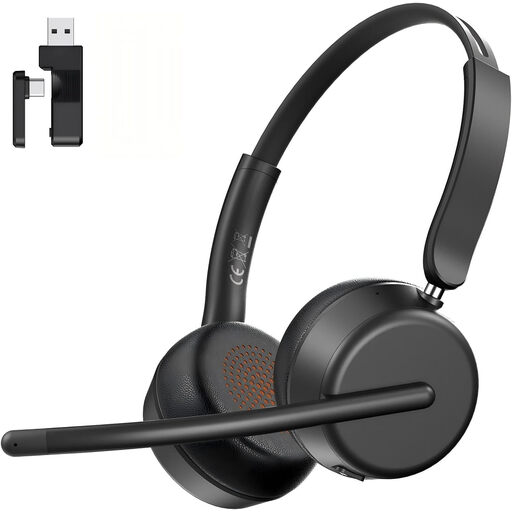
AOC wireless headset with microphone, Bluetooth 5.4, dark black
Could be suitable for recording one person speaking on a computer, provided the listed connections work with your recording device.
The description lists a USB-A/C dongle, Bluetooth 5.4 and a microphone boom that rotates through 270°. A trial recording will show whether the voice is clear at the intended location.
View at Joybuy
 No image available
Logitech H540 stereo headset with microphone
The adjustable microphone boom may be useful for recording one person speaking on a computer; check the fit and listen to a trial recording.
The product details list USB-A and compatibility with PC and Mac.
View at Joybuy
 No image available
Logitech 960 stereo headset with microphone, USB
Could work for recording one person speaking on a computer, provided the USB connection is compatible with your recording device.
The product details list an adjustable microphone boom, a 2.4 m cable and compatibility with PC and Mac.
View at Joybuy
 No image available
Logitech G PRO X gaming headset, black, USB
The product description lists a detachable microphone positioned close to the mouth; test whether the recording is clear at your speaking volume and in the intended location.
Features listed include an external USB sound card, a microphone with a cardioid pickup pattern and a 3.5 mm cable for mobile devices.
View at Joybuy
 No image available
Logitech H570e mono headset with microphone, USB
The microphone boom may be useful for recording one person speaking on a computer; check its position in a trial recording.
The product details list USB-A and compatibility with PC and Mac. The microphone should be positioned around 2–3 cm from the mouth.
View at Joybuy
Frequently asked questions
Will one headset microphone capture the whole conversation?
Not if you need to reliably record several quiet voices: a worn microphone is positioned for the voice of the person wearing it. If other voices matter too, consider additional microphones and test the setup with the actual seating arrangement.
How should I position and check the microphone before recording?
Position the microphone boom as instructed for the specific version. For the HSP Essential, Sennheiser recommends a distance of 2 to 3 cm from the corner of the mouth. Listen to a test recording featuring quiet speech and the sounds at the recording location.
Can I clean the microphone or replace parts after the gathering?
Follow the instructions for your specific model, as care and replacement parts vary. For the HSP Essential, Sennheiser describes replaceable components and advises against bending the microphone boom yourself; this doesn’t necessarily apply to other headsets.
What extra costs and rights should I consider when buying?
Check whether you already have any recorder, bodypack transmitter, audio input or headphones you’ll need; a separate headset microphone isn’t automatically a complete kit. When you buy as a consumer from a business, you have statutory rights against the seller if the goods are faulty; these are separate from any voluntary manufacturer’s warranty. Online purchases generally come with a right to cancel, usually within 14 days and subject to statutory exceptions. The Verbraucherzentrale explains these differences.
Can I simply record and share conversations at a village gathering in Germany?
You shouldn’t assume there’s blanket permission to do so. Under § 201 StGB, secretly recording another person’s private spoken words, or using or making such a recording available without authorisation, may be a criminal offence. Check in advance with the people involved about what will be recorded and who will be able to access the file; whether a particular conversation is private cannot be determined from the word ‘village gathering’ alone.


