For fixed seating, a recorder with two suitable microphone inputs can be a good choice if you want to edit each voice separately. For a simple conversation at a table, a suitably positioned recorder with built-in microphones may be enough. If both learners will be moving around, consider a wireless set with two transmitters. Before recording a long take, make a test recording and check the power supply, storage and the file that was actually saved.
Which recording setup is right for you?
Pairs talking at a table
If you’re recording questions and answers in turn from fixed seats, your setup should pick up both voices. Zoom describes the H1essential as suitable for conversations on a tripod; for two external microphone inputs, the manufacturer lists the H4essential.
Pairs on the move
If you’ll be moving around during the dialogue and don’t want to use microphone stands, a set with two transmitters could work well. RØDE describes the Wireless PRO as including two Lavalier II microphones, while DJI also offers the Mic 2 as a set with two transmitters.
People recording long takes
If you want an exercise to run without an unnoticed interruption, plan for power, storage and a playback check. Zoom lists batteries or USB power for the H1essential; RØDE distinguishes between local recording time and battery life for the Wireless PRO.
What should you look for when buying?
First, decide whether both voices simply need to be clear together or whether you need separate microphone positions and files. This will determine your setup, power supply and storage requirements.
| Buying priority |
What to check |
Who is this particularly important for? |
| Making both voices clear |
Record sample sentences at different volumes from both seats. If using separate microphones, check how many usable inputs are actually available. |
If I want to capture both learners’ questions and answers clearly, I test the setup in the actual seating positions. Around 29% of consumers say making both voices clear is their top buying priority. |
| Making sure long takes are recorded |
Check the power supply and available storage for the planned uninterrupted recording, then listen back to a saved test recording. |
If I don’t want to repeat a long exercise because the recording stopped without me noticing, I check battery life and storage before starting. Around 29% of consumers prioritise safeguarding long takes. |
| Position and room |
Test the setup at the recording location with both people present. Take movement, mounting and the positioning of a shared recorder into account. |
If seating positions or distances change, I want to hear how the recording actually sounds in the intended location. Around 24% of consumers focus mainly on microphone position and background noise. |
| Connections and editing |
Decide whether one shared file is enough. Check the available inputs and how you’ll handle the files and software later. |
If I want to edit each speaker’s contribution separately, I need a suitable recording setup. Around 18% of consumers prioritise connections and subsequent editing. |
Common pitfalls when making long recordings
-
Confusing recording storage time with battery life
RØDE lists more than 40 hours of local storage per transmitter for the Wireless PRO. DJI lists six hours of operation for the Mic 2 transmitter and receiver, and up to 18 hours when using the charging case. These figures don’t refer to the same kind of runtime.
Plan around the length of your uninterrupted take and check whether you’ll need to charge the equipment during recording.
-
Assuming four tracks mean four external microphones
According to Zoom, the H4essential has four tracks, but only two external XLR/TRS inputs in addition to its built-in X/Y microphones.
Count the external microphones you need and the available inputs separately from the number of tracks.
-
Assuming 32-bit float applies to every recording path
RØDE explains that 32-bit float on the Wireless PRO applies to local transmitter recordings, not automatically to recordings made on a connected camera.
If you want to use the local files, check that transmitter recording is enabled and allow time to export and listen back to those files.
-
Assuming one close-talk microphone is a complete dialogue set
The Shure MV7+ offers USB-C and XLR, but as a single microphone it provides just one microphone position.
Before buying, decide whether one shared recording position will be enough or whether each learner needs their own microphone. For separate positions, make sure the inputs and accessories are also suitable for your setup.
Brands to consider
Zoom
Handheld recorders for a shared conversation at a table or for use with external microphones.
- Zoom lists two XLR/TRS inputs and built-in X/Y microphones for the H4essential. According to the manufacturer, the H1essential can be mounted on a tripod for seated conversations.
- These features alone don’t guarantee that both voices will be equally clear at a particular table. A test recording is still important.
RØDE
The Wireless PRO offers a wireless setup with two transmitters and local recording.
- According to RØDE, the set includes two Lavalier II microphones, and each transmitter can record locally.
- The stated storage time doesn’t guarantee uninterrupted battery life. According to the manufacturer, 32-bit float applies only to local transmitter files.
DJI
The Mic 2 is available as a wireless set with two transmitters, one receiver and a charging case.
- DJI lists local recording and six hours of operation for the transmitter and receiver.
- The figure of up to 18 hours includes the charging case. Make sure the version you choose actually includes two transmitters.
Shure
The MV7+ is suited to recording one voice at close range or to a suitably configured multi-microphone setup.
- Shure lists USB-C, XLR and headphone monitoring.
- A single MV7+ provides only one microphone position. Manufacturer claims about editing features don’t guarantee that two voices will be clear.
Tascam
The DR-07XP is an example of a handheld recorder with adjustable built-in microphones.
- Tascam describes A-B and X-Y microphone positions, as well as a 32-bit float mode.
- Before buying, check whether the model is currently available and whether the memory card and power supply suit your recording plans.
Suitable products on Joybuy
The products below include wireless sets with two transmitters and a shared voice recorder for in-person conversations. Before making a long take, check the runtime specifications and make a test recording with both voices.
 No image available
DJI Mic Mini 2S (2 TX + 1 RX + Charging Case)
This set with two transmitters could suit a mobile dialogue, with each speaker using their own transmitter.
The description lists local 32-bit float recordings and up to 28 hours of storage. The figure of up to 40 hours of operation includes a fully charged case and doesn’t indicate how long a single uninterrupted take will last.
View on Joybuy
 No image available
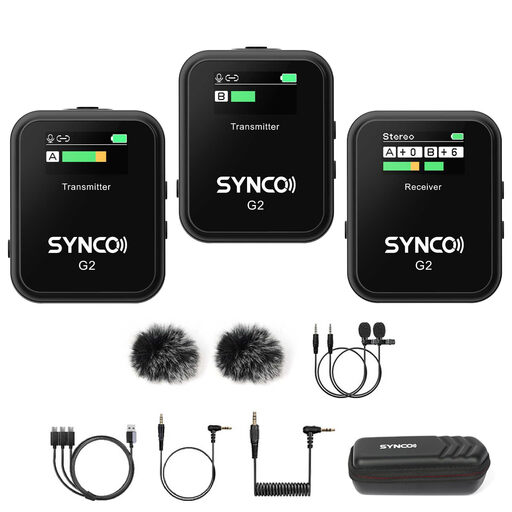
SYNCO G2(A2) Dual-Channel Wireless Lavalier Microphone
This system with two transmitters is designed for mobile dialogue recording, with each person using a clip-on microphone.
The description lists up to 8 hours of recording time per charge, as well as Mono, Stereo and Safety modes. A headphone socket is included for real-time monitoring.
View on Joybuy
 No image available
Moman M1CXT (USB-C, 2TX+1RX)
The two transmitters are designed for recording two people, and the receiver is listed as USB-C compatible.
The description lists up to 6 hours of battery life per transmitter and real-time monitoring. Charging while in use applies to the receiver, not the transmitters.
View on Joybuy
 No image available
SYNCO P2ST (USB-C, Dual Mic, Charging Case)
This set with two microphones and a USB-C receiver could suit mobile dialogue recording with two speakers.
The description lists up to 5 hours of recording time per full charge, with two additional charges from the case. Real-time monitoring is listed for the USB-C receiver.
View on Joybuy
 No image available
32 GB Voice Recorder with 4-Microphone Array
This recorder could work as a shared recording setup for in-person conversations. Test whether both voices are clear from the intended positions.
The product description lists 32 GB of storage, up to 30 hours of battery life and a 4-microphone array for in-person recording.
View on Joybuy
Frequently asked questions
How can I check that the recording is working before a long study dialogue?
Record a short sample with both voices and listen back to the saved file. Also check the power supply and available storage for your planned take. If you’re using a wireless set, enable local recording if you want to use those files. RØDE distinguishes between manual and continuous transmitter recording on the Wireless PRO.
Do I definitely need two microphones for two people?
No. A shared recorder may be enough for fixed seating if a test recording captures both voices clearly. Zoom describes the H1essential as suitable for seated conversations on a tripod. If each person needs their own microphone position or separately connected signal paths, Zoom lists two external XLR/TRS inputs on the H4essential.
What should I check about accessories and warranty rights?
Depending on your setup, check whether a memory card, microphones, cables, mount and power supply are included. If you buy from a trader in the EU, remember that your statutory guarantee rights are separate from any voluntary manufacturer’s warranty. Your Europe explains that EU purchases come with a legal guarantee of at least two years from the date you receive the goods.
Can I record a private study dialogue in Germany without permission?
Recording another person’s privately spoken words without their permission may be a criminal offence under § 201 of the German Criminal Code (StGB). Before recording, check that you’re entitled to do so and decide how the file will be used. If personal data is processed, you’ll also need a legal basis under Article 6 of the GDPR; valid consent can provide one such basis.


