First, check how your phone service lets you record a personal greeting: a recording made on a voice recorder cannot automatically be uploaded as a file. For a clear voice, a quiet environment, the right microphone position and a test call matter more than an especially high recording resolution. A separate recorder is most useful if you want to record and edit several versions as files.
Which recording method is right for you?
Recording a greeting despite background noise at home
If you can hear a fan, other household noises or echo, record a short test and check how clear it sounds after uploading it. Audacity describes noise reduction as particularly effective for steady sounds; it cannot remove changing background noise in every situation.
Voicemail without a file-based workflow
If you only need a personal greeting, first check whether your phone service lets you record it directly over the phone. Telekom describes this option for its landline SprachBox, so you may not need a separate recorder.
Greetings in several versions
If you want to save recordings, compare them and edit them on a computer, you’ll need file transfer and a suitable editing workflow. Also check which file formats your phone service accepts.
What should you look for when choosing?
Record directly through your phone service
Best if: You need a short greeting and your service offers recording by phone.
Bear in mind: You cannot automatically upload a file that you’ve previously edited on a recorder.
Use a compact voice recorder
Best if: You want to record several versions independently of your phone and choose between them on a computer.
Bear in mind: The file format and transfer method need to be compatible with your phone service.
Use a handheld recorder with extra connection options
Best if: You record regularly and also want to use USB, memory cards or an external microphone.
Bear in mind: Extra features are no substitute for a test recording or checking how to upload the finished greeting to your service.
Telekom describes recording over the phone for its landline SprachBox. Easybell offers a personalised greeting on its service and recommends specific file settings for it. These options and requirements do not automatically apply to other phone services.
| What you need |
What to check before buying |
Who it matters most to |
| A clear voice despite noise and echo |
Test the microphone position and make a recording in the conditions you’ll actually use it in. Audacity describes noise reduction as being most effective for steady sounds. |
If a fan, echo or other household noise is your biggest challenge, clarity is your priority. This need accounted for around 36% of consumers in this breakdown. |
| Uploading the greeting to your service |
Check with your phone service whether it accepts an audio file, which format it requires or whether you need to record directly over the phone. Easybell’s recommendation of WAV, Mono, 8 kHz and 16-bit PCM is specific to its service. |
If you want your recording to become a personal voicemail greeting, the upload method is crucial. Around 29% of consumers in this breakdown named this as their main requirement. |
| Recording a short greeting without fuss |
Check how to record, stop and play back audio on the specific model. Don’t treat automatic noise reduction as a substitute for a test recording. |
If you mainly want to record and check a short message without any hassle, ease of use comes first. Around 21% of consumers in this breakdown named this as their main requirement. |
| Saving and editing several versions |
Check that the connections you need are available and that you can convert the recording format into a file accepted by your phone service. Listen to a test file through your voicemail. |
If you want to update your greeting regularly and edit different versions, a reliable file-based workflow matters most. Around 14% of consumers named this as their main requirement. |
Common buying and recording mistakes
-
Buying a recorder before checking how to upload the file
A recording cannot be used as a voicemail greeting just because it’s saved as a file. The documented options vary between phone services.
First check the greeting options for your own service, then decide whether you need a recorder at all.
An extra device may be unnecessary for a single greeting if your service lets you record directly over the phone.
-
Assuming noise reduction guarantees clear speech
Audacity describes noise reduction as being most effective for steady sounds. Results with changing background noise are not always predictable, and editing can also create audible artefacts.
Make a short recording in the conditions you’ll actually use it in, then listen to the finished greeting through your voicemail.
Repeated recordings or post-production can take extra time.
-
Assuming a high recording resolution is essential
The highest advertised resolution is not automatically the most important factor for a phone greeting. Easybell recommends WAV at 8 kHz, Mono and 16-bit PCM for its own greeting service; this is not a general requirement for other services.
Prioritise clarity, microphone position and your phone service’s requirements over the highest possible recording resolution.
Brands to consider
Sony
The ICD-UX570 is a compact voice recorder for making recordings and transferring them to a PC.
- Sony lists PCM and MP3 recording, as well as recording monitoring.
- Clear Voice does not prove that changing household noise will disappear from a greeting. Check voicemail compatibility separately.
Zoom
According to Zoom, the H1essential offers USB microphone operation and recording to an SD card.
- Zoom lists built-in X/Y microphones and noise reduction added in a firmware update.
- These features do not guarantee that a single voice will be separated from all changing household sounds.
Tascam
The DR-05XP is designed for users who want to use a USB-C audio interface or an external microphone input as well as a recorder.
- Tascam lists stereo omnidirectional microphones, MP3 and several PCM recording modes.
- Omnidirectional microphones pick up sound from different directions. Extra connection options may mean more setup than you need for a single short greeting.
Philips
Philips describes the VoiceTracer DVT1170 as a recorder with WAV recording, a PC connection and simple recording start-up.
- Philips lists one-button recording start-up.
- An advertised 360° microphone does not automatically mean it will pick out one voice from surrounding room noise.
Voice recorders at Joybuy
This selection features compact voice recorders for short greetings and file-based recording. Before buying, check whether your phone service accepts audio files and which connections or accessories you’ll need.
 No image available
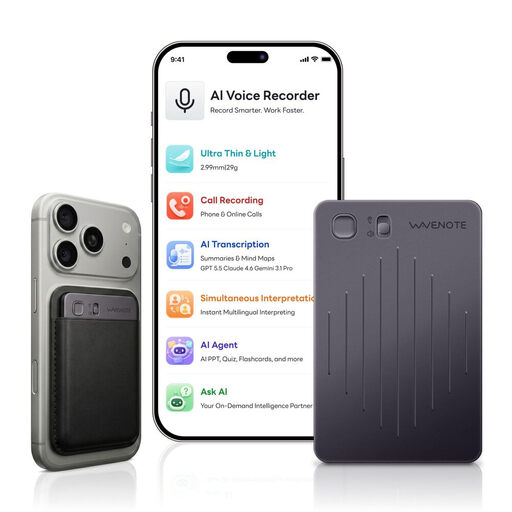
WaveNote AI Voice Recorder, 64 GB, Black Grey
Could be worth considering for a short greeting if you want to start recording with a switch and transfer files via USB-C.
Product details list built-in microphones and 64 GB of storage.
View at Joybuy
 No image available
Digital Voice Recorder, 64 GB, with transcription function
An option if you want to make voice recordings with a multi-microphone system. Try it out to see how well it picks up a single voice in your room.
Product details list 64 GB of storage, a recording function and a 6-microphone system.
View at Joybuy
 No image available
Rexsun L810, 64 GB, digital voice recorder
Could be a good fit if you want to record a short greeting with one-touch recording and then transfer the file via USB-C.
Product details list USB-C and MP3 and WAV formats.
View at Joybuy
 No image available
Rexsun L357, 128 GB, portable digital voice recorder
An option if you want to record greetings using REC/STOP and transfer files via USB-C.
Product details list 128 GB of storage, USB-C and MP3 and WAV formats.
View at Joybuy
 No image available
AI Voice Recorder, 32 GB, with case
Could be worth considering if you want to start recording at the touch of a button and save several versions.
The product name lists 32 GB of storage, real-time transcription, translation into 58 languages and summary templates.
View at Joybuy
Frequently asked questions
Do I need to buy a recorder for my voicemail greeting?
Not necessarily. Telekom describes a direct phone recording option for its landline SprachBox. Check the instructions for your own service, as this recording method does not automatically apply to other voicemail services.
How can I deal with a steady fan or fridge noise?
First, try to reduce background noise while recording and position the microphone appropriately for your voice. Audacity describes noise reduction as particularly effective for steady sounds and notes that it can cause artefacts. Listen to the entire edited greeting before using it.
Which file format should I use for my greeting?
It depends on your phone service. Easybell recommends WAV at 8 kHz, Mono and 16-bit PCM for the greeting service covered in its guidance. Don’t assume these settings apply to other providers; if you record directly over the phone, you won’t need to export a file from a recorder first.
Which extra items should I check before buying?
Check the specific model to see whether it comes with the memory card, connection cable or external microphone you need. If you only need a short greeting, compare the extra setup involved with your phone service’s direct recording option.
Can I record phone calls to use in my greeting?
Recording a greeting in your own voice is different from recording a conversation. The Bundesnetzagentur explicitly warns against recording sales calls without the other person’s prior consent and refers to § 201 StGB. Don’t simply record other people’s non-public conversations to use in your greeting.


