Who photographs figurines with a remote release?

Photographers using a fixed tripod setup

If you photograph figurines from the same spot and want to avoid touching the camera when you take a shot, a compatible cable release can help. Canon Germany and Nikon Germany list cable releases for specific cameras, so check your model and connection.

Photographers who change their setup

If you move your figurines, background or lights around and want to take a shot from another position, it’s essential to check that your specific camera supports the remote you’ve chosen. Sony Germany explicitly states which models are compatible with the RMT-P1BT.

Photographers who need to check focus

If you want to check fine details on your mobile device, a camera app with a preview and, where available, focus control could be a good fit. Canon Germany and Nikon Germany describe these features for supported cameras; check whether yours offers the function you need.

What should you look for when choosing one?

What you need What to check before buying Who is it important to?
Take a shot without touching the camera on the tripod Camera model and approved connection; cable length for the distance from the tripod If you use a fixed setup and don’t want to touch the camera body when taking a shot, the right connection is what matters most. Around 29% of consumers put this need first.
Stay mobile when changing your setup Support for the specific remote model; pairing with the camera If you move between figurines, backgrounds and lighting, wireless shooting without being tethered by a cable is handy. Around 22% of consumers prioritise freedom of movement when changing their setup.
Check the framing and fine details Live View and focus control in the app; camera compatibility If you want to check small details on your mobile device before taking a shot, a shutter button alone may not be enough. Around 21% of consumers prioritise checking the image and focus remotely.
Plan when to take your shots Whether you need an interval or timer function; camera support If you need repeated shots on a schedule, check that your camera’s features match the controls you want. Around 14% of consumers prioritise planned sequences of shots.
Avoid buying an extra accessory Existing app-based remote shooting or self-timer; the type of release you need If you only take photos occasionally and don’t mind waiting after pressing the button, your camera’s built-in features may be enough. Around 14% of consumers mainly want to avoid buying an extra release.

Common mistakes when choosing

  • Choosing by camera brand alone

    The right release also depends on your specific camera model and connection. For some Fujifilm RR-100 combinations, Fujifilm also specifies that an adaptor is needed.

    Check the full model name against the compatibility list, and confirm the connection and whether you need an adaptor.

    Some combinations may require an additional adaptor.

  • Assuming Bluetooth support means a remote will be compatible

    Having a Bluetooth connection doesn’t automatically mean your camera supports every Bluetooth remote. Sony limits support for the RMT-P1BT to cameras explicitly listed as compatible.

    Check that the specific remote model is approved for your camera, and test the pairing before you start taking photos.

  • Expecting a remote release to deliver sharp, flicker-free images

    A remote release can help you avoid touching the camera when taking a shot, but it won’t focus the camera or eliminate flicker from artificial light. Canon Germany highlights the importance of precise focusing for close-ups, while Sony Germany describes flicker adjustment features for suitably equipped cameras.

    Check focus and take a test shot separately. If you see banding, check which anti-flicker and shutter settings your camera offers.

  • Choosing a timer for single shots without checking whether you need one

    Interval and timer controls are designed for planned shots and may be unnecessary for individual figurine photos. A supported app or the self-timer may be enough for occasional photography.

    First, work out whether you really need repeated, timed shots and what remote shooting features your camera already offers.

Brands worth considering

Canon

Canon provides information about wired and wireless releases, as well as app-based remote shooting, for supported cameras.

  • Canon Germany lists an E3 connection for the RS-80E3 and describes Camera Connect as an app alternative for supported models.
  • Connections and available app features vary by model; the brand name alone doesn’t confirm compatibility.

Nikon

Nikon describes cable releases, Bluetooth remotes and app-based remote shooting for different supported cameras.

  • For the MC-DC3, Nikon Germany describes a half-press and full-press shutter release, as well as a lock.
  • These solutions aren’t universally compatible with all Nikon cameras.

Sony

Sony provides information about the RMT-P1BT Bluetooth remote and app-based remote shooting with Imaging Edge Mobile for supported cameras.

  • Sony describes the RMT-P1BT as compatible with approved cameras that have a built-in Bluetooth receiver, with buttons for focus control.
  • Sony advises checking whether your specific camera model supports Bluetooth remote control.

Fujifilm

Fujifilm lists the RR-100 as a cable release for selected X and GFX cameras.

  • Fujifilm specifies an extension cable with an angled 2.5 mm plug.
  • Fujifilm says certain camera models need an additional 2.5-to-3.5 mm adaptor.

Panasonic

Panasonic describes the DMW-RS2E as a cable release with shutter and video start/stop buttons.

  • Panasonic also lists a tripod clip.
  • For one stated compatibility condition, Panasonic refers to current firmware. Check that your camera model is approved.

Joybuy products for smartphone photography

The products below are mostly smartphone tripods or selfie sticks with remotes. They’re not the same as a camera remote release approved for a specific camera. Before buying, check that the holder and remote are suitable for your device.

Verbex K60 Black selfie stick with tripod and phone holder

Verbex K60 Black selfie stick with tripod

For taking smartphone photos on a tripod when you want to use a wireless remote.

The product name lists a Bluetooth remote, phone holder and extendable floor tripod.

View at Joybuy
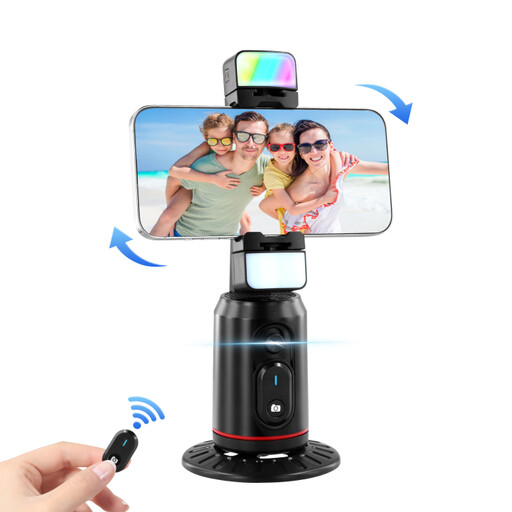
Auto Face Tracking Tripod with 360° rotation and phone holder

Auto Face Tracking Tripod, 360° rotation

For smartphone photography where you need a tripod with a remote and adjustable positioning.

The product name lists gesture control, a fill light and a phone holder.

View at Joybuy
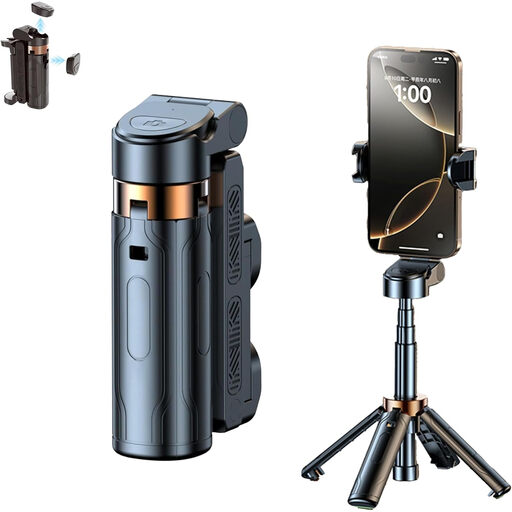
3-in-1 Bluetooth selfie stick with tripod and remote

3-in-1 Bluetooth selfie stick with tripod

For taking smartphone photos or videos from a little further away when you want a detachable Bluetooth remote.

The product name lists an extendable tripod and a phone holder that rotates 360°.

View at Joybuy
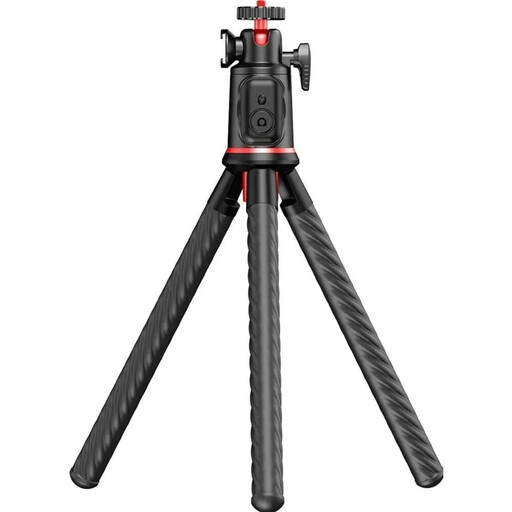
Rollei Easy Creator MonkeyPod flexible mini tripod with Bluetooth remote

Rollei Easy Creator MonkeyPod Flexible Mini

For a compact tripod setup when you want a wireless remote that works with your device.

The product name lists a mini tripod, a 360° ball head and a Bluetooth remote. Check that the holder and shutter release work with your camera before buying.

View at Joybuy

Ulanzi JJ02 mini tripod grip with Bluetooth remote

Ulanzi JJ02 mini tripod grip

For smartphone photography when you want a compact tripod grip with wireless camera control.

The product name lists a 3-in-1 tripod grip and two cold shoe mounts.

View at Joybuy

Frequently asked questions

How can you check whether a cable release is compatible with your camera?

Compare your camera’s full model name with the release’s compatibility list, and check the connection and whether you might need an adaptor. Fujifilm specifically lists an additional adaptor for some RR-100 combinations; having the same camera brand isn’t enough to confirm compatibility.

What can you do if a Bluetooth remote doesn’t trigger the camera?

First, check whether your camera supports that specific remote model. For the RMT-P1BT, Sony also lists the Bluetooth function, the Bluetooth remote control setting and pairing. If you’ve used it with another camera, you may need to pair it again.

Will a remote release eliminate banding under LED lights?

No. A remote release changes where you trigger the camera from, not the light source’s flicker. For suitably equipped cameras, Sony describes adjustments such as shutter speed and shutter type. The right setting depends on your camera and lighting.

What should you check when buying a wireless release in Germany?

For an electrical or electronic product, you can check its markings and product documentation. The Federal Network Agency lists the CE marking, manufacturer details, instructions in German and the declaration of conformity among the things to look for. CE is a manufacturer’s declaration, not an independent quality mark.