Painters using a camera on a tripod
You’re photographing individual brushstrokes or the texture of the canvas with a fixed setup and don’t want to touch the camera body to take the shot.


For sharp tripod-mounted photos of details in an oil painting, a remote shutter release compatible with your camera can be useful, as you won’t need to touch the camera body to take the shot. For video, you’ll need a dedicated start/stop function. A cable can suit a fixed setup, Bluetooth gives you more freedom to move, and an app may save you buying extra accessories if your camera supports it. None of these options will fix reflections or colour discrepancies in the painting.
You’re photographing individual brushstrokes or the texture of the canvas with a fixed setup and don’t want to touch the camera body to take the shot.
You’re filming details or stages of your work and want to start and stop recording without having to go over to the camera each time.
Before buying an accessory, you want to check whether you can already trigger your supported Canon camera using a smartphone app.
A good fit if: Your camera is fixed on a tripod and you mainly want to take photos.
The trade-off: The cable limits where you can stand, and a photo button doesn’t necessarily control video.
A good fit if: You want to keep your distance from the camera while setting up the painting and window light, and your model is explicitly supported.
The trade-off: Compatibility, pairing and the available button functions depend on the camera and remote.
A good fit if: Your supported camera and smartphone already offer the remote control you need.
The trade-off: Information about Canon Camera Connect doesn’t automatically apply to other camera brands.
| Buying consideration | What to check before buying | Who it matters most to |
|---|---|---|
| Camera compatibility | Check the exact camera model, connector or Bluetooth support, and the manufacturer’s compatibility list. | If I want to use the remote with my existing camera body, the connection needs to be explicitly compatible. Around 36% of consumers focus primarily on this compatibility. |
| Triggering the camera without touching it | Check whether photo triggering is enough and whether you can operate the remote from where you plan to stand. | When taking photos on a tripod, I don’t want to touch the camera body to take the shot. Around 29% of consumers prioritise being able to trigger the camera without touching it. |
| Video control | Check whether starting and stopping video is supported with your specific camera model. | If I’m filming details or stages of my work, I need a remote that can actually start and stop video. Around 21% of consumers value this most. |
| Existing app | Before placing an order, check the remote control functions available with your camera and app. | If I already use a supported smartphone and a compatible camera, I want to try the app as a shutter release first. Around 14% of consumers mainly want to avoid buying accessories they don’t need. |
Manufacturers specify which cameras and functions their remotes support. The fact that a connection is available doesn’t, by itself, guarantee compatibility.
Before buying, check your camera’s full model name and the functions you need against the relevant compatibility information.
For several camera bodies listed by Fujifilm, an additional 2.5 mm to 3.5 mm adapter is required for the RR-100.
Check the connection on your exact camera model and whether you’ll need an adapter.
Triggering the camera without touching it affects how you operate the camera, not reflections or the painting’s colour reproduction.
Check the lighting and reflections before shooting, and review a test photo. Choose your remote based on the photo or video function you need.
Depending on what you need, supported Canon cameras can be used with a remote shutter release or a smartphone app.
Nikon offers wired and Bluetooth remote controls for certain supported camera models.
The RMT-P1BT is a Bluetooth option for specifically supported Sony cameras.
The RR-100 is a wired option for specific cameras listed in the X and GFX series.
The DMW-RS2 is a wired LUMIX option with separate photo and video functions.
The products below are designed for remote smartphone shutter release and specific action camera systems. They’ll only suit your setup if your recording device and the accessory you want to use are compatible.
 No image available
Worth considering if you want to trigger your smartphone remotely instead of using a separate camera.
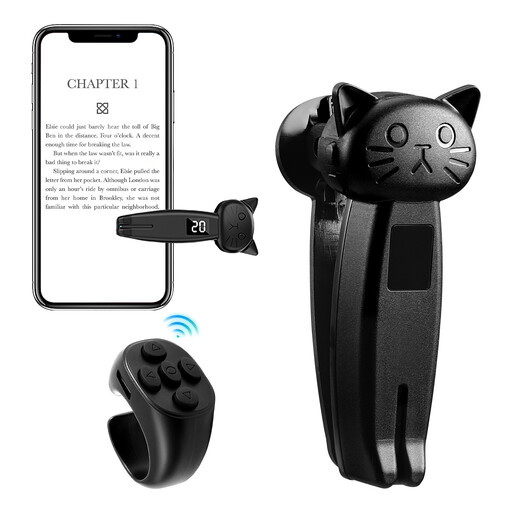
The title lists a stand, phone holder and zoom remote. According to the product details, the holder is designed for smartphones up to 6.0 inches.
 No image available
The product description also mentions using it as a smartphone camera shutter release, for example to take selfies or group photos remotely.
Features listed include a clip attachment and USB-C charging. Check that the remote works with your smartphone before buying.
 No image available
The product description says you can start and stop recording remotely. The product name lists Osmo Action 4, Osmo Action 5 Pro, Osmo 360 and Osmo Action 6 as compatible models.
The compatibility models listed are key to choosing the right product. The product name also mentions 6 GB of built-in RAM and 8K video at 10 fps.
 No image available
The product description lists a Bluetooth remote for hands-free control of an action camera.
Osmo Action 4, Osmo Action 5 Pro, Osmo 360 and Osmo Action 6 are listed as compatible. Check that your exact model is on the list.
Set up your camera and frame the shot on the tripod first, then check the focus and lighting on the painting. Next, take the photo using a device that’s compatible with your camera, without touching your setup. A remote shutter release won’t correct reflections or colour discrepancies; The Metropolitan Museum of Art describes reproducing the colours of paintings as a specific challenge in colour photography.
First, check that your camera model and the function you need are supported. With Bluetooth, test the connection to the camera. For a cable model, check the connector and whether you need an adapter. Panasonic notes that a camera firmware update may be needed to resolve certain video function issues with the DMW-RS2.
According to Your Europe, goods bought in the EU are generally covered by a legal guarantee of at least two years from the date you receive them. A voluntary manufacturer’s warranty is separate. For online purchases, Verbraucherzentrale generally describes a 14-day right of withdrawal from receipt; this is different from your rights when goods are faulty.
The Bundesnetzagentur lists products with built-in Bluetooth in connection with its market surveillance. This doesn’t indicate whether a particular model has been checked, so look at the information provided for the specific product.
This depends on the rights to the specific work and how you plan to use it. Under certain conditions, § 53 UrhG allows individual copies for private, non-commercial use, but that doesn’t in itself allow you to distribute or publicly display them. Permission to take photos for private use is therefore not blanket permission to publish them.