Buyers unsure about their camera connection
You want to avoid buying the wrong accessory, so you first check your camera model, connection and whether you might need an adapter.


For close-ups of carved spoons under artificial light, you don’t automatically need a separate remote shutter release. First check whether your camera’s self-timer or a compatible app will do the job. For a fixed setup, a suitable cable release may be all you need. If you want to trigger the shutter while rearranging the spoons or lighting, consider a wireless remote that is explicitly supported. The key factors are your camera model, its connection and, where applicable, the pairing process.
You want to avoid buying the wrong accessory, so you first check your camera model, connection and whether you might need an adapter.
You’re photographing spoons close up with your camera in a fixed position and want to take the shot without touching the camera body.
You’re rearranging the spoons or lighting during a shoot and want to trigger the shutter from your setup, or check which app features are supported.
First check whether your camera’s self-timer or a compatible app will do the job. For a fixed setup, a suitable cable release may be all you need. A supported wireless remote is worth considering if you don’t want to return to the camera whenever you adjust your subject or lighting.
| What matters when buying | What to check | Who will find this most important? |
|---|---|---|
| Compatible with your camera model | Check the full camera model against the compatibility list and connection type; also check whether you need an adapter. | If I need to avoid buying the wrong accessory, I’ll check the connection or wireless support first. Around 36% of consumers put compatibility first. |
| Triggering the shutter without touching the camera | Check whether a compatible cable release, supported app or the self-timer suits your shooting process. | With a fixed setup, I want to take the shot without touching the camera body. Around 29% of consumers prioritise contact-free shutter release. |
| Freedom to move around | Check that the specific camera and remote combination is compatible, along with the pairing process. Bluetooth alone doesn’t guarantee compatibility. | If I’m rearranging the spoons or lighting, I want to trigger the shutter from my setup. Around 21% of consumers prioritise freedom to move around. |
| Remote control | Before buying accessories, check that the app supports your exact camera model and the features you want. | It’s important to me to check the framing or settings from a distance. Around 14% of consumers prioritise remote control. |
For the cable releases mentioned here, Canon distinguishes between E3 and N3 connections. For certain cameras used with the RR-100, Fujifilm specifies that an additional adapter is required.
Before ordering, check the full camera model against the accessory list provided by the manufacturer.
To use the Sony RMT-P1BT, your camera, its settings and the pairing process must all be compatible with the remote.
Check whether Sony lists your specific camera model, and follow the required settings and pairing steps.
Triggering the shutter without touching the camera avoids pressing its shutter button, but for close-ups it’s no substitute for a stable camera position and careful focusing.
Keep the camera steady, focus on the spoon detail you want to capture, then trigger the shutter without touching the camera.
Canon offers cable releases for different EOS connections, as well as Camera Connect as a possible app alternative.
The MC-DC3 is a cable option for compatible Nikon Z cameras, while the ML-L7 is a separate Bluetooth option for compatible cameras.
Sony describes the RMT-P1BT as a Bluetooth remote for specifically supported cameras.
Fujifilm lists the RR-100 as a cable release for selected X and GFX cameras.
Panasonic lists the DMW-RS2E cable release in its LUMIX accessories range.
The products below are Bluetooth remote shutter releases and mounts for smartphone photography. They are not a selection of camera shutter releases confirmed as compatible with specific mirrorless or compact camera models.
 No image available
For smartphone photography with a fixed setup, the combination of a tripod and remote control is worth considering.
The product details specify a maximum smartphone size of 6.0 inches and list iOS and Android as compatible systems.
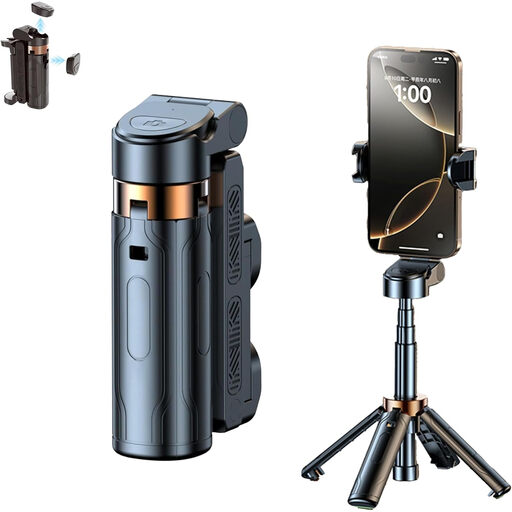 No image available
For smartphone photography with a fixed setup, this model combines a stand with a detachable Bluetooth remote control.
The product details specify a holder that rotates through 360°.
 No image available
For smartphone photos where you want to trigger the shutter from a distance, the product description specifies a detachable Bluetooth remote control.
The grip has a 1/4-inch tripod thread; a fill light is included in the product name.
 No image available
For a hands-free smartphone setup, the product details describe a folding tripod and shutter release via Bluetooth remote control.
The product name specifies that the tripod is height-adjustable.
 No image available
For smartphone photography with a fixed setup, the product description specifies a tripod stand and a Bluetooth remote control.
The product details list two cold shoe mounts for accessories. Place the stand on a stable surface and secure your smartphone properly.
Yes, provided the cable release is explicitly compatible with your camera and you stay within cable range. Also check whether a compatible app or the self-timer already meets your needs.
First, check whether Sony lists your camera as supported. Then enable Bluetooth and Bluetooth remote control in the camera menu, and pair the devices according to Sony’s instructions.
Certain cameras may require an additional adapter for the Fujifilm RR-100. For online purchases made for business purposes, EU rules generally provide a 14-day right to cancel from the date of delivery, although exceptions apply. If goods are faulty, you also have separate statutory rights. The statutory guarantee for goods lasts at least two years and is not the same as a voluntary manufacturer’s warranty. The European Union’s Your Europe website explains these rules.
Take used batteries to a collection point at a shop or a local authority collection point. The German Environment Agency warns of environmental and fire risks if batteries are disposed of incorrectly.