With a camera on a fixed tripod, the right wired remote shutter release can help you avoid touching the camera when taking a shot. If you move between the card, lighting and camera, a wireless remote compatible with your camera model may be more practical. Before buying, check whether your camera already offers a suitable app or self-timer. Bear in mind that a remote shutter release won’t correct focus, reflections or an unstable setup.
Who is a remote shutter release for?
Photographers using a fixed card setup
If you keep your camera and framing in the same position for several cards, a suitable remote shutter release can help you avoid disturbing your tripod setup when taking a shot. Canon Germany explains how a tripod helps maintain consistent framing, while Nikon Germany lists wired remote shutter releases for specific cameras.
Photographers who change their lighting setup
If you want to take a shot from a distance while repositioning the card, lighting and camera, check that the remote is approved for your exact camera model. Nikon Germany and Sony Germany list wireless remote controls for their respective supported cameras.
Smartphone photographers
If you take photos of cards with your smartphone, first check the shutter function already available on your phone. If needed, you could consider a suitable mount with a smartphone remote. Rollei describes a smartphone tripod with a remote control for your phone.
What should you consider when choosing one?
Canon Germany, Nikon Germany and Sony Germany list remote controls for specific connectors or camera models. A shared brand name alone doesn’t guarantee compatibility.
Wired remote shutter release
A good fit if: You regularly photograph at the same tabletop setup and the specific connector is approved for your camera.
The trade-off: The cable limits your freedom of movement. Canon Germany and Nikon Germany list different connectors and camera ranges.
Wireless camera control
A good fit if: You adjust the card or lighting between shots and your camera supports the remote you’ve chosen.
The trade-off: Check camera compatibility and pairing requirements. Bluetooth and infrared are different connection types.
Camera app or self-timer
A good fit if: You want to see whether your camera can already take a photo without being touched before buying extra accessories.
The trade-off: Canon Germany notes that app features vary by model. A self-timer doesn’t let you trigger the shutter instantly from a distance.
Smartphone mount with remote control
A good fit if: You photograph cards with your smartphone and need a suitable mount.
The trade-off: A smartphone remote doesn’t mean it will also work with the shutter release on a system camera.
| What matters |
What to check before buying |
Who is it important to? |
| Compatibility |
Check the full camera model name, connector and manufacturer approval for the specific remote shutter release. |
If I want to avoid buying a shutter release with the wrong connector, I check that it’s approved for my camera model. Around 36% of consumers put compatibility first. |
| Taking photos without touching the camera on a fixed setup |
Check the cable length and where you’ll be working; check the tripod, focus and lighting separately. |
If my camera stays in the same place for several cards, I don’t want to touch the tripod setup when taking a shot. Around 29% of consumers prioritise taking photos without touching the camera on a fixed setup. |
| Freedom of movement around your setup |
Check camera compatibility, pairing and the controls you need; distinguish between Bluetooth, infrared and app-based control. |
If I move between the card, lighting and camera, I don’t want to return to the tripod for every shot. Around 21% of consumers particularly value freedom of movement. |
| Smartphone instead of camera accessories |
Check that the phone fits, that it can stand securely and that its shutter function is supported. |
If I already take photos with my smartphone, I want to know whether its existing shutter function is enough or a mount would help. Around 14% of consumers prioritise getting started with a smartphone. |
Common buying misconceptions
-
“Fits Canon” or “fits Nikon” is enough to confirm compatibility
Canon uses different connectors, including E3 and N3, while Nikon describes wired remote shutter releases for specific cameras. The brand alone doesn’t tell you whether an accessory will fit.
Check the full camera model name against the approval details for the exact remote and connector.
-
A remote shutter release alone will make your card photos sharp
Taking a photo without touching the camera can help prevent camera movement, but it won’t fix focus problems, reflections or issues with your setup.
Take a test shot with one card and check sharpness, reflections, lighting and stability separately.
-
A smartphone remote is a universal camera shutter release
A remote for a smartphone isn’t automatically compatible with the shutter release on a system camera.
First decide whether you’ll be taking photos with a smartphone or a camera, then check which shutter function is right for you.
Key brands at a glance
Canon
Wired remote shutter releases, the BR-E1 and Camera Connect for supported cameras.
- Canon Germany lists different connectors for the RS-60E3 and RS-80N3.
- Not all Camera Connect features are available with every camera, so check approval for your model.
Nikon
Wired remote shutter releases such as the MC-DC2 and MC-DC3, and the ML-L7 for supported cameras.
- Nikon Germany describes taking photos without touching the camera using a wired release, and the photo and video buttons on the ML-L7.
- The camera model and connector determine which remote is suitable. The accessories listed aren’t compatible with every Nikon camera.
Sony
The RMT-P1BT is a Bluetooth option for supported Sony cameras.
- According to Sony Germany, the RMT-P1BT uses the built-in Bluetooth receiver with compatible cameras.
- The supported app depends on the camera model. Sony distinguishes between Creators’ App and Imaging Edge Mobile.
Panasonic
The DMW-RS2E is a wired remote shutter release in the LUMIX accessories range.
- Panasonic lists a shutter button and a video start/stop button.
- Panasonic states that the latest firmware update is required for one specified compatibility condition. Check your camera and firmware version.
Rollei
The Easy Creator MagPod combines a smartphone stand with a remote control for your phone.
- Rollei describes a magnetic smartphone mount and a remote control for the phone.
- This smartphone solution isn’t a confirmed remote shutter release for system cameras. Check that it suits your phone and setup.
Joybuy products for smartphone trading card photos
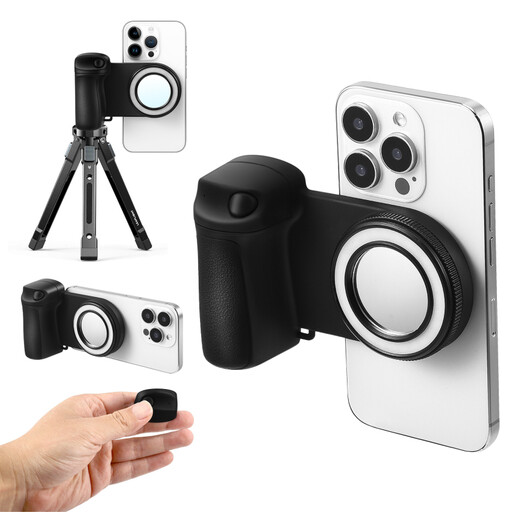
This selection is for taking trading card photos with a smartphone, where you need a mount and a remote control for your phone.
 No image available
Magnetic smartphone mount with ring light and Bluetooth remote control, 5 brightness levels
For taking card photos with your smartphone when you want to position your phone and trigger the shutter using a remote control.
Ring light; Bluetooth remote control; five brightness levels.
View on Joybuy
Frequently asked questions
Can a remote shutter release fix reflections or an out-of-focus image?
No. With a suitable setup, it helps you avoid touching the camera when taking a shot, but you’ll need to check focus, card position and lighting separately. A tripod can help you keep the framing consistent across several shots.
How do I set up remote shooting with an app?
First check which app and features your exact camera model supports. Canon Germany notes that not all Camera Connect features are available with every camera; Sony also lists supported apps by camera model.
What ongoing costs and purchase terms should I check?
Check whether you’ll need a battery or any other accessories, and review the delivery, returns and warranty information for the specific offer. For a distance purchase from a trader in the EU, you generally have a 14-day right to cancel from the date of delivery; exceptions and potential return costs apply. The European Union’s Your Europe website explains the rules that apply.
What should I check about product safety when buying a wireless remote in Germany?
The German Federal Network Agency lists CE marking and the ability to identify a product among the points checked during market surveillance. CE marking alone doesn’t prove that the remote is compatible with your camera.


