First, check the internet connection and Wi-Fi where you’ll be watching. A new router won’t fix a slow broadband connection, nor will it automatically solve a weak signal between floors. If your current router is working properly, adding a suitably connected Wi-Fi station may be a more targeted solution. Usable network cables can provide a wired backhaul; otherwise, the station’s location is key. If the recording is stored locally, it’s the route to the file that matters, not your internet speed.
Which solution is right for you?
Viewers with a weak Wi-Fi signal by the screen
If the recording keeps buffering on another floor, reception where you’re watching and a well-connected location for an additional station are crucial. F.A.Z. Kaufkompass highlights the importance of the backhaul connection between mesh stations.
Households with network cables between floors
Existing Ethernet connections can be used for backhaul, provided the system you choose supports this setup. TP-Link describes Ethernet backhaul for Deco X50, while ASUS lists it as an option for ZenWiFi XD5.
Households unsure what’s causing streaming problems
If playback keeps pausing, check your internet connection and home Wi-Fi separately before replacing any devices. The Bundesnetzagentur offers a way to test fixed-line connections, while Netflix explains how to run a network test on compatible TVs.
What should you look for when buying?
For online playback, consider your broadband connection and the connection to your playback device separately. Netflix recommends 15 Mbit/s or more for a single 4K UHD stream. This is a guideline for the service, not a universal threshold for every theatre platform or a locally stored file.
| Consideration |
What to check before buying |
Who is this important to? |
| Wi-Fi where you’ll be watching |
Check reception by the screen and at potential locations for additional stations. |
If I want to watch the recording on a floor with poor coverage, I need a reliable connection there. Around 36% of consumers put reception where they’ll be watching first. |
| Connection between floors |
Check for network sockets, cable routes and support for Ethernet backhaul. |
If I need to position stations on several floors, the backhaul connection needs to work reliably too. Around 29% of consumers prioritise the connection between floors. |
| Internet connection or home network |
Establish whether playback is online or local. For online content, test your broadband connection and the connection to your playback device separately. |
If I’m watching through a streaming service and want to avoid pauses, I need to find the actual bottleneck. Around 21% of consumers put checking their streaming connection first. |
| Existing equipment and what’s included |
Check the connection type, the operating mode you need, what’s in the box and how many stations you’ll need. |
If I want to keep using my existing devices and only add what’s necessary, compatibility and what’s included matter. Around 14% of consumers prioritise these questions and the overall cost. |
Which buying decisions can be misleading?
-
Assuming the advertised total Wi-Fi data rate is the speed you’ll get on your TV
A model’s stated data rate tells you neither how well the signal travels through floors nor the speed of your internet connection.
Check reception where you’ll be watching, and assess your fixed-line connection separately.
-
Putting a wireless station right in a Wi-Fi dead spot
An additional station still needs a working connection to the main unit or the next station.
Check the backhaul at the planned location and consider using existing Ethernet sockets instead.
Depending on your home’s layout, you may need to choose a different location or use a cable connection.
-
Confusing a single unit with a multi-station set
TP-Link sells the Deco BE25 in different pack sizes; a single unit isn’t automatically a complete multi-station set.
Check what’s in the box against the locations you need to cover before buying.
If you need additional stations, remember to factor them in separately.
Which brands and systems are worth considering?
FRITZ!
One possible way to extend your network if you already have a compatible FRITZ!Box router.
- FRITZ! lists the FRITZ!Repeater 3000 AX as offering tri-band Wi-Fi 6, two Gigabit LAN ports and mesh extension.
- Check that your specific devices support the mesh features you want, and that you can find a suitable location across the floors.
TP-Link
The Deco range includes multi-station systems. Deco X50 and Deco BE25 differ in several ways, including their Wi-Fi generation.
- TP-Link lists three Gigabit ports per Deco X50 unit and optional Ethernet backhaul. Each Deco BE25 unit has two 2.5 Gbit/s ports.
- The pack size and number of stations you need must suit your home. Port specifications don’t guarantee Wi-Fi coverage in every room.
ASUS
ZenWiFi XD5 is a multi-station Wi-Fi 6 system. Its operating mode and backhaul need to suit your existing setup.
- ASUS describes Ethernet backhaul when network connections are available, as well as router, access point and AiMesh node modes for the XD5.
- Manufacturer claims about coverage area and data rate can’t predict whether every room in a particular three-storey house will get coverage.
Joybuy products for this topic
The Joybuy models below include mesh systems for multiple Wi-Fi locations and an option for replacing your main router. Actual coverage across floors depends on your connection, backhaul and where you place the units.
 No image available
TP-Link Deco BE22, 2-pack
This two-unit set is designed for households looking to create Wi-Fi coverage in several locations. The connection between floors depends on where you place the units and the backhaul.
Wi-Fi 7, dual-band and two Gigabit WAN/LAN ports per unit.
Router and access point modes are specified.
View at Joybuy
 No image available
TP-Link Deco M4, 3-pack
Three mesh units give you several possible locations for Wi-Fi, but the pack size alone doesn’t guarantee coverage on every floor.
AC1200, dual-band and two Gigabit ports per unit.
Router and access point modes, as well as mesh roaming, are described.
View at Joybuy
 No image available
TP-Link Deco S4, 3-pack
This three-unit set is for households looking to get Wi-Fi in several locations. The connection between stations still matters when it comes to coverage across floors.
AC1200, dual-band and two Gigabit ports per unit.
Mesh roaming is described.
View at Joybuy
 No image available
MERCUSYS Halo H1200G, 2-pack
Two mesh units let you create Wi-Fi coverage in several locations. Whether they can cover three floors depends on the connection and where you place them.
AC1200, dual-band and Gigabit Ethernet ports.
App management and mesh roaming are described.
View at Joybuy
 No image available
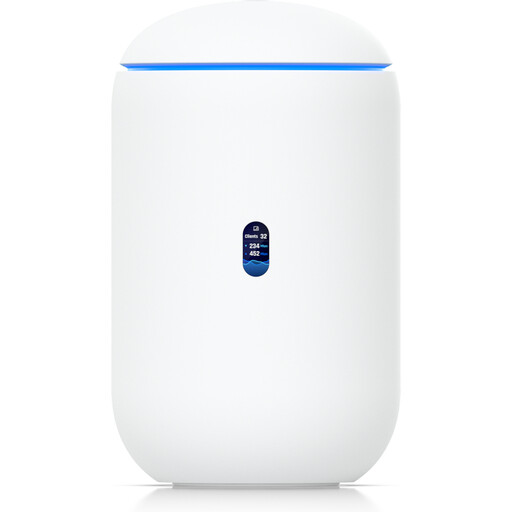
Ubiquiti UniFi Dream Router 7
This model is a single gateway option if you want to replace your main router. It isn’t a multi-station set for spreading Wi-Fi across several floors.
Tri-band Wi-Fi 7, four 2.5 GbE ports, 10G SFP+ and PoE output.
Before replacing your router, check that the connection type and any modem function you need are compatible with the device.
View at Joybuy
Frequently asked questions
How can I tell whether my internet connection or Wi-Fi is slowing playback down?
For online playback, check your broadband speed as well as the connection to your playback device. The Bundesnetzagentur provides a desktop app for testing fixed-line connections, while Netflix explains how to run a network test in its app on compatible TVs. If the file is stored locally, internet speed isn’t the relevant part of the connection.
Where should I place a wirelessly connected mesh station?
Place it somewhere it can still get a reliable connection to the main unit or the next station. Then check whether it provides coverage where you’ll be watching. In the middle of a Wi-Fi dead spot, it won’t be able to relay the backhaul reliably.
What should I do to secure my Wi-Fi after setting it up?
The Federal Office for Information Security recommends keeping your firmware up to date and changing well-known default passwords. Your router admin password and Wi-Fi password are separate login details.
Do I have to use my internet provider’s router in Germany?
No. The Bundesnetzagentur confirms that you can choose your own terminal device at the network termination point, including on passive optical fibre networks. Even so, check that your chosen device is compatible with your specific connection.
What compliance requirements apply to a Wi-Fi device sold in Germany?
According to the Bundesnetzagentur, products must comply with the applicable EU harmonisation legislation; products covered by these rules must carry CE marking. Check the marking and the relevant product version for the specific item you’re considering.


