
Lieferung heute & morgen

Qualitätsgarantie

Willkommens-Angebote freischalten: KOSTENLOSE Lieferung | Bis zu 80 % RABATT | Kostenlose 30-Tage-JoyPlus-Testphase
App herunterladen
Whether it’s for your home-office printer, kitchen water filter, electric shaver cleaning station or fountain pen, replacement cartridges can look very similar at first glance. But the model number, design, capacity and intended use are what really matter. If you buy based only on the lowest price per item, you could end up with a cartridge that isn’t recognised, prints significantly fewer pages or isn’t suitable for your device.
Names such as HP 953XL, Canon 510XL 511XL or Brother LC-223 refer to specific ink systems. A cartridge with a similar number won’t necessarily fit your printer. Regional model variants, colour slots and firmware versions can also be relevant.
The same applies to water filter cartridges: BRITA MAXTRA PRO filter cartridges aren’t automatically compatible with older Classic systems. A ShaverCare cleaning cartridge should only be used in a compatible Braun cleaning station.
XL cartridges generally contain more ink than standard cartridges. If you print a lot, that can mean fewer replacements. The key comparison, however, is the cost per page. To work this out, take the page yield, colour breakdown and stated printing conditions into account.
A black cartridge with a high page yield can be a good choice for text documents, while a low-cost multipack may be enough for occasional colour printing. For water filters, the relevant measure is filter capacity, for example 150 litres or four weeks.
Original printer cartridges are made by the printer manufacturer. Compatible printer cartridges are made by other suppliers for specific models. Remanufactured cartridges often use an existing cartridge casing. These options differ in price, availability, warranty terms and any warnings about printer recognition.
Before you buy, make sure you know whether you’re looking for an original cartridge, a compatible HP cartridge, a Canon printer cartridge or a remanufactured alternative.
First, check your device’s model number and compare it with the full compatibility list. For printers, this includes:
For fountain pen cartridges, the format is also important. Standard international cartridges won’t fit every fountain pen with a brand-specific fitting. For everyday use, fountain pen cartridges in royal blue or black may be suitable, provided your pen supports that format.
Don’t just compare the pack price. Look at:
Cost per page = cartridge price ÷ stated page yield
Treat page yield figures as a guide, as the print image, colour coverage, cleaning cycles and paper type can all affect actual ink consumption. ISO/IEC 24711 is a standardised method for measuring ink cartridge yield under defined conditions.
For filter cartridges, check the capacity in litres and the replacement interval. For cleaning cartridges, consider the pack size and the number of cleaning cycles specified by the manufacturer.
Keep ink cartridges sealed until you’re ready to use them, and store them in a dry place away from direct sunlight. Avoid touching the contacts and nozzles. When you install a new cartridge, your printer may run a short initialisation or print-head cleaning cycle.
Prepare water filters according to the instructions for use. Many MAXTRA PRO variants recommend discarding the first batch of filtered water. Filters are designed for cold tap water and should be replaced regularly.
Empty cartridges don’t always belong in your general waste. Use take-back schemes, recycling centres or local collection points, and follow the guidance on the packaging.
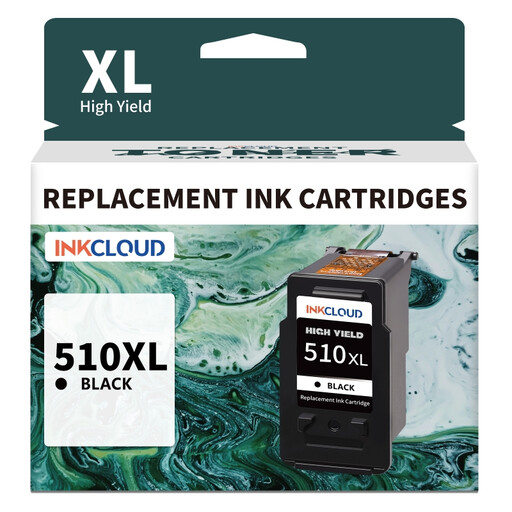
Why this product suits this profile: This remanufactured black cartridge is designed for households, students and small offices with compatible Canon PIXMA models such as the iP2700, MP495 or MX410.
The specific compatibility list helps you avoid mistaking a cartridge that merely appears to fit, such as a Canon 510XL or PG-510, for the right model.
A black cartridge for documents, with a remanufactured design and straightforward replacement.
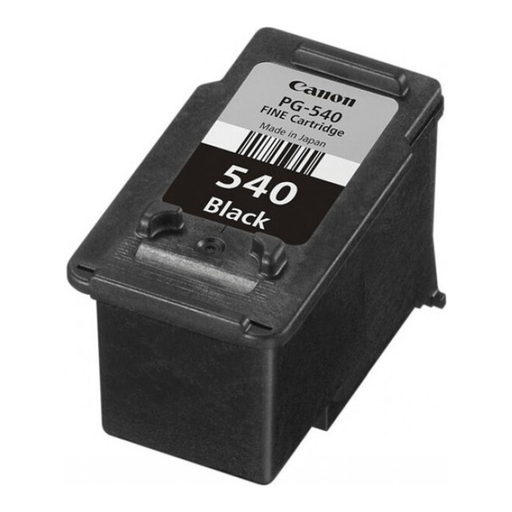
Why this product suits this profile: This original Canon cartridge is designed for compatible PIXMA MG, MX and TS series printers, making it suitable for regular text and document printing.
The PG-540 model name and clear identification as an original cartridge set it apart from compatible or remanufactured alternatives.
An original product with 8 ml of ink and a stated yield of around 180 pages under ISO/IEC 24711 conditions.
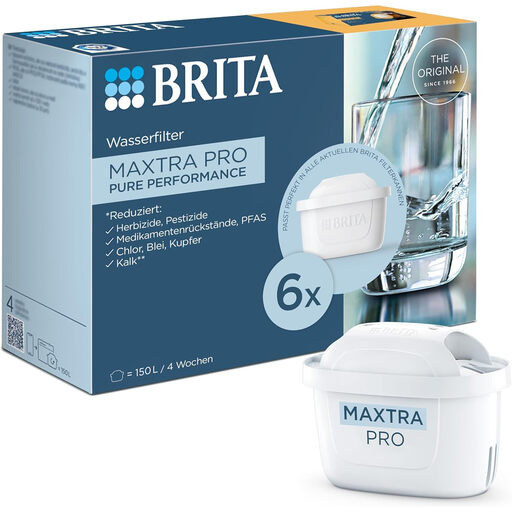
Why this product suits this profile: For households that regularly use a filter, this pack of six provides a convenient supply for BRITA jugs with the MAXTRA system.
The “MAXTRA system, excluding Classic” specification distinguishes this cartridge from BRITA fittings it isn’t compatible with.
Six water filter cartridges, each with a stated capacity of up to 150 litres or four weeks.
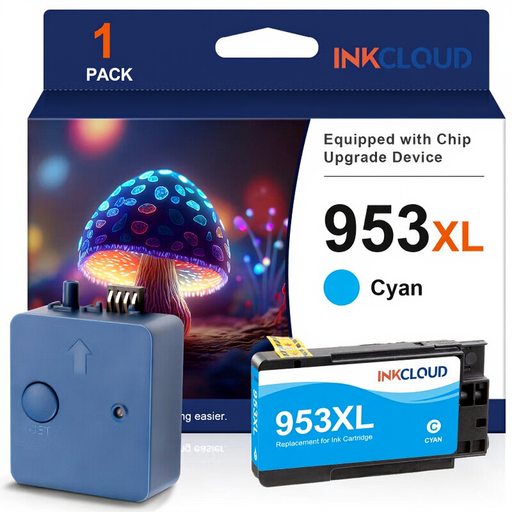
Why this product suits this profile: This multipack includes black, cyan, magenta and yellow cartridges, designed for compatible HP OfficeJet Pro models in a home office or small business.
The product description lists the supported OfficeJet Pro series and notes that a chip system is used for printer recognition.
XL cartridges with a stated yield of up to 2,000 pages in black and up to 1,600 pages per colour.
We’ve put together a complete, regularly updated list of products that meet these strict selection criteria and the safety regulations in force in the EU.
For occasional printing, a single standard-capacity cartridge is often enough. If you regularly print worksheets, invoices or shipping documents, compare XL cartridges and their cost per page. For colour printers, a multipack can be a good choice if all the colours are used up at a similar rate.
For filter jugs, keep track of the replacement interval in your calendar or use the jug’s indicator. For electric shavers, Braun ShaverCare cleaning cartridges are suitable if you have a compatible Braun cleaning station. Fountain pen cartridges, on the other hand, mainly need to be the right format and ink colour.
Note down your exact printer model number and compare it with the cartridge’s compatibility list. Also check the colour, cartridge series number and whether you need a standard, XL or multipack version.
The upfront price is often lower, but page yield, print quality and potential cleaning cycles all matter. Compare the cost per page and check that the cartridge is specifically designed for your printer model.
The BRITA MAXTRA PRO variants mentioned have a stated capacity of up to 150 litres or four weeks. Whichever comes first is the guide. If the cartridge hasn’t been used for an extended period, it should also be replaced in line with the instructions for use.