For handwritten margin notes and sketches, a convertible with a compatible stylus is the right type of device. Check whether the stylus is included with the specific configuration or available separately. If you mainly highlight PDFs and type comments, a traditional laptop may also suit you. Consider the screen size, portability and compatibility with the literature software you actually need.
Which type of device is right for you?
For annotating PDFs by hand
If you want to add margin notes or sketches directly to a paper, the stylus, display and what’s included in the box all need to work together. Lenovo Germany lists a touchscreen for the Yoga 7 2-in-1 83JR000PGE; the stylus is optional and sold separately.
For reading and comparing lots of papers
If you read longer texts or compare documents at your hotel desk, a practical screen size may matter more than stylus input. ASUS Germany lists a 14-inch display for the Zenbook A14 UX3407QA-QD496W. Apple offers the MacBook Air as a traditional laptop running macOS, with PDF annotation tools in Preview.
For researchers who travel light
If you carry your laptop around frequently and want to keep using your existing PDF or reference-management software, weight and platform compatibility are important. ASUS lists the Zenbook A14 UX3407QA-QD496W at 980 g; if you’re considering Windows on Snapdragon X, check that your specific apps and accessories will work first.
What should you consider when choosing?
Windows convertible with stylus
A good fit if: you want to add handwritten margin notes or sketches directly on the display.
Things to weigh up: The stylus for the Lenovo Yoga 7 2-in-1 83JR000PGE is optional and sold separately; the display is glossy.
Lightweight traditional Windows laptop
A good fit if: you mainly read, highlight and type, and often take your laptop with you.
Things to weigh up: The ASUS Zenbook A14 UX3407QA-QD496W runs Windows on Snapdragon X. Check that the apps and peripherals you need are compatible.
Traditional MacBook
A good fit if: you use macOS and mainly want to highlight, add text notes to and organise PDFs.
Things to weigh up: Apple’s Preview supports PDF annotations, but doesn’t directly edit existing PDF text. Nor does it offer stylus input on a convertible display.
| Priority |
What to check before buying |
Who it matters most to |
| Writing directly on PDFs |
Stylus compatibility, what’s included with the specific configuration, and how it works with your PDF app. |
If I want to add margin notes or sketches directly to a paper, I need a compatible stylus and a suitable workflow. Around 36% of consumers who consider handwritten PDF annotations essential put this first. |
| Reading and comparing papers |
Screen size, aspect ratio and screen finish; also consider your usual PDF zoom level and lighting. |
A practical display is important when reading longer texts or comparing several documents. Around 29% of consumers whose main priority is screen-based work prioritise reading and comparing papers. |
| Travelling between locations |
Check the weight of the complete configuration, along with the ports and charging options you need. |
If I carry my laptop around frequently, I want to weigh up portability against the screen size I need. Around 21% of consumers who consider carry weight essential put this first. |
| Keeping your existing literature software |
Check that your required PDF apps, reference-management software, extensions and accessories are compatible with the operating system and processor platform. |
If particular programs or devices are essential to my workflow, I need to confirm they’re compatible before buying. Around 14% of consumers whose main priority is specialist software compatibility consider this the most important factor. |
Common buying mistakes to avoid
-
Assuming a touchscreen includes a stylus
A touchscreen doesn’t mean a compatible stylus comes in the box. Lenovo lists the stylus for the Yoga 7 2-in-1 83JR000PGE as optional and sold separately.
Before ordering, check the stylus model, its compatibility and what’s included with the specific configuration.
-
Assuming a low weight means every Windows app will work
The ASUS Zenbook A14 UX3407QA-QD496W runs Windows on Snapdragon X. Microsoft says many Windows apps are supported, but that doesn’t mean every specialist application will work.
Check with the providers of your reference-management software, PDF extensions and accessories to confirm support for the specific platform.
-
Confusing the manufacturer’s guarantee with your statutory rights
Germany’s consumer advice centre distinguishes between your statutory rights against the seller and a voluntary guarantee with its own terms and conditions.
If a fault develops, contact the seller and check the statutory rights that apply to your purchase.
Brands worth considering for this type of work
Lenovo
The Yoga 7 2-in-1 range offers a convertible option for writing on screen. The configuration details cited here apply to model 83JR000PGE.
- Lenovo lists a touchscreen and 360° hinge for the 83JR000PGE.
- The stylus is optional and sold separately; the OLED display is glossy. These details apply to the configuration specified.
ASUS
The Zenbook A14 UX3407QA-QD496W is a lightweight, traditional Windows laptop with a 14-inch display.
- ASUS lists this variant at 980 g.
- If you’re using Windows on Snapdragon X, check that your specific specialist software is compatible.
Apple
The 13-inch MacBook Air M5 is a traditional macOS option for annotating PDFs in Preview.
- Apple’s Preview includes tools for adding notes and highlights to PDFs.
- Preview doesn’t directly edit existing PDF text; the MacBook Air isn’t a convertible with stylus input.
HP
According to HP, the OmniBook X Flip range is a convertible that offers both laptop and tablet modes.
- HP describes several ways to use the X Flip.
- Check whether a stylus is included, along with other features, for the specific configuration.
Joybuy products for working with PDFs
This selection includes traditional Windows laptops and convertibles for reading and annotating research PDFs, from larger displays to models with touchscreens and stylus input.
 No image available
Acer TravelMate TMP216-41-TCO, 16-inch, Ryzen 3 PRO 7335U, 16 GB RAM, 512 GB SSD
A traditional laptop option if you prefer a larger screen for reading papers.
16-inch WUXGA display; AMD Ryzen 3 PRO 7335U; 16 GB DDR5; 512 GB SSD; Windows 11 Pro Education; stated weight: 1.80 kg.
View at Joybuy
 No image available
HP OmniBook Ultra Flip 14-fh0670ng, 14-inch, Core Ultra 7 258V, 32 GB RAM, 1 TB SSD
A convertible option for switching between laptop work and handwritten PDF annotations.
14-inch OLED touchscreen with 2880 × 1800 pixels; Intel Core Ultra 7 258V; 32 GB RAM; 1 TB SSD; Windows 11 Home; stylus listed as included; stated weight: 1.34 kg.
View at Joybuy
 No image available
ASUS Zenbook 14 UX3405CA-QD1303W, Core Ultra 7 255H, 16 GB RAM, 1 TB SSD
A traditional laptop option for reading on a 14-inch display and travelling frequently.
14-inch WUXGA OLED touchscreen; Intel Core Ultra 7 255H; 16 GB RAM; 1 TB SSD; Windows 11; stated weight: 1.22 kg. The display is described as glossy, which may be worth considering in bright surroundings.
View at Joybuy
 No image available
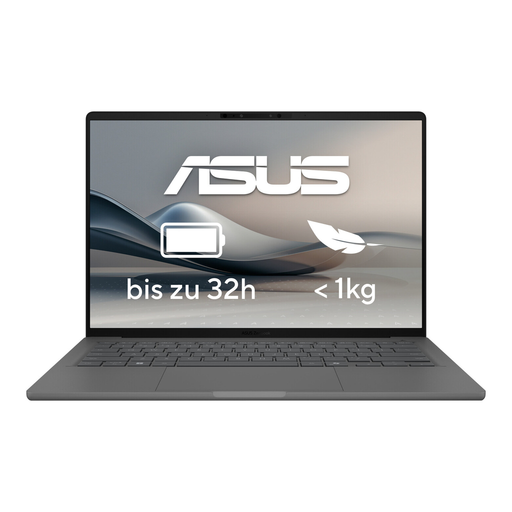
ASUS Zenbook A14 OLED UX3407RA-QD011W
A traditional laptop option if you’re looking for a 14-inch display and a low stated device weight.
14-inch OLED display; 16 GB RAM; 512 GB SSD; Windows; stated weight: 1.20 kg.
View at Joybuy
 No image available
HP ENVY x360 16-ac0473ng, Core Ultra 7 155U, 16 GB RAM, 512 GB SSD
A convertible option if you prefer a larger display and the flexibility to switch between laptop and tablet modes.
16-inch WUXGA IPS touchscreen; Intel Core Ultra 7 155U; 16 GB RAM; 512 GB SSD; Windows 11; USB-C Power Delivery; stated weight: approx. 1.87 kg.
View at Joybuy
Frequently asked questions
Does a convertible automatically come with a stylus?
No. Lenovo lists the stylus for the Yoga 7 2-in-1 83JR000PGE as optional and sold separately. For each configuration, check exactly what’s included and whether the stylus is compatible.
Is a MacBook suitable for highlighting and annotating papers?
Apple’s Preview includes tools for adding notes and highlights to PDFs. It doesn’t directly edit existing PDF text. If you want to write directly on your laptop display with a stylus, consider a convertible instead.
How can I check whether my literature software will run on a laptop?
Check that the specific programs, extensions and accessories you need are compatible with the operating system and processor platform of your chosen model. Microsoft says Windows on Snapdragon X supports many apps, but you should check compatibility with your specialist software specifically.
What should I set up before my first study session at the hotel?
Open a typical paper in the PDF app you plan to use, add an annotation and save the file again. Apple documents ways to save files in Preview that keep annotations editable later; check how this works in the app you actually use, too.


