What should you look for when buying?
First decide how you’ll arrange your code, preview and tools. Then compare resolution and ports, and finally check whether you can adjust the screen to suit your workspace.
| What matters when buying |
What to look for |
Who is it most relevant to? |
| Text clarity and workspace |
Dell UK lists the P2725QE as a 27-inch monitor with 3840 × 2160 pixels; BenQ UK lists the RD280U as a 28.2-inch monitor with 3840 × 2560 pixels. Check that the text is easy to read at your preferred scaling. |
If I’m reading long blocks of code, I need clear text without scaling making the usable space impractical. Around 33% of consumers would make text clarity their top priority. |
| Windows side by side |
LG UK lists the 34U650A-B as having 3440 × 1440 pixels; BenQ UK lists the RD280U as having 3840 × 2560 pixels in a 3:2 format. Compare how you arrange your windows and measure the space available on your desk. |
If I want to see code, previews and tools at the same time, I need enough space in the right direction. Around 25% of consumers would make having windows side by side their top buying priority. |
| Laptop connectivity |
Dell UK lists up to 90 W power delivery for the P2725QE; Lenovo UK lists USB-C, a USB hub and Ethernet for the ThinkVision P27h-30. Check that your laptop’s display output and charging requirements are supported. |
If I regularly connect my laptop, I want to avoid unnecessary plugging and unplugging while making sure display output and power delivery are suitable. Around 25% of consumers would prioritise easy laptop connectivity. |
| Positioning and reflections |
Check whether you can adjust the height and tilt to suit your space, and whether a matt screen is useful for the lighting conditions. BenQ UK lists a matt coating for the RD280U. |
If I work at a screen for long periods, I want to adjust its position to suit my workspace and take distracting reflections into account. Around 17% of consumers would make workspace adjustability their top priority. |
Joybuy monitors for code and previews
The Joybuy models below are 27-inch monitors listed as 4K, suited to code and detailed desktop views. Compare their scaling, ports and adjustment options with your computer and workspace.
 Image unavailable
MSI PRO MP273UPDE E6
A 27-inch 4K option for coding and detailed desktop views.
27 inches; 4K UHD; IPS; 60 Hz; HDR Ready.
View at Joybuy
 Image unavailable
Samsung ViewFinity S7 S70H
A 27-inch 4K option if you want to display code and desktop content in fine detail.
27 inches; 4K UHD; IPS.
View at Joybuy
 Image unavailable
INNOCN CB27U1
A 27-inch 4K option for code and previews. Check that the listed ports are compatible with your computer.
3840 × 2160; IPS; 120 Hz; HDR500; USB-C with 90 W PD; HDMI and DisplayPort.
View at Joybuy
 Image unavailable
KTC M27P6
A 27-inch 4K option with USB-C and KVM functionality, suited to a workspace with several connected devices.
Mini LED; 4K at 160 Hz or FHD at 320 Hz; HDR1400; Fast IPS; USB-C with 65 W; KVM; height-adjustable, tilt and swivel.
View at Joybuy
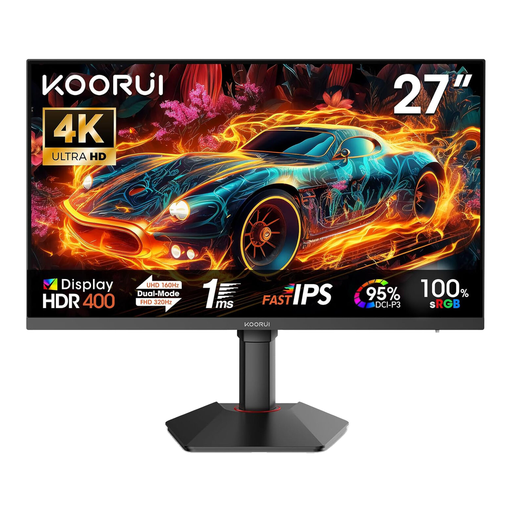 Image unavailable
KOORUI G2741L
A 27-inch 4K option if you want to switch between the resolution and refresh rate modes listed in the product title.
3840 × 2160 at 160 Hz or FHD at 320 Hz; Fast IPS; HDR 400; 2 × HDMI 2.1; DisplayPort 1.4.
View at Joybuy
Frequently asked questions
Do I need a particularly large monitor for responsive layouts?
No. What matters is how you want to arrange your code and preview. Chrome DevTools can simulate mobile views, but Chrome for Developers describes device mode as a first approximation of how a page will look on a mobile device. Important journeys should therefore also be tested on a real device.
What should I check when connecting a USB-C monitor?
Check your specific laptop’s display output and charging requirements against the monitor’s capabilities. Dell UK lists a USB-C hub and up to 90 W power delivery for the P2725QE; this doesn’t mean it is compatible with every laptop.
How should I set up my monitor for long periods of screen work?
Adjust the screen position and text size so they suit the task and your viewing distance. The ASR A6 regulation from Germany’s Federal Institute for Occupational Safety and Health sets out requirements for display screen workstations within its scope; it is not a blanket requirement to buy a particular monitor for every private shopper.
What are my rights when buying a monitor online?
For a qualifying purchase from a trader, you generally have a 14-day right to cancel from the date of delivery. Faulty goods are covered by a statutory guarantee for at least two years from receipt. The European Union’s Your Europe website distinguishes this guarantee from any additional manufacturer’s warranty.
Which EU product information should I check for a monitor?
EU energy labelling and ecodesign rules apply to electronic displays, including computer monitors. The European Commission includes this product group in its information on electronic displays. Check the details for the specific model rather than assuming they alone prove that an individual listing is compliant.


