Players with a specific console
If you want to play retro games on a particular console or PC, check the exact controller variant against your platform and game. For example, 8BitDo offers separate arcade stick variants for Switch/Windows and Xbox.


If you want an arcade-style joystick and large action buttons, and have the space for them, an arcade stick may be the better choice. If you prefer a directional pad and something easy to put away, go for a compact gamepad. First, check the exact model variant, platform compatibility and inputs you need. Similar-sounding models may support different systems or require extra setup. Bright daylight doesn’t favour one type of controller over another: check for reflections on your screen and make sure you can see the controls clearly where you play.
If you want to play retro games on a particular console or PC, check the exact controller variant against your platform and game. For example, 8BitDo offers separate arcade stick variants for Switch/Windows and Xbox.
If you’d rather have a joystick and large action buttons than a directional pad, layout, footprint and connection type are key considerations. MAYFLASH and HORI offer different stick variants and control layouts.
If you play in daylight and have limited space, check both the controller’s size and any reflections on your screen. The Federal Institute for Occupational Safety and Health covers glare protection in the context of workplaces; this doesn’t mean any particular controller is glare-free.
| Buying criterion | What to look for | Who it matters most to |
|---|---|---|
| Platform and game | Check the full model variant, console or operating system, and the inputs you need against your game. | If you want to avoid buying the wrong controller because it doesn’t support your platform or the inputs your game requires, this check is essential. Around 33% of consumers put platform and game compatibility first. |
| Control feel | Compare a joystick and action buttons with a directional pad and button layout; check which inputs your game requires. | If you’re choosing between arcade-style controls and a compact directional pad, the controls should feel right for your game. Around 33% of consumers give control feel and button layout top priority. |
| Visibility and footprint | Check for reflections on your screen in the daylight you usually play in, and compare the controller’s dimensions with the space available on your desk, in your hands and for the cable. | If you play in daylight with limited space, assess the screen and controller where you’ll actually be using them. Around 17% of consumers give visibility and footprint top priority. |
| Connection and setup | Check the connection type and whether a receiver is included. If your platform requires one, check whether you’ll need an additional controller or adapter. | If you want to keep cables to a minimum or avoid extra setup, the connection type of the specific model matters. Around 17% of consumers check connection and setup requirements first. |
8BitDo offers separate arcade stick variants for Switch/Windows and Xbox; M30 wireless variants also differ in their receivers and compatibility.
Check the full model name and included receiver against your system and the game you want to play.
For certain MAYFLASH F500 FLAT Elite setups, the manufacturer specifies extra requirements that depend on the model and platform.
Read the instructions for the exact variant and check what your console setup requires before you buy.
The setups mentioned may require an additional controller or a separately sold converter.
Controller size and reflections on your screen are two separate considerations. No comparison of glare in bright rooms is available for the controllers mentioned here.
Measure your available space, and check your screen and controls in the daylight you usually play in.
The range includes arcade sticks for different platforms, as well as M30 gamepads for compatible retro setups.
The F500 Elite and the separately listed F500 FLAT Elite offer different control options.
The Fighting Stick Mini SPF-038U is a compact joystick model for the PlayStation and Windows systems listed by HORI.
The Daija details described here refer to the PlayStation/PC variant for wired use.
The Drone 2 is another joystick option, which Qanba lists for PS5, PS4 and PC.
This selection includes gamepads and a leverless arcade controller. Before you buy, check the platform details against the retro game you want to play and the inputs it requires.
 No image available
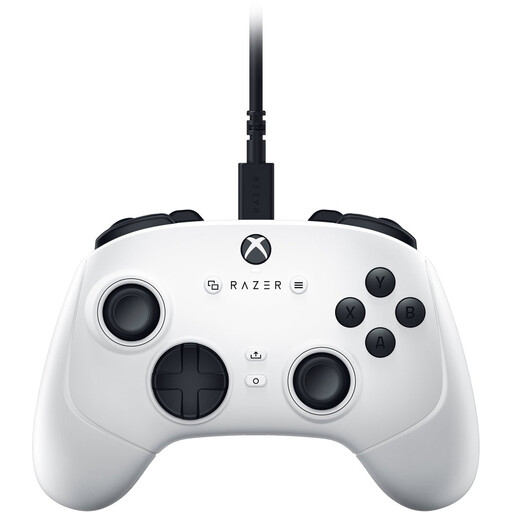
A possible option if you’re looking for a gamepad for PC or Xbox Series S/X; check support for your specific retro game separately.
A USB gamepad with analogue sticks. The product title lists PC, Xbox Series S and Xbox Series X. It connects by cable.
 No image available
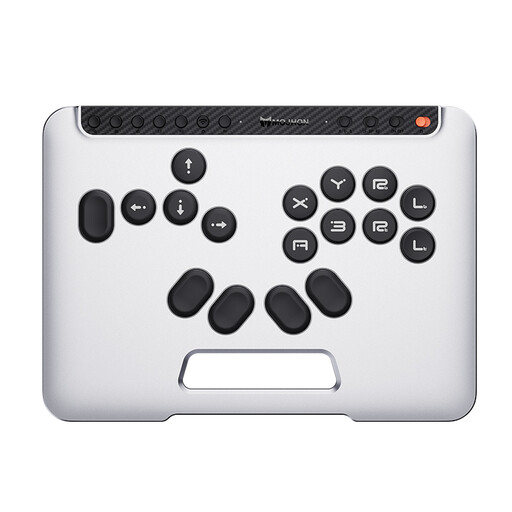
An option if you want an all-button layout instead of a joystick; check that this control style suits your retro game.
The product title lists Switch 2, Switch, PC, iOS and Android, as well as Bluetooth, 2.4 GHz and wired connections. This model is described as an all-button hitbox controller with hot-swappable mechanical switches.
There’s no product-specific evidence here on how easy individual controllers are to see in bright rooms. Check for reflections on your actual screen and in your gaming space. The Federal Institute for Occupational Safety and Health covers glare protection in the context of screen-based work, not gaming controller performance.
Choose the mode and connection that match your platform, then follow the instructions for the specific model. For the PlayStation version of the Daija, Nacon describes selecting the system and connecting the supplied cable; other models have their own instructions.
Check whether your specific setup needs an adapter sold separately. For goods bought from a trader, your statutory rights regarding faulty goods apply regardless of any voluntary manufacturer’s warranty. EU consumer information states that the minimum period is two years from receipt of the goods.
For a distance sale from a trader, you generally have a 14-day right to cancel from the date of delivery; exceptions and possible return costs may apply. This right to cancel does not apply to purchases from private sellers. This European Union information concerns the right to cancel and does not affect claims relating to faulty goods.
The Federal Network Agency explains that products covered by relevant EU harmonisation rules and placed on the EU market must carry CE marking. CE is the manufacturer’s declaration of conformity, not an independent endorsement of gaming performance. Check the marking on the specific product listing.