What should you look for when buying?
Arcade stick with a lever
A good fit if: you want a traditional lever and several action buttons for your games.
Consider: Size, platform version and connection requirements vary by model.
Classic retro joystick
A good fit if: your games need only a few fire buttons and you prefer the feel of a home computer joystick.
Consider: The click of the switches may be distracting in a shared workspace.
All-button controller
A good fit if: you prefer to control directions with individual buttons rather than a lever, and the game supports these inputs.
Consider: This control style won’t give you the feel of a lever if that’s what you’re after.
Handheld gamepad
A good fit if: you want to hold a gamepad in your hands and put it away from your desk when needed.
Consider: The button layout and cable need to suit your game and the space you’ll use it in.
Start by checking the game’s controls and the system you’ll use, then consider the space available and potential drawbacks such as switch noise. The consumer estimates below highlight the main buying priorities to consider.
| Priority |
What to check |
Who it matters most to |
| Controls and buttons |
Check that the directions and action inputs you need match the buttons and layout of the specific model. |
If I want to play my games without missing or unsuitable inputs, I’ll compare their controls with the controller. Around 31% of consumers are likely to prioritise having the right inputs for their games. |
| System compatibility |
Check the model version, operating system or console, input mode and any additional equipment required. |
If I want to use the controller with a particular PC or console, I’ll also check the input mode required. Around 25% of consumers are likely to put compatibility with their gaming system and input mode first. |
| Desk space |
Allow for the available desk width and depth, as well as space for your hands, lever movement and cables. |
If I switch between work and gaming at the same desk, I don’t want to have to move my keyboard and mouse out of the way permanently. Around 25% of consumers are likely to pay particular attention to available desk space. |
| Switch noise |
Check the switch description for the specific model; don’t assume one is quieter than another without comparable measurements. |
If others are working in the room or I want to keep disruption to a minimum while gaming, I’ll take the clicking noise into account. Around 13% of consumers are likely to prioritise keeping disturbance to a minimum. |
| Connectivity and customisation |
Check the connection type, supported button-mapping software and any additional parts you may need. |
If I want to choose between connection types or customise the controls later, I’ll check what the specific model offers. Around 6% of consumers are likely to consider connectivity and customisation their top priority. |
Key brands to consider
The features below apply to the product ranges and model versions mentioned, not necessarily to every product from each brand.
8BitDo
Worth considering if you’re choosing between an arcade stick, a leverless arcade controller and a wired gamepad.
- According to 8BitDo, the Arcade Stick offers Bluetooth, 2.4 GHz wireless and USB-C. The Arcade Controller has a flat design and uses directional buttons instead of a lever.
- According to the manufacturer’s FAQ, the SN30 Pro USB version is wired. Connection type and supported systems depend on the model.
HORI
The Fighting Stick Mini SPF-038U is designed for buyers looking for a lever and eight buttons in a compact footprint.
- For this PlayStation and Windows version, HORI lists an eight-button layout and dimensions of approximately 8 × 6 inches.
- The model number and platform version matter; the specifications don’t automatically apply to other Fighting Stick Mini versions.
MAYFLASH
The F300 is worth considering if you need PC input modes or might want to customise its controls later.
- For the F300, MAYFLASH lists XInput and DirectInput on PC, as well as compatibility with Sanwa Denshi controls.
- For the specific consoles listed—PS4, Xbox One and Xbox 360—MAYFLASH also requires a connected wired controller. Check other systems and firmware versions separately.
Speedlink
The COMPETITION PRO EXTRA USB is an option for fans of classic home computer joysticks and games with fewer action buttons.
- Speedlink lists four fire buttons, DirectInput and Windows support for this model.
- The manufacturer specifically describes the micro-switches as having a loud click. This isn’t an independently measured noise level.
Joybuy products to explore
For PC and Switch gaming, this selection includes a leverless all-button controller and a handheld gamepad.
 No image available
BIGBIG WON Fight Master Leverless Arcade Controller
An option if you want to control directions without a lever in supported games.
The product name lists Switch 2, Switch, PC, iOS and Android as compatible systems.
The product name lists Bluetooth, 2.4 GHz wireless and wired connectivity, as well as hot-swappable mechanical switches.
View at Joybuy
 No image available
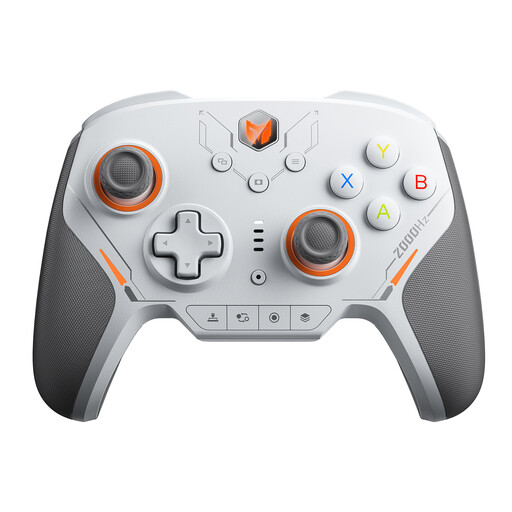
BIGBIG WON BLITZ2 Wireless Controller
An option if you’d rather use a handheld gamepad than an arcade stick.
The product name lists PC, Switch, iOS and Android as compatible systems.
The product name lists 16 mechanical micro-switches, TMR electromagnetic joysticks and a 2000 Hz polling rate.
View at Joybuy
Frequently asked questions
Will a retro joystick with four fire buttons work for every arcade game?
Not necessarily. Speedlink lists four fire buttons for the COMPETITION PRO EXTRA USB. Check that the available inputs cover the actions required by the specific game you want to play.
What can I do if a game doesn’t recognise my controller as expected on PC?
First, check which Windows version and input mode your specific model supports. MAYFLASH lists XInput and DirectInput for the F300; the right setting will also depend on the game.
What should I bear in mind if I change parts on a controller?
Follow the instructions for your specific device and check which parts are designed for it. MAYFLASH lists compatible Sanwa Denshi controls for the F300; this doesn’t mean that any part or model can be swapped in. According to EU information, changes made by buyers or third parties may mean the original CE conformity no longer applies.
What rights do I have when buying a controller online?
For a typical online purchase from a business seller in the EU, you generally have a 14-day right to cancel from the date of delivery; exceptions and conditions on return costs may apply. Separately, according to the EU consumer portal, faulty goods are covered by a statutory guarantee of at least two years. A voluntary manufacturer’s warranty doesn’t replace this.
Do I need to register a wireless controller myself in Germany?
EU and government information sets out requirements for placing radio equipment on the market and the relevant conformity marking; it doesn’t require buyers to obtain individual permission or register a device to play games. For a wireless model, check the conformity information provided for the device being sold. This alone doesn’t confirm that a specific model is compliant.


