Retro gamers with a specific system
If you play on a particular console or PC, check the exact model version against your system and game. 8BitDo and MAYFLASH list different platforms and connection requirements for different versions.


Start by choosing based on your gaming system and the inputs you need. A retro pad has a D-pad, an arcade stick has a joystick and separate action buttons, while a gamepad can also handle games that use analogue sticks. In a dark room, what matters is whether the controls you need for your game are illuminated. Also check the exact platform version, the space it takes up and whether you’ll need any extra devices.
If you play on a particular console or PC, check the exact model version against your system and game. 8BitDo and MAYFLASH list different platforms and connection requirements for different versions.
If you want to find the controls in low light, check which buttons are actually illuminated. GameSir says the T7 Pro Retro Green has illuminated ABXY buttons and an illuminated D-pad.
Choose between a D-pad, a joystick or a joystick-free layout based on the inputs your game uses. Retro-Bit, HORI and MAYFLASH offer different control styles and models to suit these preferences.
First, check which system you’re using and what inputs your game requires. Then compare how easy the controls you need are to see, and consider how the connection and setup will fit into your gaming space.
A good fit if: you want to find the buttons and D-pad easily, and also play games that use two analogue sticks.
Consider: A gamepad layout isn’t an arcade control panel, and manufacturers’ specifications don’t tell you how bright it will look in your room.
A good fit if: your game uses digital directional inputs and action buttons.
Consider: The Retro-Bit SEGA Saturn USB Arcade Pad isn’t listed as having illuminated buttons. USB and original-console versions are different models.
A good fit if: you prefer a joystick and separate action buttons.
Consider: An arcade stick needs space and won’t replace two analogue sticks in every game.
A good fit if: you want to replace the joystick or buttons later; MAYFLASH describes the F300 and F300 Elite as customisable.
Consider: For some consoles, MAYFLASH requires an additional wired controller to be connected to the F300. You should also check the firmware version when using retro mini consoles.
A good fit if: you’d rather enter directions using buttons than a joystick.
Consider: Check that the layout suits your game and platform. Depending on the model, some consoles may also require extra devices.
| Buying priority | What to check | Who is this especially important to? |
|---|---|---|
| Platform and game compatibility | Check the exact model version, console or operating system, input mode and game features you need. | If I want to use the controller with a particular system and game, finding the right connection comes first. Around 31% of consumers say compatibility is their top priority. |
| Directional and action inputs | Check that the D-pad, joystick, directional buttons or, where needed, two analogue sticks suit the game’s inputs. | I want controls that suit the inputs used in my retro games, rather than an unfamiliar control style. That’s why around 25% of consumers prioritise choosing the right type of controls. |
| Controls in the dark | Check whether the exact model has illuminated buttons and a D-pad, especially the ones you need. An “RGB” label alone doesn’t tell you this. | If I want to find my game’s buttons quickly in a dark room, I look for illumination on those specific controls. Visibility is a priority for around 19% of consumers. |
| Connection and accessories | Check the connection type, the ports you need and whether you’ll also need to connect another controller. | I want to know how cables, wireless receivers and any extra devices will fit into my setup. An easy connection and setup are the main priority for around 13% of consumers. |
| Space and handling | Consider the space available, your arm position and cable management in your gaming area. | If I have limited space or prefer a particular hand position, my controller needs to suit my gaming area. Around 12% of consumers prioritise the space it takes up and how it feels to use. |
8BitDo offers one version for Switch and Windows, and a separate version for Xbox and Windows. Similar names don’t mean the models support the same systems.
Check the full model name and listed platform against your own system.
GameSir specifically describes the T7 Pro Retro Green as having illuminated ABXY buttons and an illuminated D-pad. An RGB specification for another model doesn’t confirm the same button lighting.
For the exact model version, check whether the controls you actually need while playing are illuminated.
For the F300, MAYFLASH says that an additional wired controller must be connected for certain consoles. For the F500 FLAT Elite, the manufacturer lists a separate converter for the specified PS5 setup.
Before choosing a device, check the requirements for your exact console and model version.
MAYFLASH says that firmware 1.15 for the F300 Elite removes support for certain retro mini consoles.
If you’re pairing it with a retro mini console, check the model and installed firmware against the manufacturer’s guidance.
Arcade sticks available in separate Switch/Windows and Xbox/Windows versions, including models with wireless connectivity.
Customisable F300 sticks and the joystick-free F500 FLAT Elite suit different arcade control preferences.
SEGA Saturn-inspired pads are available as USB models and as versions that connect to original consoles.
The Fighting Stick Mini SPF-038U offers a compact arcade layout for the PlayStation supported by that model.
Gamepads such as the T7 Pro Retro Green and Cyclone 2 are an alternative to an arcade joystick.
The models below include gamepads and a joystick-free arcade controller. If you’re looking specifically for a classic retro pad or an arcade stick with a joystick, compare the controls with what your game requires.
 No image available
This joystick-free arcade layout is an option if you’d rather enter directions using buttons than a joystick.
The product title lists it for Switch 2, Switch, PC, iOS and Android, and mentions Bluetooth, 2.4 GHz and wired connectivity.
The title mentions interchangeable mechanical switches and RGB lighting, but this doesn’t tell you which individual buttons are illuminated in a dark room.
 No image available
If you’re looking for a gamepad for Switch, the product title lists this version for that platform and Bluetooth.
The title mentions seven-colour LED lighting, vibration feedback and a range of 10 m.
Check whether the lighting covers the controls you want to find in a dark room.
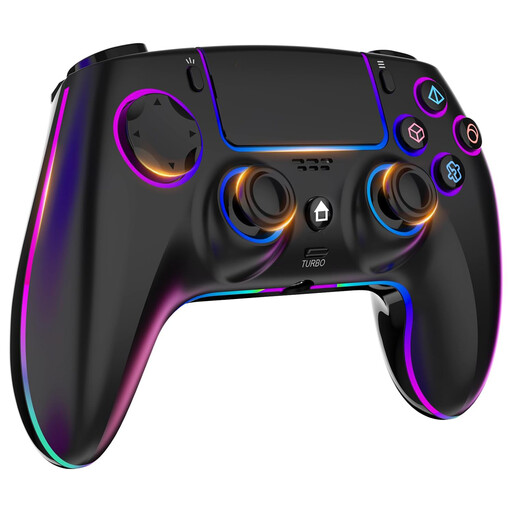 No image available
The product title lists this version for PS4 and PC. Check that the platform specification matches your game and device.
The title mentions seven-colour RGB lighting, dual vibration, turbo, a touchpad, a headphone jack and a 1000 mAh battery.
The RGB specification alone doesn’t tell you which buttons are illuminated.
 No image available
If you’re looking for a gamepad with a joystick and buttons, the product title lists PC, Switch, Android and iOS as compatible platforms.
Features listed include a TMR joystick, dual-mode triggers, mechanical buttons, RGB backlighting and a 1000 Hz polling rate.
Bluetooth is mentioned in the title; check the connection and compatibility with your specific system.
 No image available
According to the product title, this gamepad version is designed for PC, Switch 2, iOS and Android.
The title lists 16 mechanical buttons, a capacitive joystick, 14 customisable RGB lights, a 6-axis gyroscope and a 2000 Hz polling rate.
The RGB specification doesn’t confirm that the buttons you need are illuminated.
No. An RGB specification alone doesn’t tell you whether the buttons you need for your game are illuminated. GameSir specifically says that the T7 Pro Retro Green has illuminated ABXY buttons and an illuminated D-pad. For other models, check which specific controls are lit.
First, check that you’re using the input mode for your model and that the buttons are mapped correctly in the game. Retro-Bit’s manual explains how to switch between D-Input and X-Input. For certain Windows issues with its Xbox arcade stick, 8BitDo recommends checking that it’s in gamepad mode.
Check the model, hardware version and target console against the manufacturer’s guidance. MAYFLASH says firmware 1.15 for the F300 Elite removes support for certain retro mini consoles. Retro-Bit also notes that V1 and V2 firmware are not interchangeable.
No, this depends on the model and platform. For the F300, MAYFLASH requires a wired controller to be connected for certain consoles. Check the requirements for your exact stick and system combination.
According to the consumer advice centre, online purchases generally come with a right to cancel, usually within 14 days of receiving the goods. Exceptions and the terms of the specific contract apply. Your statutory rights against the seller and a voluntary guarantee are separate entitlements.