Players with an analogue retro console
You want to capture the picture and sound from a console with a Composite or S-Video output. Check that the grabber supports your console’s specific signal and PAL mode, and is compatible with your computer.


Your console’s video output is what matters: Composite or S-Video is suited to an analogue grabber, while an HDMI capture card needs an existing HDMI signal or a suitable additional converter. If you want to play on a separate screen while recording, check whether the specific model has an HDMI passthrough output. In a shared bedroom, you should also check the game audio and microphone separately. Whether a particular retro signal is recognised depends on the entire device chain.
You want to capture the picture and sound from a console with a Composite or S-Video output. Check that the grabber supports your console’s specific signal and PAL mode, and is compatible with your computer.
Your console or an existing converter outputs HDMI, and you want to play on a separate screen while recording. Look for an HDMI input and output on the model you choose.
You want to record the game audio without accidentally capturing someone else’s conversation or creating an echo. Check which audio sources are selected and switch off any microphone you don’t need.
The percentages below show which consideration comes first in this buying decision; they are not market shares.
| Buying priority | What to check | Who it matters most to |
|---|---|---|
| Compatible console connection | Match your console’s output, cable and video signal to the inputs explicitly listed for the grabber. | If my console outputs Composite or S-Video, the grabber must accept that exact connection. Around 36% of consumers focus primarily on this analogue compatibility. |
| Playing while recording | Check whether the specific model supports HDMI passthrough and can connect to a separate screen. | If I want to play on my own screen while recording, a suitable passthrough setup is essential. Around 29% of consumers prioritise the gameplay display. |
| Game audio and privacy | Check the audio sources and microphone in your recording software, then listen to a short test recording. | If I only want to capture the game audio and avoid recording conversations in a shared room, I want to be able to mute the microphone. Around 21% of consumers focus primarily on controlling their audio sources. |
| Computer and additional equipment | Check the operating system, USB connection, required software and whether you may need additional converters. | If I want to use my existing computer and software and avoid extra devices, the entire connection chain needs to be compatible. Around 14% of consumers focus primarily on computer integration and setup. |
Composite and S-Video are not HDMI inputs. An HDMI capture card therefore can’t accept an analogue console signal directly.
Start by checking your console’s actual output, then compare it with the inputs on the specific device.
With an analogue console and an HDMI capture card, you may need a suitable additional video converter.
An HDMI passthrough display, a software preview and an inline converter are different parts of the signal chain. A passthrough specification doesn’t tell you the latency of the complete recording setup.
Plan the route from the console output to the gameplay screen and recording software separately.
In a shared bedroom, you could accidentally record other people’s voices. Setting up the same audio source twice can also create an echo.
Check which sources are active and whether they’re muted in your recording software, then make a short test recording.
According to Hauppauge, the USB-Live2 is an analogue grabber for Composite or S-Video sources on a Windows computer.
AVerMedia offers different capture options: the DVD EZMaker 7 C039 for analogue inputs and the Live Gamer MINI GC311 for HDMI with passthrough.
Game Capture Neo is designed for an existing HDMI signal with an additional gameplay screen; the 4K S is another HDMI option.
According to the manufacturer, the VGB500 is an HDMI capture device with HDMI passthrough.
According to Magewell, USB Capture HDMI Gen 2 is an HDMI-to-USB capture device. Check that it’s compatible with your operating system and computer.
This selection is for capture setups using an HDMI capture card with passthrough. If your console has a Composite or S-Video output, you may first need a converter that supports your specific console signal.
 No image available
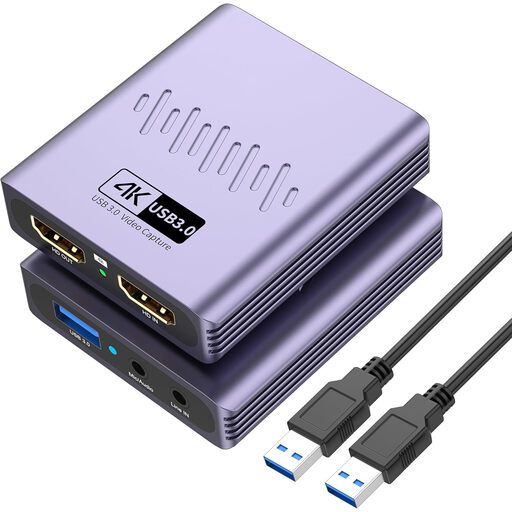
For an HDMI source with a separate screen, the title lists HDMI passthrough and USB 3.0.
The title lists video recording up to 1080p, 4K passthrough, a microphone input and a headphone output. For a Composite or S-Video console, you’ll need a suitable analogue-to-HDMI converter.
 No image available
For the intended HDMI capture setup, check that the specific input matches your console’s signal before buying.
The product title lists USB 3.0, five ports and audio recording. For a Composite or S-Video console, you’ll need a suitable analogue-to-HDMI converter.
 No image available
For an HDMI source with a separate gameplay screen, the title lists HDMI passthrough and USB 3.0.
The product title lists video recording up to 1080p, as well as a microphone input and headphone output. For a Composite or S-Video console, you’ll need a suitable analogue-to-HDMI converter.
 No image available
For an HDMI capture setup with a separate screen, the title lists HDMI passthrough and USB 3.0.
The product title lists 1080p recording and compatibility with Windows, macOS and Linux. For a Composite or S-Video console, you’ll need a suitable analogue-to-HDMI converter.
 No image available
For the intended capture setup, match the device’s video input to your console’s output.
The product title lists USB 3.0 and five ports. For a Composite or S-Video console, you’ll need a suitable analogue-to-HDMI converter.
No, not through its HDMI input. Use either a grabber with a compatible analogue input or a converter that adapts your specific console signal for the HDMI capture card.
In OBS, select the audio sources you want explicitly, disable any microphone you don’t need and check the recorded tracks with a short test recording. According to OBS Project, setting up the same audio source twice can cause an echo.
It depends on your signal path. With an analogue console connected to an HDMI capture card, you may need a suitable converter. For HDMI passthrough, you’ll need a separate gameplay screen and the right connections. Also check the operating system and USB requirements for the specific model.
Under Section 201(1) of the German Criminal Code (StGB), recording another person’s non-publicly spoken words without authorisation is a criminal offence. Whether a particular recording is authorised depends on the circumstances. This legal information is based on the statutory text published by the Federal Ministry of Justice and the Federal Office of Justice. Switch off any microphone you don’t need, and discuss any intended voice recording in advance.
No. Under certain conditions, Section 53(1) of the German Copyright Act (UrhG) covers individual copies for private use; Section 19a of the Act separately governs the right to make works available to the public. These provisions alone don’t determine whether specific game footage may be published. You can find them in the statutory text published by the Federal Ministry of Justice and the Federal Office of Justice.