You don’t necessarily need to plug your headphones into your controller. If your gaming device has a suitable audio output, you can connect your headphones and controller separately. Then decide whether you’d prefer a compact gamepad, an arcade stick or directional buttons. Check both platform compatibility and the documented audio features for the specific model – controllers with similar names may not have the same connections or compatibility.
Who are the different types of controller for?
Gamers who plug headphones into their controller
You want to plug in your headset directly and control the audio while you play. What matters is the documented socket and how it works with your platform – not simply whether it’s called a “controller”.
Retro gamers who prefer an arcade stick
You prefer the stick-and-button layout of an arcade controller and want a version that works with your console or PC.
Gamers with more than one system
You want to use the same type of controller with different devices, so you check the supported platforms and connection options, as well as any controllers or adapters you may need.
What should you look for when choosing?
First, check how your headphones and controller connect to your gaming system. Then choose the control style that suits your games and the space you have available.
| What matters |
What to check before buying |
Who is it important to? |
| Headphone connection and audio setup |
Check for a 3.5 mm socket and headphone and microphone functionality on the exact model and platform you use. |
If I want to use my headset directly with the controller, I check its documented audio features. Around 36% of consumers prioritise this. |
| Console, PC and game compatibility |
Check the full model name, supported system, connection type and the controls required by your games. |
If my controller needs to work with a particular console and my games, I check the exact platform version. Around 29% of consumers prioritise this compatibility. |
| Classic arcade controls |
Consider a stick rather than directional buttons alone, the button layout, the space required and the controls your games need. |
If I want a classic stick-and-button layout, this matters more to me than a compact design. Around 21% of consumers prioritise an arcade stick. |
| Compact or button-only controls |
Compare the dimensions, type of directional control, platform and, where relevant, headphone connection. |
If I’m short on space or prefer to enter directions using individual buttons, I look specifically for this design. Around 14% of consumers prioritise compact or button-based controls. |
Avoid these buying mistakes
-
Assuming similarly named 8BitDo sticks work with the same platforms
According to 8BitDo’s FAQ, the Arcade Stick for Switch and PC isn’t designed for Xbox or PlayStation. The Arcade Stick for Xbox is a different model.
Before buying, check the full model name and platform list against your gaming system.
-
Assuming a 3.5 mm socket guarantees every audio feature
Documented headphone or microphone functionality may depend on the model, platform and connection method.
Check headphone and, where relevant, microphone functionality for your exact system and planned connection. If you’re using a headset, check the plug wiring too: 8BitDo specifies a CTIA connection for its Arcade Stick for Xbox.
-
Overlooking the extra hardware needed for the MAYFLASH F500 FLAT
For PS4 and the Xbox consoles listed by the manufacturer, a compatible console controller must be connected to the F500 FLAT by cable. For PS5, MAYFLASH specifies a separately available converter.
Check in advance which controllers, cables or converters you’ll need for your specific console.
-
Choosing an arcade stick without checking your games’ controls
8BitDo notes that the Arcade Stick for Xbox may have limitations with games that require two joysticks at the same time.
Compare the controls your games need with the stick, buttons and mode options available on the arcade stick.
Key brands at a glance
8BitDo
Its ranges vary by platform and control style, so check the specific version.
- 8BitDo lists a 3.5 mm socket on both the Arcade Stick for Xbox and Arcade Controller for Xbox.
- According to the manufacturer’s FAQ, the Switch/PC arcade stick isn’t listed as compatible with Xbox or PlayStation. Features of individual models don’t necessarily apply to every device from the brand.
HORI
The Fighting Stick α is a stick-controlled model for PlayStation 5, PlayStation 4 and Windows.
- HORI lists a 3.5 mm socket, audio controls and a case that opens for maintenance on this version.
- The listed platforms and features don’t confirm Xbox compatibility and can’t automatically be assumed to apply to other HORI models.
MAYFLASH
The F500 FLAT offers button-only controls, with support for several platforms subject to specific conditions.
- MAYFLASH lists headset audio output for PS4 and certain Xbox consoles.
- For PS4 and the listed Xbox consoles, the manufacturer also requires a compatible controller connected by cable. For PS5, MAYFLASH specifies a separately available converter.
GameSir
The wired G7 HE is a gamepad alternative if you don’t need an arcade stick.
- GameSir lists analogue sticks, a 3 m USB-C cable and a 3.5 mm audio socket for the G7 HE. This model is designed for the specified Xbox and Windows systems.
- According to the manufacturer, the G7 HE is wired. These features apply to this specific model, not necessarily to the brand as a whole.
Qanba
The Drone 2 is an arcade stick for PS5, PS4 and PC, with a specified headset interface.
- Qanba lists a 3.5 mm microphone input with a mute button, as well as a headset interface.
- The manufacturer’s information is less clear about headphone output on PC. It also doesn’t confirm that other Qanba sticks have the same features.
Joybuy products for arcade gaming and gamepad controls
This selection includes leverless button controls and gamepads for the platforms listed for each product. Compare the platform and connection details. If the controller doesn’t have a suitable audio socket, check whether you can connect your headphones directly to your gaming device.
 No image available
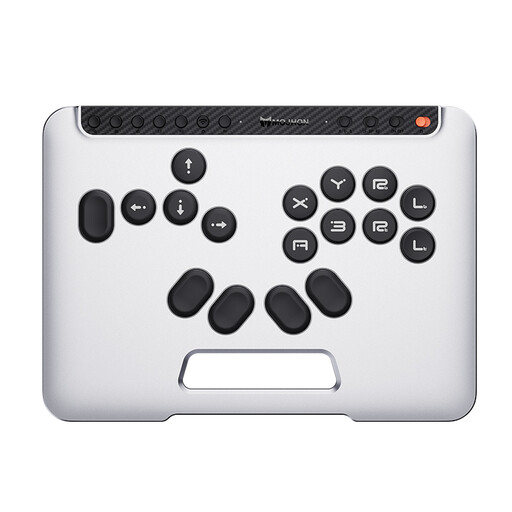
BIGBIG WON Fight Master Leverless Controller for Switch 2/Switch/PC/iOS/Android
Worth considering if you prefer to enter directions using buttons rather than a stick.
The product title lists Switch 2, Switch, PC, iOS and Android, as well as Bluetooth, 2.4G and wired connections.
The title also mentions hot-swappable switches and all-button hitbox controls. Before buying, check that the listed connection works with your device.
View on Joybuy
 No image available
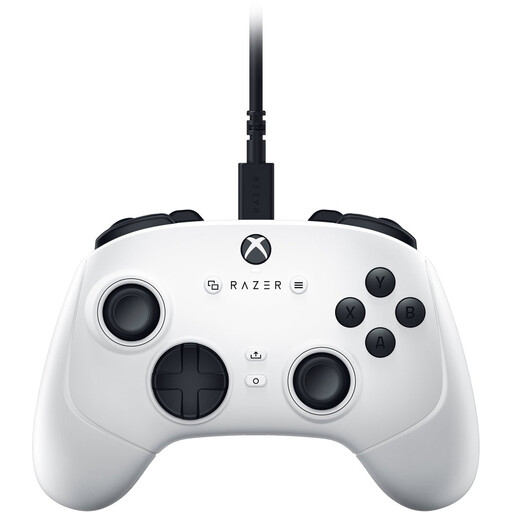
Razer Wolverine V3 Tournament Edition White
This gamepad could be a good choice if you’re looking for a gamepad for PC or Xbox rather than an arcade stick.
The product title describes a USB gamepad with analogue controls for PC and Xbox Series S/X.
Check compatibility with your specific device and how you plan to connect your headphones.
View on Joybuy
 No image available
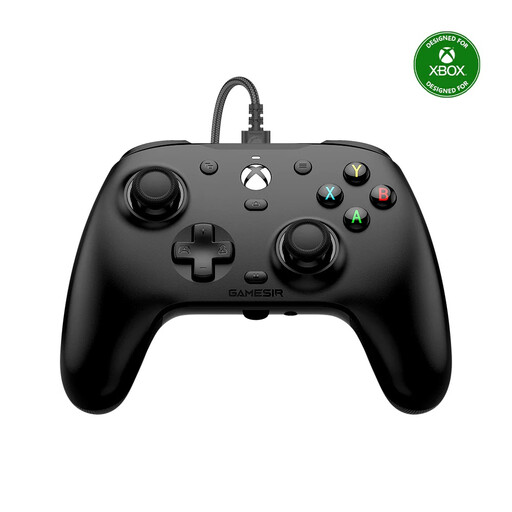
GameSir G7 HE Wired Controller
The G7 HE is a good fit if you’d rather use a wired gamepad than an arcade stick and want to connect your headphones to the controller.
GameSir lists a 3.5 mm audio socket and support for Xbox Series X|S, Xbox One and Windows 10/11. The manufacturer also specifies a 3 m USB-C cable.
Check audio playback and microphone functionality with your specific system and headset.
View on Joybuy
Frequently asked questions
Do I have to connect my headphones to the controller?
No. If your gaming device has a suitable audio output, you can connect your controller and headphones separately. If you want to plug your headset directly into the controller, check its documented audio features for your platform. Microsoft describes this option for compatible Xbox Wireless Controllers with a 3.5 mm socket.
Will the 8BitDo Arcade Stick for Switch and PC also work with Xbox or PlayStation?
According to 8BitDo’s FAQ, the Switch/PC arcade stick isn’t designed for Xbox or PlayStation. Don’t confuse it with the separate Arcade Stick for Xbox, and check the platform information for the full model name before buying.
What do I need to connect before playing with a MAYFLASH F500 FLAT?
For PS4 and the Xbox consoles listed by the manufacturer, you’ll also need to connect a compatible console controller to the F500 FLAT by cable. For PS5, MAYFLASH describes a separately available converter. Check that it’s suitable for your specific game and setup.
What should I check if my headset is silent when connected to the GameSir G7 HE?
First, check the USB connection, volume and microphone mute setting. According to the GameSir instructions, you can adjust the volume using the M button and directional pad. There’s also a separate microphone mute button.


