Who are the different tablet options suited to?

Offline retro gamers

If you don’t want to rely on a dependable Wi-Fi connection at your holiday home, set up the app and any required cores, and make sure your games are available to you, before you leave. Then test that a game launches without an internet connection.

Travellers packing light

If you’re looking for a tablet that’s easy to carry, weigh up screen size against how you plan to use it with a controller or on a table.

Gamers with a demanding collection

If you want to emulate particular games that may be more demanding, check which core they require and whether it’s compatible with the specific device. Don’t base your decision on processor or display specifications alone.

What should I look for when buying?

Compact Android tablet

A good fit if: Portability and a games collection set up in advance are your priorities.

Keep in mind: Check the specific emulator version. Screen size and expandable storage don’t indicate how well a particular core will perform.

iPad mini (A17 Pro)

A good fit if: You prefer the compact iPad format and the games you need work with the available apps and cores.

Keep in mind: According to Libretro, the App Store version doesn’t include all cores. Certain features, such as dynamic recompilation, aren’t available either.

Performance-focused Android gaming tablet

A good fit if: You want to play more demanding games as well as retro titles, and a core you’ve tested benefits from extra hardware.

Keep in mind: Advertised refresh rates and hardware specifications don’t guarantee higher frame rates or compatibility with your games.

Buying priority What to check before buying Who is this important to?
Getting games and storage ready for offline use Install the app and any required cores in advance, check how much storage is free, and test launching a game without an internet connection. If you’re using a microSD card, check which content the exact model can store on it. If I want to play at my holiday home without relying on Wi-Fi, I want my apps and games ready to go before I set off. Around 29% of consumers who consider offline preparation their top priority pay particular attention to this.
Portability and screen size Compare the dimensions and weight of the specific model with how you plan to use it. Samsung lists an 8.7-inch screen for the Galaxy Tab A11 and an 11-inch screen for the Galaxy Tab A9+. If there’s not much room in my luggage, I want a handy device that’s still easy to see while I’m gaming. Around 23% of consumers put portability first.
Compatibility with the games you want to play Check the platform, app version, required core and features needed for your particular games collection. Libretro notes limitations with the App Store version of RetroArch on iPadOS. If certain games matter to me, I want to know before buying whether they’ll work with the core I plan to use. Around 18% of consumers prioritise compatibility with specific games.
Controller support Pair your chosen controller with the tablet and emulator, then test the button mapping and connection in a game. If I’d rather use familiar buttons than a touchscreen, I want to set up the controls before I travel. Around 18% of consumers prioritise controller support.
Power supply Check the charging port and what’s included with the exact model. If you’re planning longer sessions away from a plug socket, test how long the battery lasts with your games. If plug sockets aren’t easy to reach, I want to plan charging and play time for my stay. Around 12% of consumers put power supply first.

What are the key buying and setup tips?

  • Assuming gaming hardware guarantees retro compatibility

    A performance-focused processor or high-refresh-rate display doesn’t prove that a particular emulator core is available or that a game will run as expected.

    Start by identifying the games you want to play and the core they need. Consider extra hardware only if you can see a specific benefit for your own collection.

  • Confusing expandable storage with extra app storage

    According to Xiaomi, the microSD card in the REDMI Pad SE 8.7 4G is for media, not apps. This limitation applies to the specific model stated.

    Check where you can store the emulator app and game files on the exact model, and how much internal storage you’ll need.

  • Assuming a controller or power adapter is included

    You’ll need to set up and test a working controller layout with your chosen emulator. Xiaomi specifically notes that the REDMI Pad SE 8.7 4G doesn’t include a power adapter.

    Test the controller you plan to use before setting off, and check what’s included with your specific tablet model.

Which brands are worth considering?

Xiaomi / REDMI

According to Xiaomi, the REDMI Pad SE 8.7 is a compact Android option with expandable storage.

  • Xiaomi lists an 8.7-inch display and a 6.650 mAh battery capacity.
  • According to Xiaomi, the microSD card in the REDMI Pad SE 8.7 4G isn’t intended for apps. The battery capacity alone doesn’t tell you how long a particular retro game will run.

Samsung

Samsung offers a choice of compact and larger screen sizes with the Galaxy Tab A11 and Galaxy Tab A9+.

  • Samsung lists an 8.7-inch screen for the Galaxy Tab A11 and an 11-inch screen for the Galaxy Tab A9+.
  • Comparing screen sizes isn’t the same as testing an emulator. Check the storage and mobile data versions of your preferred model separately.

Apple

The iPad mini (A17 Pro) is a compact iPadOS option, provided the apps and emulator cores you need are available.

  • Apple lists an 8.3-inch display and storage options of 128, 256 or 512 GB.
  • According to Libretro, the App Store version of RetroArch doesn’t offer all cores and doesn’t support certain features, such as dynamic recompilation.

Lenovo

According to Lenovo, the Legion Tab Gen 3 is a more compact Android tablet designed with gaming in mind.

  • Lenovo lists an 8.8-inch display, a Snapdragon 8 Gen 3 and a refresh rate of up to 165 Hz.
  • These manufacturer specifications don’t prove how well a particular retro game will run or whether it’s compatible.

REDMAGIC

According to REDMAGIC, the Astra Gaming Tablet is a compact Android option for anyone considering performance-focused apps as well as retro games.

  • REDMAGIC lists a 9.06-inch screen, a Snapdragon 8 Elite and 8.200 mAh on its global specifications page.
  • The global specifications don’t confirm the details of the German model or how warranty claims are handled there. Nor do they show how a particular emulator core will perform.

Joybuy products for retro gaming at your holiday home

This Joybuy selection includes Android tablets in compact and larger formats. Set up your chosen app, games and controller before you travel, and check compatibility with your specific model.

ALLDOCUBE iPlay 70 mini Ultra, 8.8-inch Android tablet

ALLDOCUBE iPlay 70 mini Ultra, 8.8 inches, 12GB+256GB

This compact Android tablet could be a good fit if portability matters for your trip. Be sure to test your games and emulator cores for compatibility in advance.

Android 14, Qualcomm Snapdragon 7+ Gen 3, 12GB+256GB and 7300mAh. According to the product title, a power adapter isn’t included.

View at Joybuy
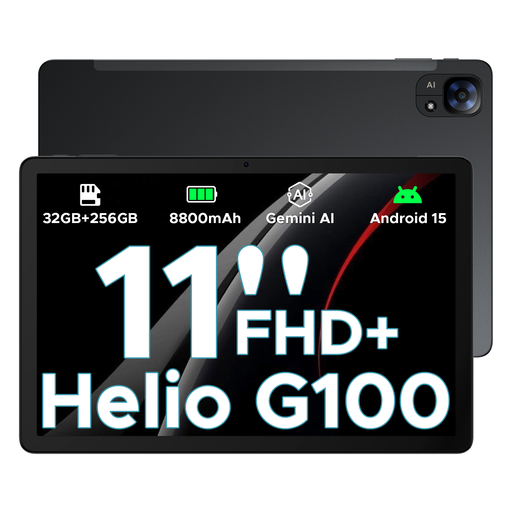
DOOGEE Tab E3 Android 15 AI tablet, 11 inches, black

DOOGEE Tab E3 Android 15 AI Tablet, 11 inches, Black

The 11-inch screen gives you more room to play if screen space matters more than having the most compact tablet for travel. Check emulator compatibility with your games separately.

FHD+, 90 Hz, Helio G100, 32GB+256GB/2TB and 8800mAh.

View at Joybuy
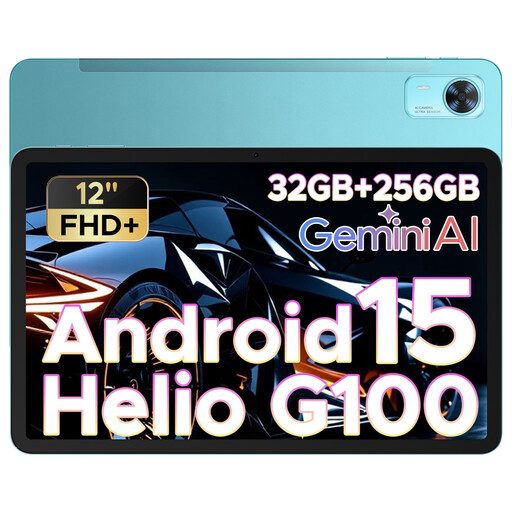
DOOGEE Tab E3+ Android 15 tablet, 12 inches, blue

DOOGEE Tab E3+ Android 15 Tablet, 12 inches, Blue

The 12-inch screen could be a good choice if having more room to play matters more than a tablet that takes up as little space as possible. Check that your chosen games and cores are compatible before you travel.

FHD+, 90 Hz, Helio G100, 32GB+256GB/2TB and 8800mAh.

View at Joybuy

Frequently asked questions about retro gaming tablets

Should I install the emulator before I travel?

If you don’t want to rely on the Wi-Fi at your holiday home, set up the app you want to use, its cores and your controller in advance, then test launching a game offline. Libretro notes that its Android version on Google Play hasn’t been updated for years, so check you have the right version and a trustworthy source before installing it.

Can I use any controller without setting it up?

It’s best not to assume so. According to Libretro, RetroArch lets you set up button mappings for each controller, with different layouts for individual cores or games. Test your particular combination before you travel.

Does a higher mAh rating automatically mean longer retro gaming sessions?

No. Battery capacity alone doesn’t tell you how long your games will run. Xiaomi lists a capacity of 6.650 mAh for the REDMI Pad SE 8.7; Xiaomi specifically notes that the REDMI Pad SE 8.7 4G doesn’t include a power adapter.

What rights do I have if a tablet is faulty or bought online in Germany?

Your statutory rights against the seller are separate from any voluntary warranty. The Verbraucherzentrale says that online purchases generally come with a 14-day right to cancel; the deadline and conditions depend on the specific contract and when the relevant period starts. If your device is faulty, your statutory rights in respect of the defect should also be considered separately.

Can I download retro games as ROMs if I own the original?

You can’t assume that’s always allowed. Among other things, § 69c UrhG protects the reproduction of computer programs. § 69d paragraph 2 UrhG covers a backup copy made by someone entitled to use the program, where that copy is necessary to safeguard future use. This isn’t a general permission to download games from any source. What matters is the rights that apply to the specific source and type of use.