
Lieferung heute & morgen

Qualitätsgarantie

Willkommens-Angebote freischalten: KOSTENLOSE Lieferung | Bis zu 80 % RABATT | Kostenlose 30-Tage-JoyPlus-Testphase
App herunterladen
Drivers of older vehicles know the challenge: the factory-installed radio often lacks modern navigation features or the ability to seamlessly integrate a smartphone. Using apps like Google Maps, Waze, or Spotify while driving becomes cumbersome and can be a distraction. A complete overhaul of the infotainment system is frequently costly and complex.
This article introduces practical and straightforward solutions for retrofitting Apple CarPlay and Android Auto. The focus is on plug-and-play devices that require no permanent modifications to your vehicle and provide a modern user interface for navigation, communication, and media playback. The goal is to offer an objective basis for your purchasing decision.
Before you decide on a product, several technical aspects should be considered. These criteria will help you find a solution that fits your needs and your vehicle.
The easiest way to retrofit an infotainment system is by choosing a Plug and Play CarPlay device. These external screens are typically attached to the dashboard or windshield with a suction cup or an adhesive mount. Power is conveniently supplied via the vehicle's 12V socket (cigarette lighter). The major advantage: no modifications to the vehicle's electronics are necessary, and the device can be removed without a trace or used in another vehicle if needed.
A Wireless CarPlay Display offers maximum convenience. As soon as you get into your car, your smartphone connects automatically to the screen without you having to take it out of your pocket. Look for modern transmission standards like dual-band Wi-Fi (2.4 GHz/5 GHz) and Bluetooth 5.0 or higher. These ensure a stable and fast connection, which is crucial for smooth streaming and uninterrupted navigation. Wired alternatives offer an equally stable connection while simultaneously charging your smartphone.
A portable car display usually has its own small speaker. For better sound quality, however, the audio should be played through the car's speakers. Common methods for this include:
Additional features, such as compatibility with a CarPlay with reverse camera, can significantly enhance safety when parking.
Here you will find a selection of products that take different approaches to modernising the driving experience—from a full-fledged infotainment upgrade to minimalist mounts.
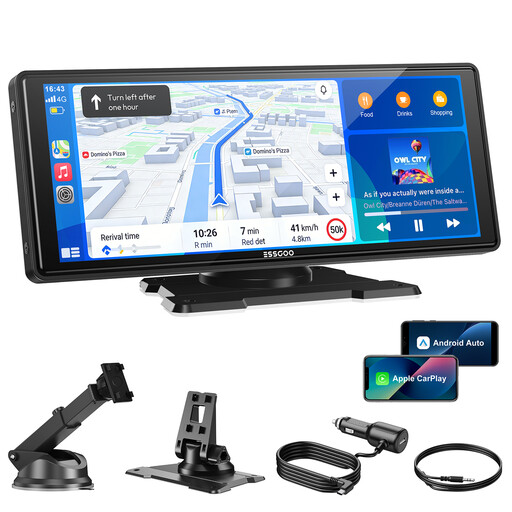
Why It Stands Out This device is a comprehensive solution for anyone looking to retrofit Wireless CarPlay and Android Auto. The large 10-inch car display with an HD resolution of 1600 x 600 pixels provides a clear and crisp view of maps and apps. Thanks to dual-band Wi-Fi and Bluetooth 5.3, the connection to your smartphone is fast and stable. The installation is incredibly simple and requires no tools.
Pros
Who Is It For? For drivers seeking a fully functional and modern infotainment solution that can be installed quickly and used in almost any vehicle (car, SUV, truck). It's ideal for bringing an older car up to the latest technological standards without major effort.
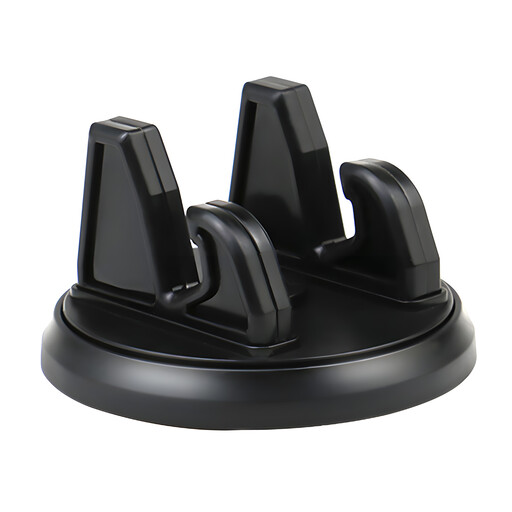
Why It Stands Out This mount is a minimalist and cost-effective alternative. While it doesn't offer its own CarPlay interface, it allows for the secure positioning of your smartphone on the dashboard. This lets you use your phone as an external navigation device for the car without taking your eyes off the road. The 360° rotation ensures an optimal viewing angle.
Pros
Who Is It For? For budget-conscious drivers who primarily need a secure and flexible mount for their smartphone for navigation and can do without a dedicated CarPlay user interface.
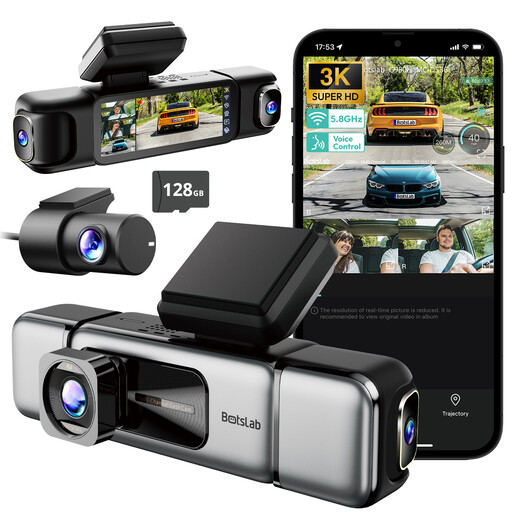
Why It Stands Out This product serves a different purpose than pure infotainment retrofitting but represents a meaningful technological upgrade for any vehicle. With four cameras, the Botslab Dash Cam offers a 560° all-around view and seamlessly records traffic events. It enhances security through documentation and monitoring, especially in parking mode.
Pros
Who Is It For? For vehicle owners whose priority is safety and the seamless recording of trips. It's a great addition for anyone looking to equip their vehicle not only with infotainment but also with modern security systems.
If the products presented here don't exactly match what you're looking for, or if you'd like to discover other practical accessories for your vehicle, you can find a wider selection in our car gadgets category.
Discover more car gadgets and accessories here
Yes, mobile plug-and-play solutions like external CarPlay screens are designed to be universally compatible. Since they are powered via the 12V socket (cigarette lighter), they work with almost any car, SUV, or truck, regardless of make, model, or year. This makes them an ideal solution for CarPlay for any car.
There are several common methods. The simplest is the built-in FM transmitter, which sends the audio signal to a vacant radio frequency. A higher-quality transmission is often achieved via an AUX cable that connects the display directly to the car radio's AUX input. Some devices also support audio transmission via Bluetooth to the vehicle's audio system.
No, the installation is intentionally kept simple. A Plug and Play CarPlay device is typically attached to the dashboard or windshield with a mount. Then, the included power cable is plugged into the cigarette lighter. The entire process usually takes only a few minutes and requires no technical expertise or tools.