
Lieferung heute & morgen

Qualitätsgarantie

Willkommens-Angebote freischalten: KOSTENLOSE Lieferung | Bis zu 80 % RABATT | Kostenlose 30-Tage-JoyPlus-Testphase
App herunterladen
An RGB night light with motion sensor should do more than just bathe a room in colour. For many shoppers, wireless use, USB-C charging, flexible installation and easy operation are key considerations. At the same time, vague product descriptions often lead to disappointing purchases: the light doesn’t respond where you need it, the mounting won’t stay put, or the promised lighting effects aren’t practical for everyday life.
This buying guide highlights what to look for before you purchase, and which model might suit different situations.
The term “motion sensor” alone tells you very little about how it will actually perform. What really matters are the detection range, the detection angle and the trigger conditions you need. A PIR sensor typically picks up changes in heat radiation. It can work well in hallways, cupboards or for finding your way to the bathroom at night, but it won’t necessarily respond to every slow movement.
With an LED night light with motion sensor, you should also check whether the sensor is always active, only triggers in the dark, or can be switched off manually.
An RGB mood light can display different colours and transitions. However, concrete details are far more important than vague terms like “intense” or “immersive”. Look at the number of modes, whether you can adjust the brightness, and if warm white light is available.
The Yeelight Vega is described as having 11 preset lighting effects. That’s a clear product specification, but it doesn’t automatically mean every effect is suitable for a bedroom, a child’s room or gaming. For daily use, simple switching between modes is often more important than a long list of effects.
A rechargeable night light needs regular charging. So check the charging port, battery capacity and how you operate it. USB-C is practical because compatible cables and chargers are common in most homes. However, the actual run time depends on brightness, colour, sensor operation and how often you use it.
With a rechargeable ambient light, you should also know whether the charging cable is included and whether you can use the light while it’s charging. Battery life figures should be treated as manufacturer estimates unless they state standard test conditions.
A magnetic LED light can be quickly removed and repositioned if you have a suitable metal surface. This is handy in the bedroom, living room or gaming area. Before mounting, check:
Adhesive mounts are an alternative, but depending on the surface, they may not come off without leaving marks.
For decorative purposes, RGB can be great. As a night light for the bedroom, you’ll also want a low brightness setting and possibly warm white light. In the living room or as a gaming light, colour changes and preset scenes may be more important.
Look for clear controls – whether by button, touch or app. Some products don’t offer an app connection. If you want to turn the light on quickly, don’t rely solely on smartphone features.
For USB-C and USB lights, details like 5 V input voltage or the charging current are helpful. Only use compatible charging sources and follow the manufacturer’s instructions. For indoor use, the light should be used in its intended environment and protected from water and high humidity.
A CE mark and details of the responsible person in the EU are important product information. However, they don’t replace reading the actual instructions, especially if you’re using the light in a child’s room.
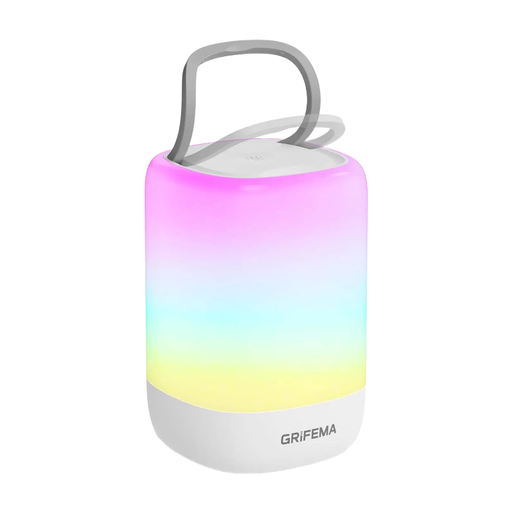
Why this product fits the profile: This compact RGB night light offers touch control, a USB-C port, dimming and a stated 1500 mAh Li-ion battery. It’s suitable for a bedside table, a child’s room or occasional camping.
The product description lists specific controls, seven RGB colours and USB-C charging, rather than just talking vaguely about “mood lighting”.
RGB colours, brightness control, timer function and a portable body with a silicone cover.
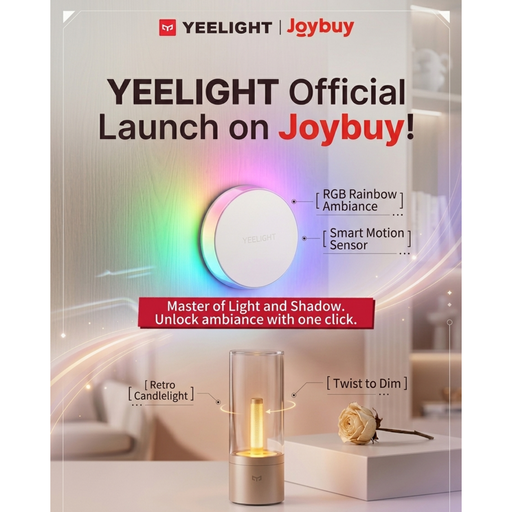
Why this product fits the profile: According to the product description, this model combines RGB functions, motion sensors, magnetic mounting, USB-C charging and 11 preset effects. It’s a good fit for design-led living and gaming spaces.
The key features are clearly stated. However, you should still check how the sensor and effects will work in the room you have in mind.
Magnetic mounting, USB-C charging and 11 preset lighting effects according to the product specifications.
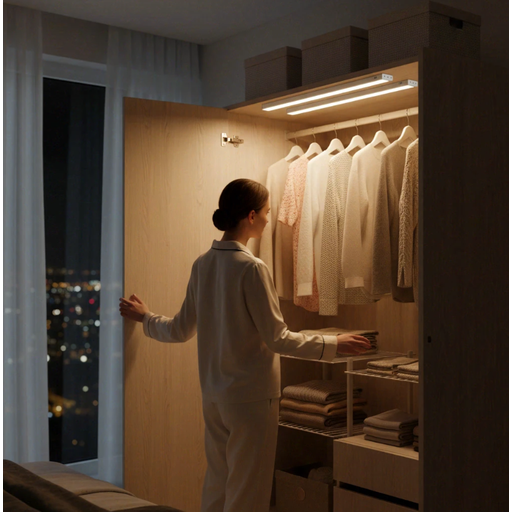
Why this product fits the profile: This set is designed for cupboards, shelves, the kitchen, hallways and indoor areas. Two 30 cm lights with PIR sensors and three colour temperatures cover functional lighting needs.
The stated PIR range of 3 to 5 metres and three colour temperatures make planning easier. The lights are fixed with adhesive tape, so no drilling is needed.
41 LEDs per light, 1100 mAh battery, USB charging and three colour temperatures from warm to cooler white.
Not every situation needs RGB or a motion sensor. For a fixed bedside table, a rechargeable table lamp with touch dimming may be enough. For targeted lighting in a cupboard or on a shelf, slim sensor lights are a good alternative. You’ll find more models in the Battery Lights for Indoors category.
We’ve put together a full, regularly updated list of products that meet these strict selection criteria and comply with EU safety regulations.
First, make sure the surface is clean, dry and free of dust. If you’re using a magnetic mount, check that you have a suitable metal surface. After mounting, make sure the sensor isn’t blocked. Then test the night light from different directions and in the lighting conditions where it will be triggered.
The run time depends on brightness, colour, sensor sensitivity and how often it’s triggered. Higher brightness and frequent motion detection will reduce battery life. Reliable comparisons are only possible if manufacturers state the same test conditions. Charge the battery with a compatible USB source and follow the instructions provided.
While charging, power consumption is generally low, but it depends on the battery capacity and charge level. For a rough idea, you can look at the charging power, charging time and how often you charge it. Compared to a permanently switched-on room light, a sensor-based night light is usually only active for short periods. What matters most is how you actually use it, not just the RGB feature.