
Lieferung heute & morgen

Qualitätsgarantie

Willkommens-Angebote freischalten: KOSTENLOSE Lieferung | Bis zu 80 % RABATT | Kostenlose 30-Tage-JoyPlus-Testphase
App herunterladen
The right lighting can completely transform the atmosphere of a room. Smart LED strips are particularly popular for gaming setups, home cinemas, or as modern indirect lighting. However, the market is flooded with products whose marketing promises often suggest more than the technology can deliver. Many buyers invest in an LED strip only to be disappointed when the expected dynamic colour gradients fail to appear, or when connectivity issues severely limit its usefulness.
This guide, created by your Joybuy Product Recommendation Officer, focuses on the crucial technical features you should check before buying. We'll highlight the most common pitfalls and show you how to make an informed decision that meets your modern lighting design needs.
Before we dive into the technical details, let's look at the three most common problems that lead to frustration and unnecessary expense:
To avoid the mistakes mentioned above, you should focus on three technical specifications. These largely determine the functionality, durability, and visual effect of your lighting.
This is the most important point. The abbreviation RGB stands for Red, Green, and Blue. While a standard RGB strip can mix millions of colours, it can only display one single colour across its entire length at any given time.
RGBIC stands for "RGB + Independent Chip." Each section of the LED strip has its own IC chip. This allows for segment-by-segment control of the LEDs. Only with this technology can multiple colours be displayed simultaneously on a single strip, which is what makes flowing animations, rainbow effects, and dynamic music sync LED possible. For immersive LED lighting for gaming or in a home cinema, RGBIC technology is essential.
A 5m smart LED strip is of little use if the control is cumbersome. Look for a stable connection via Wi-Fi (2.4 GHz) and Bluetooth. A mature LED strip with app control offers not only colour and brightness adjustments but also schedules, predefined scenes, and ideally a DIY mode for creating your own effects.
For a future-proof investment, compatibility with Matter for LED strips is crucial. Matter is a universal smart home standard supported by Apple, Google, Amazon, and other major manufacturers. A Matter-certified device integrates seamlessly into various ecosystems and will continue to work even if you switch your voice assistant or smart home hub provider in the future.
The visual quality of indirect lighting depends heavily on the density of the LEDs. A value of 24 LEDs per metre or more ensures a uniform light pattern without visible gaps. At a lower density, the light points appear isolated, which detracts from the effect.
A transparent protective coating over the LEDs serves two purposes: it protects the sensitive diodes from dust and accidental contact, and it also acts as a diffuser. The light is softened and distributed more evenly, resulting in a more premium appearance.
Based on the criteria above, we have identified products that offer a suitable solution for different users and use cases.
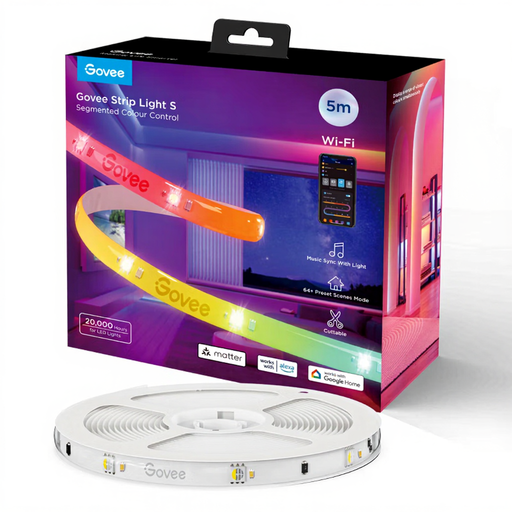
Why This Fits Their Persona: Ideal for users seeking a fully-featured, immersive lighting solution. This Govee LED strip is designed for demanding gaming setups or for integration into an existing, cross-platform smart home.
Features true RGBIC technology for segmented colour control. Its Matter certification ensures universal compatibility, avoiding the connectivity dead-end.
Segmented control for colour gradients; future-proof thanks to Matter; protective coating for durability and better light diffusion.
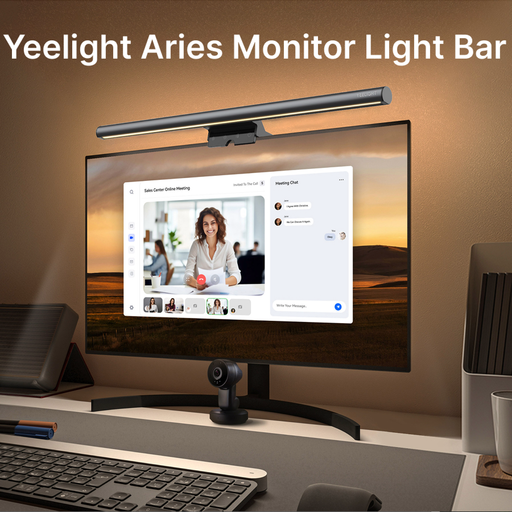
Why This Fits Their Persona: A specialised solution for anyone who spends long hours in front of a screen. It illuminates the workspace without creating glare on the monitor, thereby reducing eye strain.
Solves a specific problem (screen glare) that general-purpose LED strips can cause. The focus is on functional, ergonomic lighting rather than purely decorative effects.
Asymmetrical optical design prevents reflections on the screen; dimmable and adjustable colour temperature to protect the eyes.
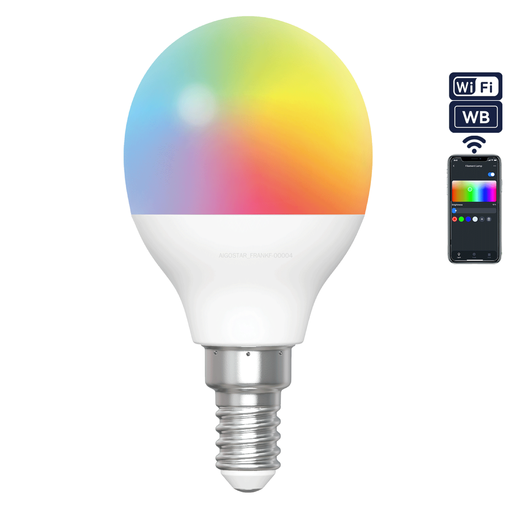
Why This Fits Their Persona: A cost-effective way to dive into the world of smart lighting without committing to the installation of an LED strip. Perfect for experimenting with app control and colour adjustments in existing lamps.
Offers a low-risk entry point. Instead of investing in a potentially inferior LED strip, you can test app controls and the creation of light scenes with a reliable smart bulb.
Easy installation into existing E14 sockets; control via Wi-Fi and Bluetooth; features both RGB colours and adjustable white tones (2700K-6500K).
We have compiled a complete, real-time list of products that fully satisfy these strict selection criteria and UK safety regulations.
The fundamental difference lies in how the LEDs are controlled. On an RGB strip, all LEDs receive the same signal, which is why the entire strip can only light up in a single colour. An RGBIC strip has additional IC chips that allow individual segments of the strip to be controlled independently. This enables multiple colours to be displayed simultaneously, creating dynamic effects like colour gradients or chasing light animations.
Avoid bending the strip at a sharp 90-degree angle, as this can damage the circuitry. The recommended method is to form a gentle curve or a small loop at the corner. Before applying, thoroughly clean the surface with a suitable agent to ensure it is dry and free of dust and grease. This is crucial for the longevity of the adhesive strip.
That depends on your existing smart home setup. Matter devices require a "Matter controller" (also known as a "border router") to communicate on the network. This functionality is often already integrated into newer smart home hubs, such as recent models of Amazon Echo, Google Nest Hub, or Apple TV 4K. If you already own such a device, you generally won't need an additional hub for your Matter-enabled LED strip.