First, check whether you can reach your game and menu keys directly on a 60% layout, and how much desk space will actually be left. For rapid repeated inputs, a model with adjustable actuation and Rapid Trigger may be a good fit. However, this is no guaranteed gaming advantage, and it should not take priority over the layout, key mapping and typing feel you want.
Which keyboard is right for you?
Players short on desk space
If your desk, keyboard and mouse are all competing for the same space, a compact layout can help. Just check that you can reach the keys you need for your game directly on your chosen layout. RTINGS covers compact formats in its keyboard comparisons, while the BAuA recommends leaving enough room for flexible positioning of your mouse and keyboard when working at a computer.
Players who make rapid repeated inputs
If you press the same key repeatedly in quick succession, adjustable actuation and Rapid Trigger may be useful features to consider. RTINGS describes Rapid Trigger as resetting the key as soon as it starts moving upwards again; this does not guarantee an advantage in-game.
Players who need extra key commands
If you often use arrow, navigation or function keys as well as your main game keys, check which of them are directly accessible on your chosen layout. On a compact layout, some commands may require an Fn combination or remapping.
What to look for when buying
60% with Rapid Trigger
A good fit if: desk space is limited and your key mapping works with the keys available directly.
The trade-off: this format typically lacks dedicated arrow, function and navigation keys.
65% or 75%
A good fit if: you want extra keys within easy reach and can spare a little more desk space.
The trade-off: compare the actual case dimensions and key layout. The percentage alone does not tell you how much space a particular model will need.
Compact, conventional mechanical
A good fit if: size, key mapping and typing feel matter more to you than dynamic reset.
The trade-off: a standard mechanical switch does not offer the same dynamic reset as Rapid Trigger. However, according to RTINGS, magnetic switches are not essential for a responsive gaming keyboard.
The percentages show which buying priority matters most to consumers choosing a gaming keyboard for rhythm games on a small desk.
| Criteria |
What to check before buying |
Who considers it especially important |
| Desk space |
Measure the desk width, including room for mouse movement and the cable, and compare it with the dimensions of the specific model. |
When your keyboard and mouse have to fit on a small desk, every bit of space counts. Around 25% of consumers put desk space first. |
| Actuation and repeated inputs |
Check whether the model has Rapid Trigger and adjustable actuation, then try the settings in your own game. |
If you often play fast sequences of keystrokes, you may want to adjust the reset to suit the way you play. Around 25% of consumers prioritise rapid repeated inputs. |
| Keys within easy reach |
Make a note of your game, menu, pause and navigation keys, then check them against the layout. |
If you want to access important commands without an Fn combination, the specific key layout matters. Around 20% of consumers prioritise direct access to keys. |
| Everyday use and connectivity |
Check the language layout and model variant; for wireless models, check the intended gaming mode. |
If you also use the same keyboard for typing, you need a suitable layout and a connection that works for gaming. Around 15% of consumers prioritise this mixed use. |
| Typing feel and hand position |
Leave room for flexible positioning and a wrist rest; assess the feel and sound of the switches on the specific version. |
For longer sessions, hand position and typing feel matter as well as gaming. Around 15% of consumers place particular importance on comfort and noise. |
Common buying mistakes
-
Assuming a 60% layout suits every rhythm game
This format typically lacks dedicated arrow, navigation and function keys. Depending on your game and menu controls, you may need to use extra Fn combinations.
Compare your key mapping with the actual layout before choosing this format.
-
Assuming technical specifications guarantee an advantage in-game
A polling rate or a manufacturer’s latency figure does not, by itself, prove that you will get better results in-game. RTINGS found no difference in release latency that would affect buying decisions for most of the modern Rapid Trigger models it tested.
First check the layout, connection and adjustment options, and whether the keyboard suits your key mapping.
-
Confusing similarly named models and language layouts
Model generations and language variants can differ; a similar product name does not confirm that it is the same version.
Check the full model name, generation, language layout and switch variant against the specific product details.
Key brands at a glance
Wooting
The Wooting 60HE v2 is a compact keyboard with magnetic switches and configurable actuation. Take care not to confuse it with the 60HE+.
- In its 60% comparison, RTINGS highlights the 60HE v2’s low latency and extensive configuration options.
- The 60% format has fewer keys within easy reach; this review does not prove it is better for every rhythm game.
SteelSeries
The Apex Pro Mini Gen 3 is a wired 60% model with a German layout.
- SteelSeries lists Rapid Trigger and an adjustable actuation range of 0.1 to 4.0 mm.
- The Mini layout means checking that you have the direct-access keys you need; the manufacturer’s specifications do not prove better gaming results.
Razer
The Huntsman V3 Pro Mini is a 60% keyboard with analogue optical switches.
- Razer lists Rapid Trigger and an adjustable actuation range of 0.1 to 4.0 mm.
- Check that the specific version has the DE layout you want. Claims about competitive advantages are not independent evidence of an advantage in rhythm games.
Keychron
The K2 HE is a 75% alternative with magnetic switches and an available DE-ISO variant.
- This larger compact format may appeal to players who want extra keys within easy reach.
- It is less focused on saving desk space than a 60% model. Keychron also notes that the magnetic switch version has limited compatibility with other switches. Check the variant and connection.
ASUS ROG
The Falchion Ace HFX is a 65% keyboard with magnetic switches and Rapid Trigger.
- ASUS lists extra controls and two USB-C ports.
- Check whether the specific version is available with the German key layout you want.
Joybuy product selection
This selection features compact gaming keyboards whose product details list magnetic switches and Rapid Trigger. Pay particular attention to the layout, the number of keys within easy reach and the language variant.
 No image available
Redragon M68, 68 keys, US layout
Magnetic switches and Rapid Trigger are listed for rapid repeated inputs; check that the US layout matches the key arrangement you want.
Wired USB-C connection; 8000 Hz polling rate according to the product name.
Joybuy
 No image available
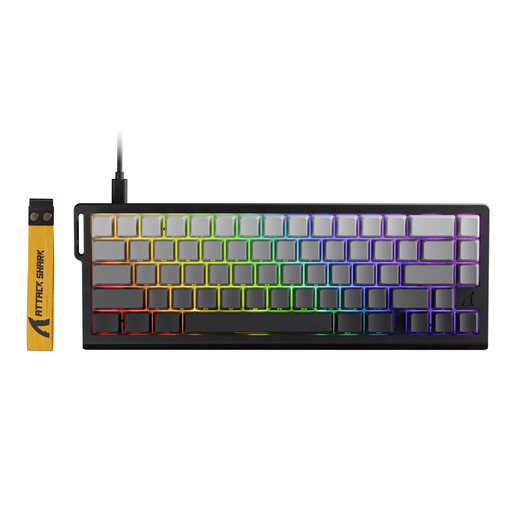
ATTACK SHARK X68 HE
The product details list magnetic switches and Rapid Trigger for frequently repeated keystrokes.
66 keys; the description lists wired USB-C operation and adjustable actuation.
Joybuy
 No image available
AULA WIN60HE, 60%, Black/Graywood Magnetic Switch
The 60% layout saves space, but you’ll need to make sure your game and menu keys are accessible in the arrangement.
Wired; magnetic switches, adjustable actuation and Rapid Trigger mode are listed. 8000 Hz polling rate according to the product name.
Joybuy
 No image available
AULA Hero 68, 60%, US layout, White and Black King Magnetic Switch
A compact option for a small desk; check that the US key layout and lack of direct-access keys suit your key mapping.
Hall effect magnetic switches, Rapid Trigger and adjustable actuation from 0.01 mm are listed. Wired; 8K polling rate according to the product name.
Joybuy
 No image available
AJAZZ AK820 V2, 75%, wired
The 75% layout is described as having arrow, function and navigation keys within easy reach, making it a good option if these keys matter to you.
Hall effect magnetic switches, Rapid Trigger and adjustable actuation are listed. 8K polling rate according to the product name.
Joybuy
Frequently asked questions
Does a keyboard for rhythm games need Rapid Trigger?
No, Rapid Trigger is not essential. It changes how a key resets and may be useful for rapid repeated inputs. According to RTINGS, magnetic switches are not essential for a responsive gaming keyboard. Key mapping and typing feel matter too.
How should I set up my keyboard on a small desk?
Start by deciding which keys you need for your game, then position your keyboard and, if needed, your mouse so there is room for both and for your hands. The BAuA recommends leaving enough space for flexible positioning and support for your hands and arms when working at a computer; this workplace guidance is not a blanket legal requirement for gaming at home.
How do I clean a gaming keyboard?
Disconnect it before cleaning and follow the instructions for your specific model. SteelSeries recommends removing dust and wringing excess moisture from the cloth when cleaning with a damp cloth; do not wipe the switches themselves with a damp cloth.
What return and rights do I have if there’s a problem with an online purchase?
For a typical online purchase from a trader in the EU, you generally have 14 days from receiving the goods to cancel the purchase; exceptions and return costs may apply. If the goods are faulty, you also have statutory rights against the seller, generally for at least two years from receipt in the EU. A voluntary manufacturer’s guarantee does not replace these rights. The European Union’s Your Europe website explains these rules.


