Mouse-click players sharing a room
If you hit beats using your mouse buttons, the sound and feel of the main buttons matter more in a shared room. The osu! wiki describes this play style as playing with the mouse alone.


If you hit beats using your mouse buttons, mice with main switches explicitly described as quiet are a sensible place to start. However, manufacturers’ descriptions are not comparable sound measurements and don’t guarantee a quiet room. If you mainly use the mouse for aiming and tap beats on the keyboard, prioritise shape and precise control, and assess any keyboard noise separately.
If you hit beats using your mouse buttons, the sound and feel of the main buttons matter more in a shared room. The osu! wiki describes this play style as playing with the mouse alone.
If you use the mouse to control the cursor and tap beats on the keyboard, shape and controlled movement become more important. The osu! wiki lists Z and X as the default keys for this play style.
If you want to move the mouse without a cable getting in the way, remember to factor in the receiver and power supply too. Depending on the model, going wireless means charging it or changing the battery.
First, work out whether you click beats with the mouse or mainly use it to control the cursor. Then compare the buttons that matter for your play style, the right shape for you, and the connection and power requirements.
The table matches consumers in this use case with their main buying priority.
| Buying priority | What to check | Who it matters most to |
|---|---|---|
| Noise from input buttons | Check whether the noise description refers to the main buttons; the scroll wheel and side buttons may need checking separately. | If I tap beats in mouse-only mode, I want to make repeated clicks as unobtrusive as possible in a shared room. Around 31% of consumers put the noise from frequently used buttons first. |
| Controlled cursor movement | Compare shape, weight and adjustable sensitivity, and check that the specifications apply to the exact model variant. | If I tap beats on the keyboard and use the mouse to aim, I want to be able to control the cursor precisely. Around 31% of consumers prioritise cursor control. |
| Comfort during repeated movement | Check whether the symmetrical or ergonomic shape suits your hand and grip. | For longer gaming sessions, I want a shape that feels right for my hand and grip. Around 25% of consumers prioritise comfort during repeated movements. |
| Freedom of movement and power | Check the receiver connection, battery or rechargeable battery, and the conditions attached to any quoted battery life. | If a cable restricts my mouse movement, I want to play wirelessly and factor in the extra effort of charging or changing batteries. Around 13% of consumers prioritise freedom of movement and power. |
An optical sensor or gaming specification doesn’t automatically tell you how loud a click will sound in a shared bedroom.
Check whether a noise description specifically refers to the main buttons, and, if possible, try the actual mouse in your usual gaming environment.
CHERRY’s 1,000 Hz specification applies to the M68 Wireless; the manufacturer quotes 8,000 Hz for the M68 Pro Wireless.
Before buying, check the full model name and make sure the technical specifications match the variant you’ve chosen.
be quiet!’s quoted battery life of up to 110 hours applies at 1,000 Hz; the Logitech G305 uses an AA battery.
Check the power supply for the specific mouse and the conditions under which any battery-life figure applies.
The DARK PERK ERGO and SYM are gaming mice with different shapes and main switches that the manufacturer describes as quiet.
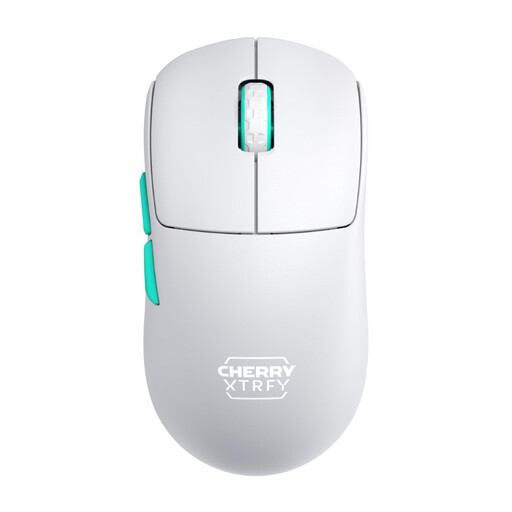
The M68 Wireless is a lightweight, symmetrical wireless gaming mouse for players who use the mouse to control the cursor.
The G305 is a wireless gaming mouse with an AA battery and adjustable sensitivity.
The M100 Silent is a quiet mouse marketed for everyday use. It’s worth considering if minimising click noise matters more to you than dedicated gaming features.
Razer offers gaming mice such as the Basilisk V3 35K.
The selection below includes wired and wireless gaming mice. If click noise is a key concern, check the specific information about the switches rather than assuming that sensor specifications or the gaming label tell you how loud the mouse is.
 No image available
The symmetrical wireless shape may suit frequent cursor movements; check that it fits your grip.
The product name lists a weight of 54 g, a Focus Pro 35K sensor and 8,000 Hz.
According to the product information, using it at 8,000 Hz requires a HyperPolling Wireless Dongle, sold separately.
 No image available
The ergonomic right-handed shape is only a good fit if you’re looking for a mouse designed for the right hand.
The model name specifies an optical sensor with 35,000 DPI, 11 programmable buttons and a USB cable connection.
 No image available
The product description mentions quiet micro-switches, but that alone doesn’t tell you whether they’ll be quiet enough for a shared bedroom.
Connection options include wired, 2.4 GHz wireless and Bluetooth. The title lists up to 12,800 DPI and seven programmable macro buttons.
 No image available
The lightweight, symmetrical shape may suit frequent cursor movements, but it doesn’t demonstrate any advantage in click noise.
CHERRY specifies a weight of 53 g and 1,000 Hz for the M68 Wireless. It also features 2.4 GHz wireless and a rechargeable battery.
 No image available
If you want plenty of programmable inputs, the product title lists 19 buttons for this MMO model.
It features 2.4 GHz wireless and Bluetooth, along with a Focus Pro 30K sensor. The title lists battery life of up to 250 hours.
It depends on how you input the beats. According to the osu! wiki, players using mouse-only mode can tap with the mouse buttons; when playing with a mouse and keyboard, Z and X are the default keys for this input. In that case, assess any keyboard noise separately.
First, check that the input buttons and cursor movements you use in the game work as expected. The osu! wiki describes an option to disable mouse buttons during play if you click using the keyboard.
It depends on the model: the Logitech G305 uses an AA battery, while the DARK PERK has a built-in rechargeable battery. Before buying, check the power supply required by the specific variant and the conditions under which any battery-life figure applies.
For a typical online purchase made by a consumer, the withdrawal period for delivered goods is generally 14 days from receipt, provided the relevant conditions are met. The Baden-Württemberg Consumer Portal distinguishes this right of withdrawal from statutory rights relating to faulty goods; a voluntary guarantee is separate from both. Check the withdrawal information and the terms of your purchase.
No. The German Environment Agency advises against disposing of electrical equipment in household rubbish; it should be collected separately.