For occasional labels, a label maker is a good choice if you regularly want to label ring binders and other items. A keyboard-operated model works without a smartphone, while an app-controlled model lets you enter text on your mobile device. If you only need a few year labels or want fully designed, matching binder spines, pre-printed or printable labels may be a better option.
Which option is right for you?
Year-by-year filing with mixed binder sizes
If your ring binders have spines of different widths, measure the available space and compare it with the tape or label size. HERMA offers pre-printed year labels and binder labels in various sizes; for the P-touch models covered here, Brother lists TZe tapes up to 12 mm wide.
Occasional one-off labelling
If you want to label individual binders as needed and would rather not use a mobile device to enter text, a model with its own keyboard may suit you. Brother describes the PT-H110 as having a QWERTZ keyboard.
A consistent archive layout
If you want several binders to have the same design, consider whether you’d prefer to create short tape labels on a mobile device or make full spine labels using a printer you already own. Brother lists app-based design for the P-touch CUBE, while HERMA and Avery Zweckform offer printable binder labels and compatible templates.
What should you look for when buying?
Handheld model with a keyboard
A good fit if: you want to enter individual years or short messages directly on the device.
Consider: tape width and cartridges must be compatible with the specific model. Brother TZe and DYMO LetraTag are different systems.
App-controlled model
A good fit if: you want to design labels on a mobile device and are happy to use an app.
Consider: you’ll need a compatible mobile device and the required app as part of your workflow.
Labels without buying a new device
A good fit if: you only need to stick on a few year labels or want to create full spine labels using a printer you already own.
Consider: you’ll need a compatible printer to print your own labels; pre-printed numbers can’t replace a binder title written in your own words.
The percentages relate to consumers choosing a year-labelling solution for a home office; each person’s most important buying priority is shown.
| Priority |
What to check before buying |
Who this matters to |
| Fit and readability |
Measure the binder spine and check the tape width or exact label size; if you’re using a label maker, check the print preview too. |
If I want the year and title to fit clearly on the spine I already have, I’ll measure the space first. Around 36% of consumers put fit and readability first. |
| Easy input |
Decide whether you’d prefer a keyboard on the device or a compatible app on a mobile device. |
If I only add a new year occasionally, I want to keep the process as simple as possible. Around 29% of consumers prioritise quick, straightforward operation without unnecessary set-up. |
| Consumables |
Check the cartridge family, supported widths and any starter supplies included; don’t assume refill tapes are compatible across brands. |
If I’ll need to buy compatible tapes later, I want to know which system my device uses. Around 21% of consumers focus mainly on consumables and ongoing costs. |
| Labelling several binders |
Decide whether you need year labels, short tape labels or full spine labels; for printer sheets, check that the size matches the template. |
If I want several binders to have matching labels, a repeatable layout matters to me. Around 14% of consumers put consistent design first. |
If you’re buying an electric label maker for the EU market, also check that the specific product listing carries the CE marking required for its product category. This requirement does not apply to paper labels.
Common pitfalls
-
Assuming a narrow tape is the same as a full binder spine label
According to Brother, the PT-H110 and PT-P300BT models work with TZe tapes up to 12 mm wide. That doesn’t automatically give you a full-size label for a year and a longer title.
Before you buy, decide whether a short year label is enough or whether you want to cover the whole spine.
You may need a separate, suitably sized spine label to create a larger labelling area.
-
Comparing only the device, not everything you need for labelling
For the Brother PT-H110, the data sheet lists a 12 mm × 4 m starter tape; batteries are not included. You’ll need compatible consumables for further printing.
Check what’s included and which refill cartridges are compatible. If you only need a few year labels, compare these with labels that don’t require an additional device.
Refill tapes and, depending on the model and what’s included, batteries or other accessories can mean extra purchases.
-
Assuming cartridges from different systems are interchangeable
The Brother PT-H110 and DYMO LetraTag 100H use different consumable systems.
When ordering refills, check the exact model and cartridge name each time.
Key brands at a glance
Brother
The P-touch PT-H110 and P-touch CUBE PT-P300BT models differ mainly in how you enter text: directly on the device or through an app.
- Brother lists TZe tapes up to 12 mm wide for both models; according to the data sheet, the PT-H110 also supports 3.5, 6 and 9 mm tapes.
- Larger labels may be needed for wide binder spines. Check tape costs and what’s included separately.
DYMO
DYMO describes the LetraTag 100H as a handheld model for labelling individual items, including files and ring binders.
- DYMO lists 12 mm LetraTag cartridges in a range of material finishes.
- The cartridges belong to the LetraTag system. Before buying, check that the size you need will fit the area you want to label.
HERMA
HERMA offers pre-printed year labels and printable binder labels as an alternative to buying an additional label maker.
- HERMA lists binder labels that can be printed using standard laser or inkjet printers.
- Pre-printed year labels don’t let you add a title in your own words; if printing your own, make sure the label size suits the binder spine.
Avery Zweckform
Avery Zweckform offers templates for narrow and wide binder labels if you want to create spine labels using a printer you already own.
- The brand offers labels in various sizes, including permanent and removable options.
- The template must match the specific label size you choose; also check which adhesive type you need.
Label makers at Joybuy
This selection includes app-controlled devices for creating personalised labels in a home office. Before buying any electric device, check that the specific product listing carries the required CE marking.
 No image available
Phomemo M110 label printer
If you need matching labels for several binders, the batch printing feature listed in the product details may be useful. You’ll need the Print Master app on a compatible mobile device to create your designs.
The product title says that a roll of labels is included. Check that the available label size suits your binder spine.
Joybuy
 No image available
Phomemo P15 2-in-1 satin ribbon and label printer
If you want to design binder labels using an app, this device may be worth considering. According to the product details, you’ll need the Print Master app to create designs and connect.
The product title lists Bluetooth, a gift box and a label refill. Check that the label size will cover your binder spine.
Joybuy
 No image available
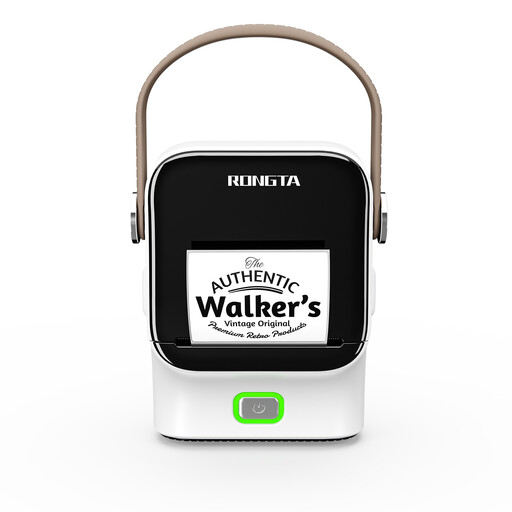
Rongta R22 Bluetooth label printer
For short year labels in a home office, you may find the app-based text entry useful; according to the product details, labels are designed in an app.
The product title lists Bluetooth, NFC detection and a 1500 mAh battery. Check which roll size is right for your binders.
Joybuy
 No image available
Phomemo D30 Bluetooth label printer
If you want to create year labels on a regular basis using a smartphone or tablet, this device may suit your workflow. According to the product details, you connect to the device and create designs using a mobile device.
The product title lists a label refill. Check that the available size is suitable for the binder spine you want to label.
Joybuy
Frequently asked questions
How do I choose between a tape label and a full binder spine label?
Measure the area you want to label first. A suitable tape may be enough for a short year label; for a year and a longer title, look for a label large enough to cover the binder spine. Tape width and spine label size are two different solutions.
What should I check before my first print and when changing the tape?
Only use the cartridge family and width supported by your model. According to Brother, the PT-H110 works with TZe tapes from 3.5 to 12 mm; the data sheet lists a starter tape but no batteries. Check the layout in the preview and load the material according to the instructions for your device.
What are my rights if a new device is faulty?
In Germany, your statutory consumer rights are against the seller and are separate from any voluntary manufacturer’s warranty. The Verbraucherzentrale states that the standard limitation period for typical new movable goods is two years from delivery. If a product is faulty, you should first request that the seller puts it right.
What rules apply to electric label makers and their disposal?
EU consumer information says that electrical and electronic devices must carry the CE marking where required. This is a manufacturer’s declaration, not an independent quality mark. In Germany, an end-of-life electric label maker must not go in household waste. Where possible, remove any batteries and dispose of them separately before handing the device in.


