Modellers with limited desk space
You need room for clay, tools and both hands, and want to film with your smartphone. The key things to consider are the footprint, camera angle and a mount that won’t obscure what you’re doing.


Set your framing first, then choose a mounting option that leaves room for your work and freedom to move. A desk kit can make it easier to set up your phone and light; if the base gets in the way or your hands block the light, consider mounting them separately and positioning the light to one side. Test the light angle and white balance with the clay you’ll actually use, rather than relying on manufacturers’ specifications alone to guarantee accurate colours or glare-free footage.
You need room for clay, tools and both hands, and want to film with your smartphone. The key things to consider are the footprint, camera angle and a mount that won’t obscure what you’re doing.
You want to show each step using clay colours that look true to life, and may be filming in changing room or window light. That’s why you should include the light colour and white balance in your test recording.
You show edges, indentations and surfaces up close. Adjust the direction of the light and check the footage rather than assuming even lighting will make the details easy to see.
At a small modelling table, set your framing first. Then you can decide whether the base, light angle and power supply will work with your setup.
| What matters | What to check before buying | Who is it especially important for? |
|---|---|---|
| Work surface and framing | The space needed for the base, or a suitable, sturdy desk edge for a clamp; and whether your hands can move freely within the frame. | If you want the clay, tools and both hands to stay visible in a confined space, I’d prioritise a clear work area over the convenience of a stand. Around 33% of consumers prioritise space and an overhead view for this reason. |
| True-to-life clay colours | Adjustable light colour on the specific model; and a test recording with the clay you plan to use and your camera’s white balance. | I want to show the clay colours used in a lesson clearly, so I match the light to the white balance. Around 27% of consumers put clay colours first. |
| Edges and surface texture | Whether the light can be tilted or positioned independently; and a short test recording from your intended camera angle. | If learners need to see indentations, edges and modelling marks, I check the light and shadows directly in the video. Around 27% of consumers prioritise shape and surface texture. |
| Power supply and setup | The power connection required, cable routing and what’s included with the specific model; and suitable mounts for your phone or camera. | To make sure the kit is ready to use where I’m filming, I want to check the power source and mounts in advance. Around 13% of consumers focus mainly on the power supply and a complete setup. |
A desk kit positions your phone and light together, but takes up space you may need for clay, tools and your hands. The holder alone won’t tell you whether you’ll get the view you want of your work.
Set your framing at your own table and check whether there’s room for your phone, light and hands at the same time.
If you need to position the camera separately, you may also need a suitable mount.
The direction of the light and the shadows it casts affect how much depth you can see in edges and indentations on video. Even lighting doesn’t guarantee that each step will be clear.
Try the ring light at a different angle or position it to one side, then check how the shape looks in a short recording.
Product pages may list several ring sizes with different power ratings. USB kits also need a suitable power source.
Compare the specifications for the version you’ve chosen, and check the power connection and what’s included before you buy.
Depending on what’s included, you may also need a suitable power source or mount.
For smartphone filming, consider the SpotLight Smart 80 II with its table tripod, or the foldable SpotLight FoldUp 102 II.
The RH8B version of the Bi-Color Desk Ring Light is a compact desktop model for anyone who wants to compare adjustable white light.
According to Rollei, the LUMIS Comfort Bi-Color combines a ring light, smartphone holder and height-adjustable tripod. It may be worth considering if you’re filming yourself teaching.
The selection includes ring lights for smartphone filming: a kit with table and floor tripods, and a model that attaches to your smartphone.
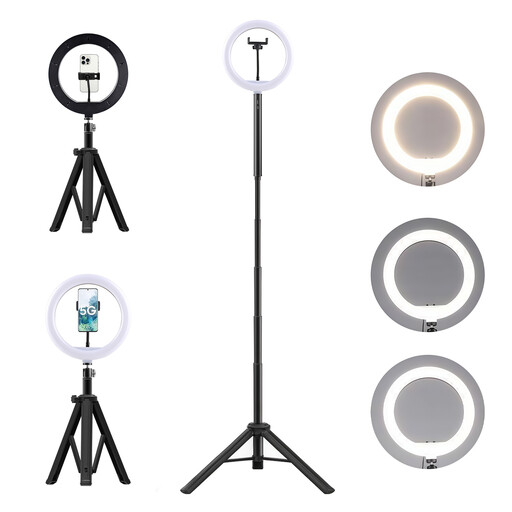 Image unavailable
The kit combines a ring light with a smartphone holder, table tripod and floor tripod.
The description lists three colour temperatures, ten brightness levels and a 360° adjustment head.
The battery information specifies a lithium-ion battery: do not dismantle, crush or pierce it; keep it away from heat, fire, water and children; and use only compatible chargers.
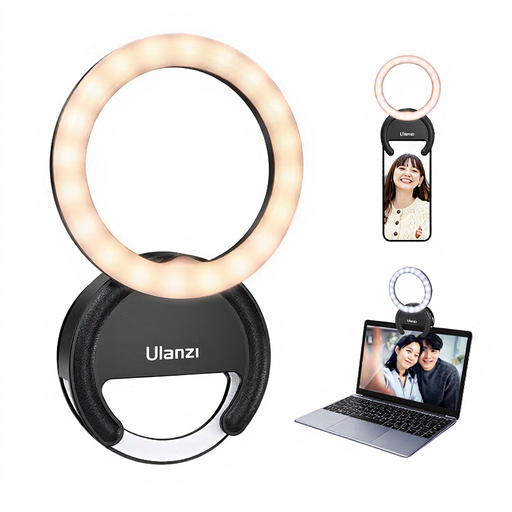 Image unavailable
According to the description, the ring light is designed to attach to a smartphone or laptop.
The product title lists three colour temperatures from 3000 K to 7000 K and five brightness levels.
The warnings advise against looking directly at the LEDs at maximum brightness, exposing the light to water or high humidity, or leaving it switched on unattended for long periods.
No. First frame the clay and your hands, then check which direction the light needs to come from to show the shape clearly. A separate camera mount lets you position the camera independently of the light; just make sure the connections and mount are suitable.
Make a test recording with the light you’ll actually be using and adjust your camera’s white balance. Different light colours can affect how colours appear; the ring light’s Kelvin rating alone won’t guarantee true-to-life footage.
It depends on what’s included and what power source is available where you’re filming. Hama specifies an external USB 5 V/1.8 A power supply for the SpotLight Smart 80 II. Before buying, check whether the version on offer includes everything you need to connect it.
For products that must carry a CE marking under relevant EU regulations, the manufacturer uses it to declare, on its own responsibility, that the product complies. Germany’s Federal Network Agency points out that CE is neither a mark of origin showing that a product was made in Europe nor the result of an independent quality test.
For consumer purchases, the seller is generally responsible for your statutory rights if the product is faulty, not the manufacturer. The Verbraucherzentrale (German consumer advice centre) states that the statutory warranty period is two years; this is separate from any voluntary manufacturer’s guarantee.