For puzzle videos, the first priority is a stable camera position that shows your hands and the whole puzzle. A ring light can work well if a test recording keeps the pieces clear and limits reflections. A kit with a tripod and smartphone holder can make setup easier, but it doesn’t guarantee a safe position directly above the puzzle. If you notice reflections or flickering bands, test the light angle and camera settings with your actual setup; Sony Support describes flickering and banding in video recordings under LED lighting.
Who is a ring light for puzzle videos suitable for?
Overhead videographers
If you film your hands and puzzle pieces from above, you’ll need to position the camera, light and tripod so they don’t obstruct the frame. Hama and Rollei list a tripod and smartphone holder as part of certain kits; you’ll need to check whether the specific setup will stand securely above your puzzle.
Videographers filming glossy puzzles
With glossy pieces, position the light to avoid reflections that obscure the image or the edges of the pieces. An evenly lit, front-facing ring light won’t automatically solve this problem.
Videographers using existing room lighting
If you already have lights on in the room, match the colour and brightness of your lighting to those conditions in the camera image. The best way to check for possible flickering is to record a short test clip using your planned lighting and camera settings.
What should you look for when buying?
Ring light kit with floor tripod
A good fit if: you film with a smartphone, have space beside the table and can check the overhead view with the specific setup.
Consider: A supplied tripod and smartphone holder don’t guarantee a stable position directly above the work surface.
Ring light with a desk clamp
A good fit if: your filming space is set up permanently, the clamp fits the edge of your desk and you want to position the light and camera independently.
Consider: Check the desk edge and camera mount; a clamp alone doesn’t guarantee a suitable overhead position.
Light positioned to the side
A good fit if: a test recording with front lighting shows distracting reflections or makes the edges of the pieces hard to see.
Consider: Changing the angle of the light can move reflections, but may also create shadows from your hands or puzzle pieces. Check the results with your own puzzle.
| Concern |
What to check before buying |
Who is this important to? |
| Clear, stable overhead view |
Check the tripod type, angle and mounting. Test with your recording device attached to make sure the puzzle and your hands remain visible. |
When filming from above, I want the whole puzzle and my hands in shot, without the tripod or holder blocking the view. Around 31% of consumers prioritise a clear, stable overhead view. |
| Reflections and piece edges |
Check the light angle and adjustability. Compare a short recording with the light positioned in front and to the side. |
With glossy pieces, I want to see the image and edges clearly, rather than have distracting reflections in shot. Around 31% of consumers prioritise controlling reflections. |
| Matching colours to room lighting |
Check the light colour options and brightness control on the specific model. Assess the puzzle colours in the camera image with the room lights switched on. |
When filming under existing artificial lighting, I want similar puzzle designs to be easy to tell apart in the video. Around 23% of consumers place most importance on matching the light to the room lighting. |
| Flickering and banding |
Record a test clip using your planned lighting and camera settings. Sony Support describes flickering and banding in video recordings under LED lighting. |
To avoid visible changes in brightness or bands in my footage, I want to test the light and camera together. Around 15% of consumers prioritise recording with as little flicker as possible. |
Which buying and setup mistakes should you avoid?
-
Assuming tripod height guarantees a safe overhead view
A tripod may look tall enough, but that doesn’t mean the camera and light will sit securely above the work surface or keep the whole puzzle in shot.
Before choosing your setup, consider the table, puzzle size, camera position and everything included in the box together.
Depending on the camera position, you may also need a suitable camera mount.
-
Assuming a front-facing ring light will always suit puzzle filming
Testberichte.de describes even, front-facing illumination as a feature of ring lights. However, reflections may still show up on glossy designs, or the edges of the pieces may be hard to see.
Compare different light positions in a test recording, checking for reflections, shadows and clearly defined edges.
-
Assuming similarly named kits are the same model
Testberichte.de’s ranking lists the Hama SpotLight Steady 120; the manufacturer information described here relates to the Hama SpotLight Steady 120 III. The NEEWER name used there also doesn’t identify a complete, clearly specified model.
Check the full model number, mounting and what’s included against the specific product on offer.
Which brands are relevant for ring light setups?
Hama
The SpotLight Steady 120 III is described as a smartphone setup with a floor tripod.
- Hama says the kit includes a smartphone holder and tripod. You can adjust the light intensity across ten levels and the light colour across three.
- The stated maximum tripod height of 215 cm doesn’t guarantee a secure overhead mount. Don’t confuse it with the differently named SpotLight Steady 120.
Rollei
The LUMIS Comfort Bi-Color is described as a smartphone setup with a supplied tripod and a tilting ring.
- According to Rollei, the model offers three light colours, ten brightness levels and a tripod up to 1.6 m.
- The colour selection is limited to the stated settings; the manufacturer’s information doesn’t guarantee a suitable overhead view for every puzzle.
Elgato
The Ring Light is described as a fixed desk setup with a clamp, with the light and camera mount adjusted separately.
- Elgato lists an adjustable range of 2,900–7,000 K, a camera mount with a 1/4-inch thread and a clamp for desk edges up to 6 cm thick.
- The desk edge needs to fit the clamp; an additional suitable mount may be needed for overhead filming.
NEEWER
The European manufacturer’s range includes different ring light sizes and designs, including RL-18 kits and compact desk models.
- You can narrow down the model and kit options by checking the full product name.
- The range overview doesn’t confirm the features of every NEEWER model or identify a set described only as an 18-inch model.
Ring lights for puzzle videos at Joybuy
These Joybuy products are ring lights with different tripod and lighting control features for video recording. Before choosing one, check that it suits your camera position and existing room lighting.
 No image available
Ring light with tripod, 10-inch, remote control
For smartphone filming, if a ring light with a tripod suits your setup.
10 inches; remote control; three light colours; ten brightness levels; tripod: 63 inch.
View at Joybuy
 No image available
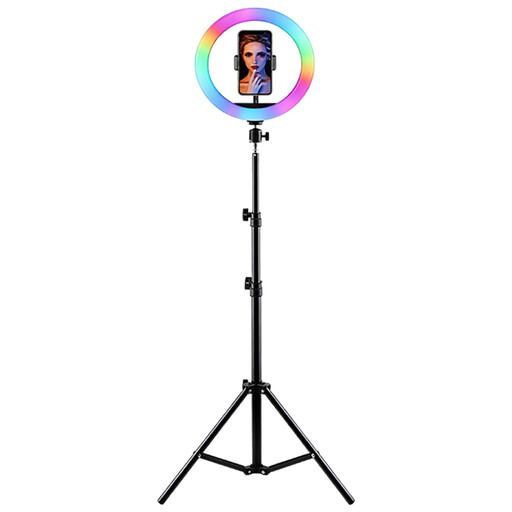
LED ring light with RGB, tripod and smartphone holder
For video recording if you’re looking for a height-adjustable tripod and adjustable lighting.
Height-adjustable tripod; smartphone holder; adjustable brightness and colour temperature; RGB colours.
Place on a stable surface and protect from moisture.
View at Joybuy
 No image available
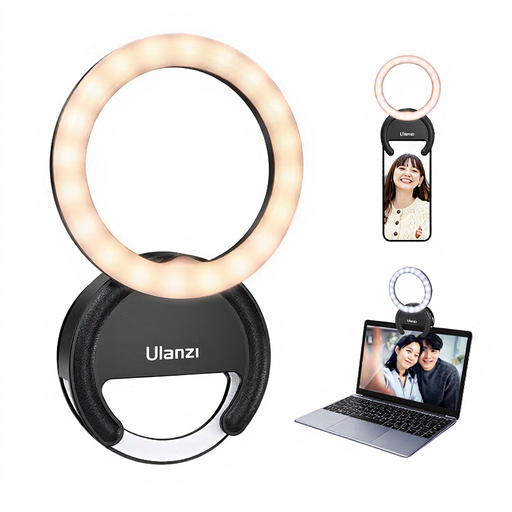
ULANZI Ring Light for Phone 4, 4-inch
For compact smartphone or laptop filming, if a 4-inch ring light suits your setup.
Three colour temperatures between 3000 K and 7000 K; five brightness levels.
Don’t look directly at the LEDs when they’re at maximum brightness. Protect from water and high humidity, and don’t leave switched on unattended for extended periods.
View at Joybuy
Frequently asked questions about ring lights for puzzle videos
Is a phone holder in the ring enough for an overhead puzzle view?
Not necessarily. Check with your smartphone that the whole work area remains visible and that the tripod and your hands don’t obstruct the recording. Details about the holder and tripod describe what’s included, not how stable a particular overhead position will be.
What can I do if bands appear in my video when the ring light is on?
Start by recording a short test clip with all the lights on and your planned camera settings. Sony Support describes flickering and banding in video recordings under LED lighting; check which light source is involved and what flicker-reduction settings your camera model offers.
What are my rights when buying a ring light online?
For a typical online purchase by a consumer in the EU, you generally have a 14-day right to cancel, starting from the day you receive the goods. Under the conditions set out by the European Union, you may have to pay the return postage. If the goods are faulty, you also have legal rights against the seller; goods in the EU are generally covered by a statutory guarantee of at least two years from receipt. This is separate from any additional manufacturer’s guarantee.
Does the CE mark prove that a ring light is suitable for puzzle videos?
No. The Bundesnetzagentur lists CE marking, manufacturer information and declarations of conformity among the things checked during market surveillance. This isn’t an independent test of how the light and reflections will look on your puzzle.


