Filming at a small drawing desk
If you need room for your book, hands and camera at the same time, a stand can take up valuable desk space. A clamp is only an option if your desk edge is suitable.


First, choose a camera position that shows both pages of the book and your hands. Then decide whether there’s room for a stand on your desk or whether a clamp will fit on the edge. An adjustable ring light may be enough for close-up filming; if you’re getting distracting reflections, separately adjustable lighting is another option. Check the result from the actual camera angle, as manufacturer specifications don’t guarantee reflection-free footage or accurate colour reproduction on your paper.
If you need room for your book, hands and camera at the same time, a stand can take up valuable desk space. A clamp is only an option if your desk edge is suitable.
A smartphone holder on its own doesn’t tell you whether you can capture the entire open book from above. Check the angle, position and frame on your own desk.
If you want to assess colours and details in your video, adjust the brightness and colour temperature, then check for reflections on your own pages in a test clip.
A good fit if: You film with your smartphone and have room for the stand next to your open sketchbook.
The trade-off: The light and camera are combined in one set-up, but the stand takes up desk space.
A good fit if: Your desk edge is suitable for a clamp and you want to keep the work surface clear.
The trade-off: NEEWER’s R10 clamp set doesn’t list a smartphone holder, so you’ll need to plan the camera position separately.
A good fit if: A test clip shows distracting reflections and you want to move the light and camera independently.
The trade-off: Changing the light’s position also changes the shadows and illumination, so test the result with your drawings.
| What matters | What to check before buying | Who will find this especially important? |
|---|---|---|
| Clear desk space and an overhead view | Measure the available space and desk edge; check the reach, mounting method and framing with the book open. | If there’s hardly any room beside the book, I need a suitable mount that keeps my hands in view without obstructing the frame. Around 31% of consumers prioritise space and an overhead view. |
| Reflections on paper | Test a matt and a glossy page from the intended camera angle; check whether the light and camera can be positioned separately. | When filming glossy drawings, I want to avoid distracting reflections in the finished video. Around 25% of consumers say reflections are their top concern. |
| Brightness and colour temperature | Compare the listed adjustment options and assess a test clip using your own colours. | If I want colours to remain clear in the video, I need to be able to adjust the lighting to suit the subject and recording. Around 25% of consumers prioritise adjustable lighting. |
| A simple overall set-up | Check what’s included, whether there’s a smartphone holder, how the cable will run and whether you’ll need a USB power supply. | If you want to avoid having to gather lots of separate parts, check the holder and power source as part of the complete set-up. Around 19% of consumers prioritise an easy set-up. |
The mount alone doesn’t tell you whether both pages of the book and your hands will stay in shot.
Sketch out the frame you want on your desk, then check the adjustment range, angle and included accessories before buying.
If the camera can’t be positioned suitably on the ring light, you may need a separate camera mount.
Reflections also depend on the paper’s surface, the position of the light and the camera angle. Ulanzi recommends checking footage for unwanted reflections.
Test both matt and glossy pages in your planned set-up. If reflections are distracting, try positioning the light independently.
NEEWER lists an R10 set with a desk stand and smartphone holder, as well as a separate clamp set with different listed accessories.
Compare the full set name, included accessories and connection details for the specific variant.
If a smartphone holder or suitable power source isn’t included, you may need to add extra accessories to complete your set-up.
NEEWER offers an R10 desk stand set with a smartphone holder, as well as a separate R10 clamp arm set. The two configurations differ in their set-up and listed accessories.
Hama describes the SpotLight Smart 80 II as a set with a ring light, smartphone holder and desk tripod.
According to Rollei, the LUMIS Comfort Bi-Color is a smartphone ring light set with a tripod and a swivelling ring.
Godox’s instructions for the LR120 describe a USB-powered ring light with a smartphone holder.
The selection includes smartphone ring lights with a built-in battery, a desk tripod or a direct device mount. The key is finding an arrangement that gives you the framing you want on your desk.
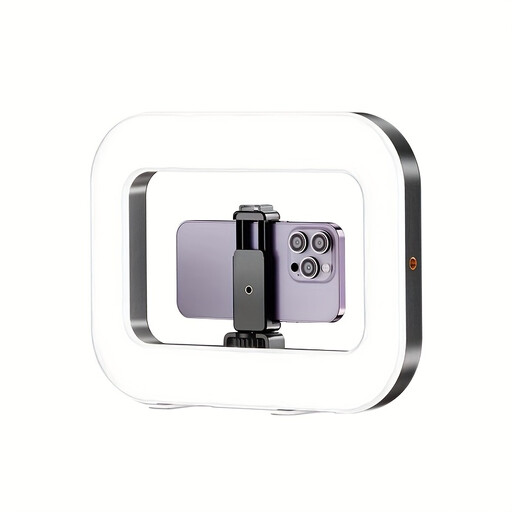 No image available
Could be worth considering for smartphone filming if you’re looking for a compact, wireless set-up.
The description lists three brightness and colour temperature settings, along with horizontal and vertical positioning.
A 1/4-inch thread is listed for attaching the light to a tripod. The description specifies a 5 V/2 A USB charger for charging.
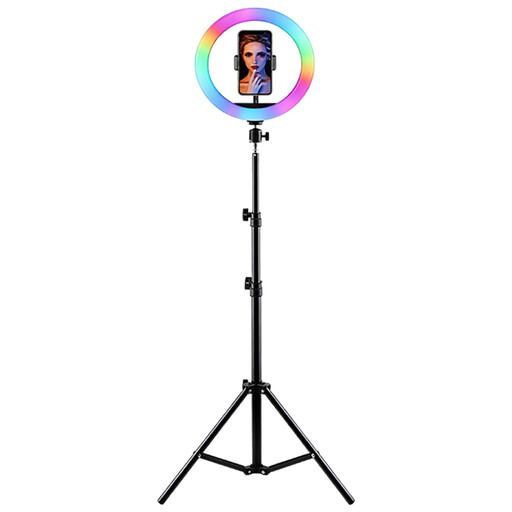 No image available
This set could suit you if you want to place the ring light and smartphone holder together on a stable surface.
The title lists a height-adjustable tripod, a smartphone holder, adjustable brightness and colour temperature, as well as RGB lighting.
The description calls for a stable surface, protection from moisture and a suitable power supply.
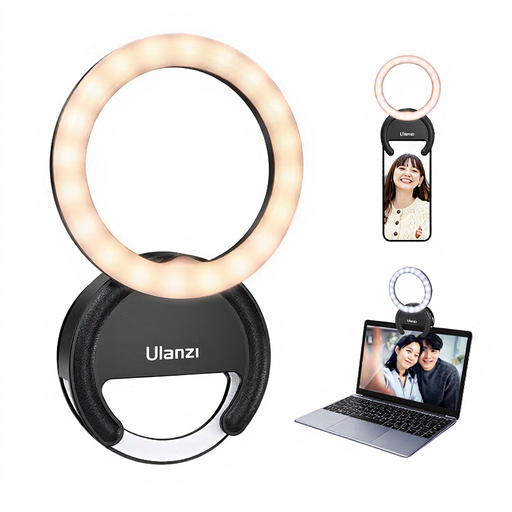 No image available
The listed mount attaches to a smartphone, laptop or tablet for a compact set-up; check whether it gives you the framing you want at your desk.
The title lists three colour temperatures from 3000K to 7000K and five brightness settings.
No. A holder only shows that you can attach a smartphone. Check the angle, camera position and framing with your sketchbook open. If space is tight, a suitable desk clamp for the camera may help.
Check the reflection from the actual camera angle and first try changing the light’s position or angle. Ulanzi recommends checking ring light footage for unwanted reflections; no particular light can guarantee that they won’t occur.
It depends on the specific set. For the Godox LR120, the manufacturer’s instructions specify USB power and an adapter rated above 5 V/2 A. For the variant you choose, compare the included accessories, connection details and smartphone holder position.
No. Statutory rights apply to faulty goods and are claims against the seller; a guarantee is an additional voluntary promise subject to its own terms. The Verbraucherzentrale explicitly distinguishes between these two types of protection.
For a version on sale that requires CE marking, check that it has the necessary CE marking and the required accompanying information and safety instructions in German. The Bundesnetzagentur includes these points in its guidance on checking sellers. Don’t put an old electric ring light in household waste; the Bundesumweltministerium recommends using the designated disposal routes.