
Lieferung heute & morgen

Qualitätsgarantie

Willkommens-Angebote freischalten: KOSTENLOSE Lieferung | Bis zu 80 % RABATT | Kostenlose 30-Tage-JoyPlus-Testphase
App herunterladen
If you’re looking to buy a robot dog, you’ll find models designed for entertainment, research, industrial inspections and as electronic pets. But the differences go beyond design. Camera resolution, navigation, battery life, movement capabilities, safety features and software all help determine whether a device is right for the job.
Terms such as ‘intelligent’, ‘autonomous’ or ‘AI-powered’ don’t automatically describe specific capabilities. Check whether the robot actually offers voice control, follow-me navigation, a camera, obstacle detection or programmable movements. It’s also important to find out whether certain features are only available through an app, a remote control or an internet connection.
An electronic pet with lights and sound effects is designed for simple interaction. A quadruped robot with articulated joints, powerful motors and sensors, on the other hand, needs a suitable operating area. These devices aren’t automatically suitable for children and shouldn’t be used unsupervised around pets or delicate objects.
The stated runtime depends on gait, speed, camera use, surface and usage pattern. Buyers should also check whether a battery, charger, remote control, app access and spare parts are included. With intensive use, charging breaks and the possible need for spare batteries can affect running costs.
Depending on the model, a quadruped robot can move across flat surfaces, uneven terrain, stairs or slopes. For research and inspection, joint mobility, torque, maximum speed and payload are more relevant than tricks alone.
The Unitree Go2 Pro is advertised as reaching speeds of up to 4,7 m/s. The product information provided also lists a speed range of 0 to 3,5 m/s, a payload of around 8 kg and a weight of approximately 15 kg including the battery. Buyers should always check the specific configuration and the relevant user manual.
A robot dog with a camera can transmit images or capture its surroundings for navigation features. According to the product information, the Go2 Pro has a front-facing camera with 1280 × 720 pixels, a wide-angle lens and a 4D LiDAR system. SLAM navigation, map transfer via an app and obstacle avoidance are also listed.
However, sensors are no substitute for supervision. Cables, small objects, edges, glass surfaces or changes in the ground may not be detected reliably. If you plan to use an autonomous robot dog for security or inspection tasks, set up a controlled test area and clear rules for stopping it in advance.
Check the battery capacity, charging time, charger and correct battery installation. The Unitree Go2 Pro is listed with an 8000-mAh battery and a stated runtime of around one to two hours. Actual usage time may vary depending on the load.
With powerful devices, safe distances and dry operating conditions should also factor into your decision. According to the safety information provided, the Unitree AS2 Air must not come into contact with water or high humidity. Moving legs and joints can create pinch points, so keep hands, hair, clothing and pets away while it’s operating.
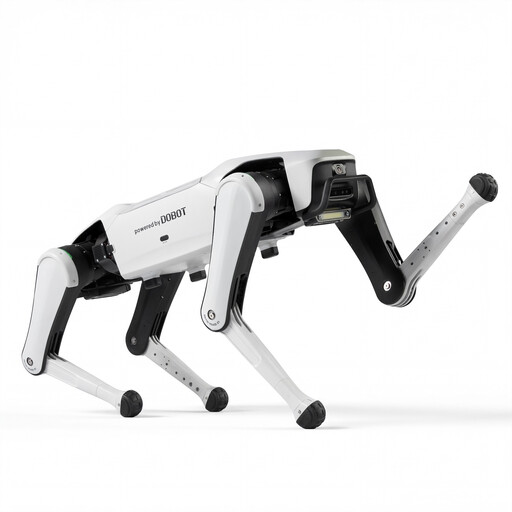
Why this product suits this user type: The Rover X1 is described as a quadruped smart companion with Vision Follow and voice interaction. It’s a good fit if you’d like to explore basic robotics features without starting with an industrial inspection robot.
The product name lists specific features such as Vision Follow and Voice Interaction, rather than relying on vague marketing claims. Even so, check what’s actually included and whether an app is required before buying.
Quadruped design, Vision Follow and voice interaction, according to the product information.
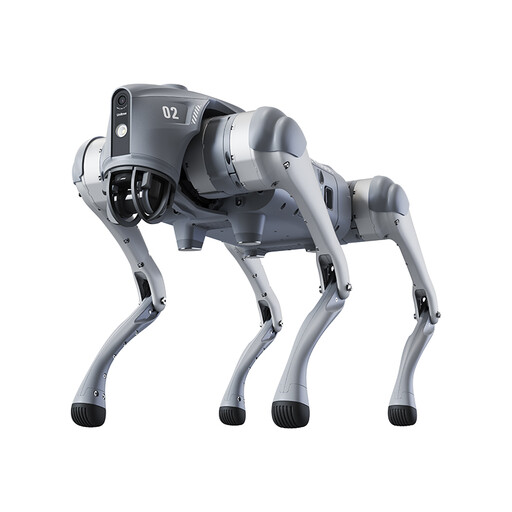
Why this product suits this user type: The Go2 Pro combines a camera, LiDAR, app integration, remote control, voice interaction and several movement modes. It’s a good match for tech enthusiasts who want to make systematic use of robotics features.
The product information specifies details about the sensors, camera, battery and connectivity. It also states that the device isn’t a toy and isn’t intended for anyone under 14.
4D LiDAR, a 1280 × 720-pixel front-facing camera, SLAM navigation and a stated battery life of around one to two hours.
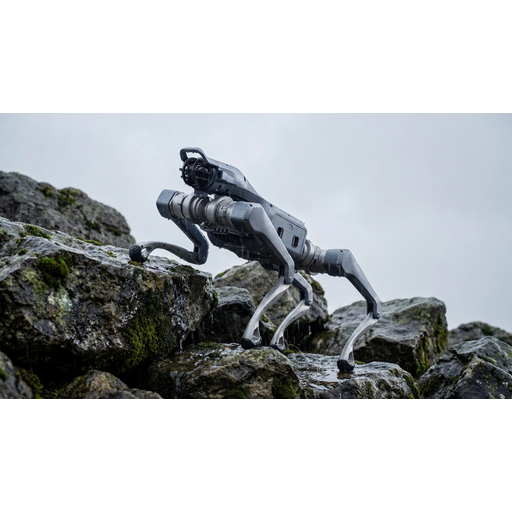
Why this product suits this user type: According to the product information, the Unitree AS2 Air is intended for industrial, scientific and inspection applications. Its high-resolution camera, multi-legged movement and ability to operate on uneven terrain make it a good fit for users with a clearly defined working area.
Its clear focus on industry and research makes it less likely to be mistaken for a family or toy product. Follow the safety guidance on joints, battery, moisture and supervision before use.
Industrial crossed-roller bearings, a high-resolution camera and, according to the product information, around twice the dynamic performance of the Go2.
We’ve put together a complete, regularly updated list of products that meet these strict selection criteria and fully comply with the safety regulations in force in the EU.
First, place the device on a flat, dry surface and fit the battery according to the instructions. Then switch it on, connect it to the app or remote control and, if necessary, update the firmware. Before its first run, set up a clear test area without people, pets or obstacles.
Runtime depends on the model, gait, speed, sensors and surface. The Unitree Go2 Pro is listed as offering around one to two hours. Treat this as a product estimate, not a guaranteed runtime for every use.
Powerful models such as the Unitree Go2 Pro or Unitree AS2 Air aren’t automatically toys. Moving joints, weight and speed can pose risks. For children, only use products specifically designed for them, with appropriate supervision. Always follow the manufacturer’s safety instructions.