For a robotics club with beginner programmers, a robot dog with clear learning resources and a visual programming option is a sensible starting point. Python becomes important when the group wants to develop its own programmes and extensions. ROS, computer vision and navigation projects are better suited to more advanced groups that can set aside time for setup and technical support. In each case, check which programming options and resources are available for the specific model variant.
Which starting point suits your club?
Clubs with beginner programmers
If learners are starting out by exploring movement sequences and programming logic, a visual programming option, clear tasks and a manageable setup time are important. Petoi and ELECFREAKS document visual programming options for the learning platforms mentioned; the resources should suit your group and the specific model variant.
Maker teams aiming to use Python
If you want to move on from initial exercises to developing your own programmes, control sequences or extensions, you’ll need documented interfaces and a suitable development environment. Petoi describes Python options for its learning platforms, while ELECFREAKS lists Python for the XGO Robot Kit V2.
Advanced robotics projects
For longer-term projects involving simulation, image processing or navigation, consider platforms with relevant documentation. Hiwonder’s PuppyPi resources cover ROS, Gazebo, LiDAR and SLAM, among other topics. These learning goals require time for setup and technical support.
What should you look for when buying?
Start by deciding what you want the club to programme. Then check the learning resources, the interfaces you’ll need and the setup requirements for the computers you have available.
Visual programming
Best for: Groups learning to create programmes and movements before they have any Python experience.
Limit: Visual programming alone doesn’t tell you whether open interfaces or future ROS projects will be supported.
Python and maker projects
Best for: Teams looking to make their own control logic and extensions part of the learning experience.
What to consider: The development environment and connections must work with your school’s IT setup and be properly supported.
ROS and navigation
Best for: Supported projects that explore simulation, perception or autonomous navigation in a structured way.
What to consider: Your computers, network and technical experience need to match the project.
| Criteria |
What to check before buying |
Who should pay particular attention |
| Getting started and learning resources |
Does the exact model variant support visual programming, and are there activities to suit the time available for your club? |
If new members need to understand how programmes work first, I don’t want to spend most of our sessions setting everything up. For around 33% of consumers, a guided introduction is the main priority. |
| Python and extensions |
Are the Python environment, interfaces and examples documented for the specific model? |
After our first movement exercises, our team wants to write its own code and add new features later. Around 25% of consumers put this programming route first. |
| Sensors and project goals |
Which sensors and feedback features are included with this variant, and is there documentation for the project you have in mind? |
For our project on grasping, perception or navigation, the hardware needs to suit the task. For around 25% of consumers, this project goal takes priority. |
| Setup and operation |
Does the model need assembling, and will the required tools run on the computers you have available? |
Our sessions are short, so I need a setup that the support team can prepare reliably. Around 17% of consumers give this consideration the greatest weight. |
Common misconceptions
-
Assuming app control means you can programme freely
An app, voice control or remote control can make it easier to get started. But that doesn’t tell you whether learners can write their own Python code or develop sensor logic.
For the variant on offer, check that it supports your preferred programming environment, has interface documentation and includes suitable example projects.
-
Assuming ROS features make for an easy introduction to robotics
Alongside movement, Hiwonder’s PuppyPi documentation covers simulation and navigation. Projects like these need to include setup and support as part of the learning plan.
Before choosing a model, establish which computers, network access, prior knowledge and project time you actually have available.
-
Leaving assembly and school IT checks until after ordering
Building a kit can be part of the learning experience, but it takes up time that would otherwise be available for programming activities.
Decide in advance whether the group will assemble it, and establish who will look after calibration and the development environment.
Petoi estimates that the Bittle-X Construction Package takes 40 to 90 minutes to assemble and configure. This estimate doesn’t automatically apply to other variants.
-
Assuming what’s included and what support is available locally
A power supply, spare parts and a way to arrange repairs can be just as important for running a robotics club as the programming features.
For your country and the specific variant, check with the retailer what’s included and how to get spare parts and support.
Key brands to consider
The model ranges mentioned here support different learning goals. The brand alone doesn’t tell you what’s included with the variant on offer.
Petoi
According to Petoi, Bittle X offers a compact introduction that can take you from Coding Blocks to more advanced programming options.
- Petoi documents Coding Blocks, Python and other development environments.
- Features and assembly requirements depend on the variant; the manuals referenced are mostly in English.
ELECFREAKS
According to ELECFREAKS, the micro:bit-compatible XGO Robot Kit V2 combines visual programming with Python.
- For the XGO Robot Kit V2, ELECFREAKS lists 15 degrees of freedom, an arm and gripper, plus posture and joint feedback.
- Check whether the micro:bit, required sensors and spare parts are included or available with the variant on offer.
Hiwonder
PuppyPi’s documented learning resources are aimed at more advanced robotics projects.
- PuppyPi documentation covers movement, Gazebo simulation, image processing, LiDAR, SLAM and navigation.
- ROS, Docker and networking add to the setup and support required for a robotics club.
Unitree
According to Unitree, the Go2 range includes several configurations, including EDU, to suit different project requirements.
- Unitree lists 4D LiDAR and obstacle detection for the Go2 range.
- Unitree says you’ll need to enquire directly for details of the EDU configuration. Check the development access and what’s included for the variant you choose.
XiaoR GEEK
According to XiaoR GEEK, the XR robot dog is an ESP32-based kit for maker projects.
- XiaoR GEEK lists 12 degrees of freedom, an aluminium body and a camera for this model.
- Check that the learning resources, development tools and support suit the project you have in mind.
Joybuy products to consider
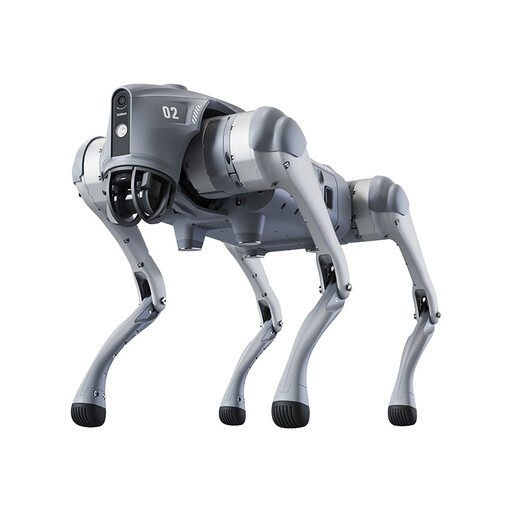
The Go2 Pro featured here could suit clubs looking to explore visual app-based programming. If you’re planning your own advanced projects using interfaces, be aware of this variant’s limitations.
 No image available
Unitree Go2 Pro robot dog
This variant could work for guided activities using visual app-based programming, as long as the app is compatible with your club’s devices.
The product description lists LiDAR, a front camera and obstacle avoidance, but excludes Secondary Development. So don’t plan to use this model for your own advanced projects involving interfaces or Python.
Before buying, check the learning resources, app requirements and the runtime and speed details that apply to this variant. The product description states that the device is not a toy and is not suitable for anyone under 14.
View at Joybuy
Frequently asked questions
Should a robotics club start with Blocks or go straight to Python?
For a group with little programming experience, visual programming is a sensible place to start if the focus is on understanding sequences and movements. If the club plans to write its own code later, also check the Python options for the exact variant. ELECFREAKS lists both for the XGO Robot Kit V2, while Petoi documents Coding Blocks and Python for its learning platforms.
Are app or remote controls enough for programming projects?
No. Controls don’t replace a documented environment for writing your own programmes. Check separately which Coding Blocks, Python or interface features are available on the specific robot for your project.
How long does it take to assemble a robot dog kit?
It depends on the model and variant. Petoi estimates that the Bittle-X Construction Package takes 40 to 90 minutes to assemble and configure; you can’t assume the same time applies to other kits.
What should the club check before setting up and using the robot?
Establish who will look after charging, calibration and the programming environment, and check which computers and network access are available. If your project uses ROS, include the required Linux, Docker and networking knowledge in your plans.


