Who are the different approaches suitable for?

Teachers without a class set of devices

If you want to discuss commands, algorithms and errors in groups, you can use paper-based teaching resources without providing a robot or device for each group. RAABE describes a Hubi lesson unit with a picture card and worksheets for this purpose.

Teachers introducing children to robotics

If children are to test prepared sequences of commands on a real dog, simple controls and guided activities are important. Learning Resources describes direction buttons and cards for Ranger, which can be used for these first sequences.

Leaders of a robotics club

For ongoing projects involving block programming and more advanced tasks, teachers leading the club should be able to support computer connections and set-up. Petoi provides documentation on Coding Blocks and a curriculum for Bittle X.

What should you consider when choosing?

Offline resources with a robot dog theme

Suitable if: You want to introduce commands and algorithms in Years 3 or 4 without buying robots.

Worth bearing in mind: The activities don’t make a real dog move; check the terms for accessing the resources to make sure they suit your intended use.

Dog with buttons and direction cards

Suitable if: Children are to try out planned direction commands directly on a robot dog.

Worth bearing in mind: According to Learning Resources, Ranger is programmable but Zip isn’t; the materials will need adapting for a German-language class.

Quadruped with block programming

Suitable if: A supervised club wants to go beyond simple sequences of commands and programme movements and loops.

Worth bearing in mind: Petoi recommends Bittle for ages 10 and up; different assembly options and English-language curriculum content require extra planning.

Dog with stored sequences of movements

Suitable if: The group wants to compare direct control with repeated sequences of movements.

Worth bearing in mind: Lexibook describes Power Puppy as offering programmable movements and instructions; check the specific model to see which commands are available.

Consideration What to check before buying Who it matters most to
Teaching without extra devices Year group, sequence of activities, copies for groups and the terms for accessing the resources. If I want several groups to plan commands on paper without providing devices, this approach is my priority. For around 33% of consumers, teaching without additional devices is their main concern.
Testing commands on a real dog Input method, number of programmable dogs and how comprehensive the activity resources are. If children are to try their planned direction commands straight away, the robot’s movement matters to me. Around 27% of consumers prioritise trying their first commands on a real dog.
More advanced programming Exact model variant, computer required, connection method, curriculum language and age guidance. If a robotics club is to work on loops and more advanced movement programmes, I need suitable programming activities and time to supervise. Around 20% of consumers prioritise more in-depth visual programming.
Organising repeated use Number of devices needed for each group plan, batteries or charging accessories, and small parts and storage for the specific variant. If the same activity station needs to be ready for several lessons, the ongoing organisational effort matters to me too. Around 20% of consumers prioritise reliable repeat use.

Which selection mistakes should you avoid?

  • Assuming a robot is included with the teaching resources

    RAABE describes Hubi as a picture card and character in an offline coding unit. The story setting doesn’t mean a robot dog is included with the resources.

    Decide in advance whether children should work through commands on paper or run them on a device, then choose your resources accordingly.

    If movement is part of the learning objective, you may also need a suitable robot model.

  • Assuming two dogs in a set mean two coding stations

    In the Coding Critters Ranger & Zip set, Learning Resources says Ranger is programmable but Zip isn’t. The number of figures therefore doesn’t automatically match the number of coding stations available.

    Plan your groups around the number of devices that can actually be programmed, and check whether the stations can be used in turn.

    You may need another programmable device for groups working in parallel.

  • Assuming remote control is the same as block programming

    Lexibook describes Power Puppy as offering movements and instructions; Petoi documents Coding Blocks and activities involving loops. These features don’t automatically offer the same kind of programming.

    Ask for a demonstration of the specific model to see which commands can be entered and which teaching activities are suitable.

  • Treating a kit as a ready-to-use device

    Petoi distinguishes between Bittle X variants and says the kit version needs additional assembly. Learning Resources says batteries aren’t included with the Ranger set.

    Check the full details of the variant and schedule a test run before your first group lesson.

    Assembly and supervision take time to prepare; you’ll need to arrange batteries separately for Ranger.

Relevant brands at a glance

RAABE

Teaching resources for Years 3 and 4 featuring Hubi, a robot dog character; no robot hardware is described.

  • The supplier’s description mentions a picture card, algorithms and a lesson unit lasting around eight hours.
  • Check which activities and copying options suit your class and the terms for accessing the resources.

Learning Resources

Coding Critters Ranger & Zip combines a programmable dog with play materials and direction cards.

  • According to the manufacturer, Ranger responds to direction commands entered using buttons and is designed for guided sequences of commands.
  • The manufacturer says Zip isn’t programmable, batteries aren’t included and there’s no confirmed German-language teaching version.

Petoi

The Bittle X family is designed for supervised robotics projects using block programming; consider each variant separately.

  • Petoi documents Coding Blocks and a curriculum with more advanced activities, including loops.
  • The manufacturer considers Bittle most suitable for users aged 10 and over; younger children should be supervised during assembly. Kit and pre-assembled variants involve different levels of preparation.

Lexibook

Power Puppy DOG01BK is described as a remote-controlled dog with programmable movements and instructions.

  • The manufacturer’s description mentions a training function for programming movements and instructions.
  • Check the specific model to see which commands can be stored and whether suitable teaching activities are available.

Robot dog models at Joybuy

The following Joybuy models are described as AI or companion robot dogs. If you’re choosing one for programming lessons, check that the specific variant supports programmable sequences of commands and provides the age and safety information your class needs.
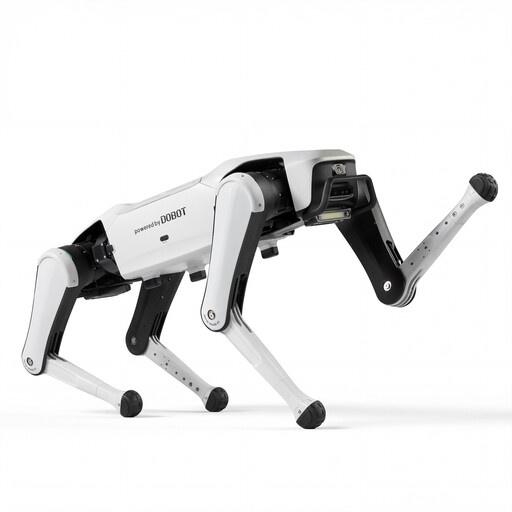
DOBOT Rover X1 AI robot dog

DOBOT Rover X1 AI Robot Dog

This model is only worth considering for lessons involving programmable sequences of commands if it meets the needs of your class.

The product title mentions Vision Follow and Voice Interaction.

Before using it, check the programming options and the age and safety information for the specific variant.

View at Joybuy
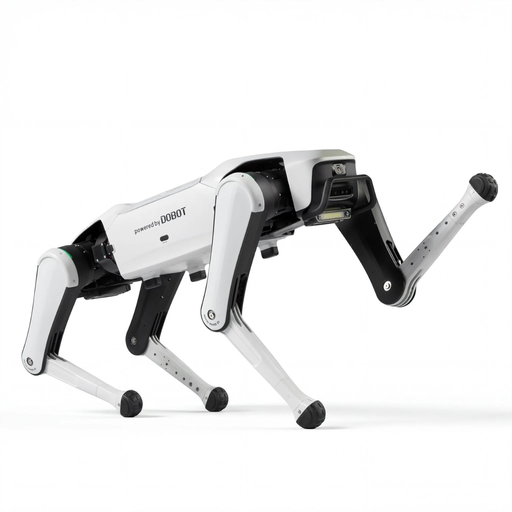
DOBOT Rover X1 Pro AI robot dog

DOBOT Rover X1 Pro AI Robot Dog

For programming lessons, the features should suit the planned activity and the technical set-up available in the classroom.

The product title mentions Vision Follow, UWB Follow and Voice Interaction.

Before using it, check the programming options and the age and safety information for the specific variant.

View at Joybuy
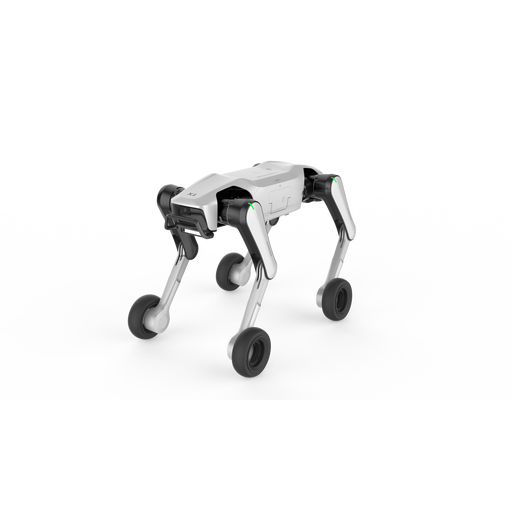
DOBOT Rover X1-W Pro AI robot dog

DOBOT Rover X1-W Pro AI Robot Dog

Whether the model is suitable for a lesson depends on whether its programming options match the learning objective.

The product title mentions a Wheel-Leg Dual Mode, as well as UWB Follow, Vision Follow and Voice Interaction.

Before using it, check the programming options and the age and safety information for the specific variant.

View at Joybuy
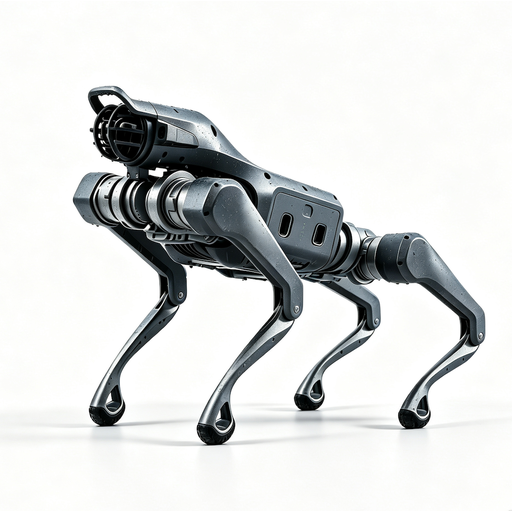
Unitree As2 Pro quadruped robot dog

Unitree As2 Pro quadruped robot dog

For programming lessons, the specific variant should support the required sequences of commands and meet the needs of the class.

The product title mentions Voice Interaction, Follow and Obstacle Avoidance.

Before using it, check the programming options and the age and safety information for the specific variant.

View at Joybuy

Frequently asked questions

Do I need a real robot dog for the Hubi resources?

No, not for the lesson unit described by RAABE: Hubi is a character in an offline coding story, with a picture card and activities for Years 3 and 4. The resources described don’t include a robot dog.

How do I prepare a Bittle X for a supervised programming lesson?

Petoi documents Coding Blocks for Bittle X V2 and connection via a USB-C data cable or Bluetooth. Before the lesson, check the exact model and board variant, the school computer, software permissions and charge level; according to the manufacturer, a kit also requires extra assembly.

What should I plan for repeated use?

Learning Resources says batteries aren’t included with the Ranger set; you should also make sure all the cards and parts are kept together for future lessons. Bittle X variants differ, as does the preparation they require, so check the specific version before planning.

Can a school use a robot dog with a microphone or app?

According to the Federal Network Agency, voice control alone isn’t grounds for a ban. For toys capable of transmitting data, relevant scenarios include recordings being made without people’s knowledge and then used or shared, as well as the possibility of secretly recording third parties. If pupil data is processed through an online learning platform, you should also check the data protection requirements for the specific use in school.

Which toy safety rules apply when buying in Germany?

For products legally classified as toys, the European Commission refers to Toy Safety Directive 2009/48/EC; the European Union lists toys as a product group that must carry the CE marking. Regulation (EU) 2025/2509 will not replace the Directive until 1 August 2030. Check the specific product listing to confirm whether a particular robot variant and its labelling meet the applicable requirements.