
Lieferung heute & morgen

Qualitätsgarantie

Willkommens-Angebote freischalten: KOSTENLOSE Lieferung | Bis zu 80 % RABATT | Kostenlose 30-Tage-JoyPlus-Testphase
App herunterladen
A robot vacuum and mop can pick up dust, crumbs and hair around your home, then mop hard floors. However, models vary considerably in their navigation, maintenance requirements and ability to handle carpets. A high Pa rating alone won’t tell you whether a model is right for your home.
The figure in pascals, or Pa, describes the maximum suction pressure under specific conditions. It’s not, on its own, a reliable measure of cleaning performance. These factors matter too:
A powerful robot vacuum also needs an effective cleaning route. If it wanders aimlessly or misses edges, its high suction power may not deliver much practical benefit.
A basic mop attachment spreads water over a cloth. This can tackle a light film of dust, but it won’t necessarily replace a thorough manual clean. Check the type of mopping system, how the water flow is controlled and whether the automatic mop lifts when it reaches carpets.
Rotating mops and systems that continuously clean the mop pad are more complex designs for dealing with heavier dirt. Even so, check for spilled liquids, sticky residue and larger debris before starting a clean. Many robots aren’t designed to vacuum up large amounts of liquid.
A robot vacuum with an auto-empty station can empty its dustbin automatically. Depending on the model, the station may also wash and dry the mops or refill the water tank. You’ll still need to check and replace consumables such as dust bags, filters, brushes and mop pads.
Before buying, check how much space the station needs. It should be placed on a level surface, with enough clearance in front and in a dry spot near a suitable power socket.
If you have pets, a robot vacuum for pet hair should have not only suitable suction power but also a main brush that’s easy to access and clean. Anti-tangle systems can reduce maintenance, but you’ll still need to check the brush from time to time.
For a robot vacuum for carpets and hard floors, automatic carpet detection and adjustable suction power are also useful. The robot should lift its mop on carpets or let you mark carpeted areas as no-go zones in the app.
A robot vacuum with laser navigation uses a LiDAR system to map rooms. This helps it follow a more systematic route, clean rooms individually and respect virtual walls or no-go zones. Cameras, infrared sensors and structured-light systems can also help it detect obstacles.
Keep in mind that even good sensors won’t always reliably detect very small objects, cables or liquids. Before starting a clean, pick up loose cables, toys, sharp objects and delicate ornaments.
An app should let you do more than simply start and stop the robot. Useful features include:
The stated battery life is usually a laboratory or manufacturer figure, and will depend on the suction setting, the amount of carpet and the navigation system. For larger homes, automatic recharging followed by resuming the clean is a useful feature.
The models below vary in suction power, station, navigation and mopping technology. Specifications are based on the product information provided.
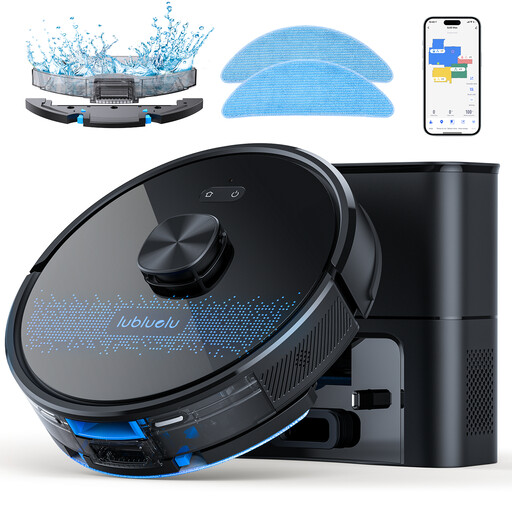
Why this product suits this profile: This model combines vacuuming, mopping, laser navigation and app control with a station that empties the dustbin automatically. Its stated suction power is 4,000 Pa.
Laser mapping helps prevent aimless driving, while the auto-empty station means you don’t have to empty the robot’s small dustbin every day.
Laser navigation, app control and automatic dust emptying in one compact solution.
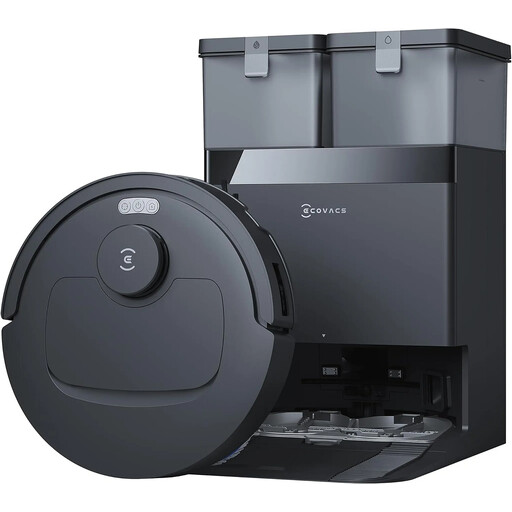
Why this product suits this profile: According to the product information, this robot vacuum and mop offers up to 25,000 Pa, ZeroTangle 3.0, TrueMapping 2.0 and an OMNI station with automatic emptying and mop cleaning.
The specifications explicitly list carpet detection, mop lifting and anti-tangle technology.
Automatic dust emptying, mop washing and hot-air drying, plus app and voice control.
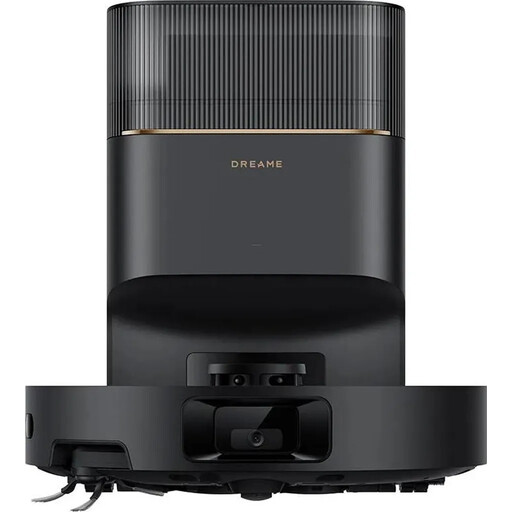
Why this product suits this profile: The robot combines 13,000 Pa, a 5-litre dust station, LDS and 3D navigation, and a stated runtime of up to 260 minutes in vacuum mode.
The large station means less frequent emptying, while the Detangling DuoBrush is designed to reduce hair tangles.
A 5-litre dust bag, app control and a stated coverage of up to 250 m² per charge.
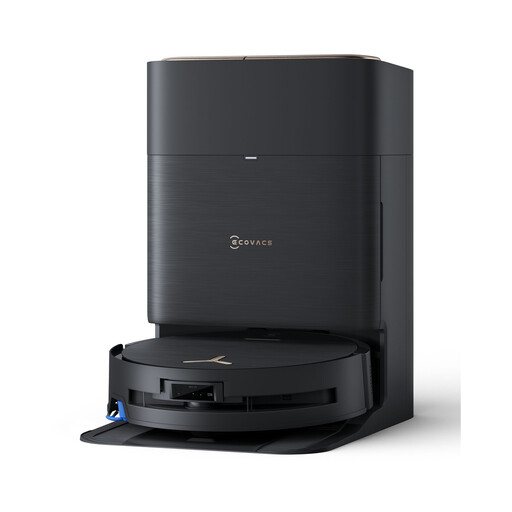
Why this product suits this profile: The product information lists an OZMO roller with continuous self-cleaning, 16,600 Pa and an OMNI station that washes and dries the mop and empties the dustbin.
The mop is cleaned with fresh water while the robot is running, helping to prevent it from spreading dirt it has already picked up.
Roller mop with continuous cleaning, ZeroTangle 3.0 and AIVI 3D obstacle detection.
We’ve put together a complete, regularly updated list of products that meet these strict selection criteria and the safety regulations in force in the EU.
Place the charging station on a level, dry floor, leaving enough space at the sides and in front. Connect the robot to the relevant app and start an initial mapping run. Pick up cables, small items and delicate objects from the floor. You can then set rooms, cleaning times, carpet zones and no-go areas.
Its lifespan depends on the battery, brushes, filters, mop pads and how well you maintain the sensors. Clean the main and side brushes regularly, keep the charging contacts dry and replace worn parts as recommended by the manufacturer. A battery gradually loses capacity over charging cycles, so it’s not possible to give a general figure for its lifespan.
As well as electricity, you’ll need to budget for dust bags, filters, side brushes, main brushes and mop pads. Stations with water tanks also need to be refilled and emptied regularly. Before buying, check whether original or compatible replacement parts are available and how often the manufacturer recommends replacing them.