Who is this set-up right for?

People who work and live across two floors

If you want the cleaning done while you’re at work, you’ll need to decide whether to carry the robot between floors yourself or have a separate device for each one. eufy Support says you need to intervene manually when moving between floors.

Homes with an open stair landing

Here, the priorities are cliff detection, sensor maintenance and a supervised test run on the floor in question. iRobot lists cliff detection for the Roomba j7; ECOVACS explains how to clean dusty cliff sensors if a relevant DEEBOT error message appears.

Households with little time for appliance maintenance

An auto-empty or mopping station can take care of some tasks, but it needs space and is tied to the floor it’s on. eufy Support and Dreame Germany describe station features for specific models; also check what the robot can do without its station.

What should you look for when buying?

Move one device between floors

A good fit if: You can clean the floors one after another and are happy to carry the robot yourself before starting it.

The trade-off: Moving between floors is still a manual task, and functions that rely on a station may be limited.

One device per floor

A good fit if: You want separate living areas cleaned during the same period without having to move a robot manually.

The trade-off: More devices mean more space and maintenance.

Automatically clean only the most important floor

A good fit if: You want one floor cleaned regularly while you’re out, and can start the other floor manually from time to time.

The trade-off: The second floor won’t be cleaned automatically.

Priority What to check before buying Who is it important to?
Cliff protection Check the cliff sensors and the manual for the specific model. Test the robot on the floor in question before setting an unattended schedule. If there’s an open stair landing nearby, I don’t want to leave sensor performance and a test run to chance. Around 36% of consumers put cliff protection first.
Moving between floors Check how many maps can be saved, how to set up additional floors and what happens after a clean without the station. If you want both floors cleaned, you’ll also need to plan when to move the robot. Around 29% of consumers prioritise floor-by-floor organisation.
Scheduled start Check the scheduling function, where the station will go and what the robot can do without it. If I want a clean to start while I’m at work, I need to know whether the robot can reach the area I have in mind without any intervention. Around 21% of consumers prioritise an unattended schedule.
Maintenance Check the station’s dimensions, access to its containers and the effort involved in replacing consumables. I want to keep the containers and station clean with as little effort as possible, and I also need to plan where to put it. Around 14% of consumers prioritise low maintenance.

Common planning mistakes

  • Assuming that maps for several floors mean the robot can move between them by itself

    A saved map helps the robot find its way around another floor, but it won’t carry the robot up or down the stairs. eufy Support says you need to intervene manually when moving between floors.

    First decide whether one floor being cleaned while you’re out is enough, or whether you want both floors cleaned without moving the robot.

    With one device, moving it remains an extra task; another device needs space and maintenance.

  • Expecting a station’s mopping function to work on another floor

    According to eufy, the eufy X10 Pro Omni switches to vacuum-only mode when mopping on a floor without the Omni Station.

    Check vacuuming and mopping separately, and find out exactly what your chosen model can do without its station.

    A station on every floor you want to clean needs extra space.

  • Assuming cliff detection is maintenance-free protection

    iRobot lists cliff detection for the Roomba j7; ECOVACS says dusty cliff sensors may need maintenance if a DEEBOT error message appears. These details apply to specific models and don’t replace testing the robot by your own stairs.

    Check and maintain the sensors as directed in the manual for your specific model before setting an unattended schedule.

  • Choosing a station location without leaving room to use it

    For access to the water tanks on the X10 Pro Omni Station, eufy recommends at least 85,0 cm of clearance in total height.

    Measure the floor space and clearance needed to use the station for the model you’ve chosen.

    An unsuitable location can make the station harder to use or mean you need to find somewhere else for it.

Key brands and model-specific features

eufy

The X10 Pro Omni is one example of a model with multi-map storage and functions that work without the station.

  • eufy Support says you can save up to five maps when the feature is enabled.
  • According to eufy, the model switches to vacuum-only mode when mopping without the Omni Station; this doesn’t mean it can clean another floor by itself.

Dreame

Dreame Germany says the D10 Plus Gen 2 supports maps for multiple floors and comes with an auto-empty station.

  • For this model, Dreame lists a 4-litre dust bag and maps for multiple floors.
  • Multiple maps don’t mean the robot can climb stairs or reach a station on another floor.

iRobot

Roomba models show why you should check mapping and cliff-detection features for the exact model you’re considering.

  • iRobot lists cliff detection for the Roomba j7.
  • According to iRobot Support, the i3, i4 and i5 models support just one smart map; features can’t be assumed to work the same way across all models.

ECOVACS

The DEEBOT range includes different models, so check navigation, mopping functions and maintenance advice for the exact model.

  • ECOVACS Support explains how to clean dusty cliff sensors when the relevant DEEBOT error message appears.
  • This maintenance advice doesn’t mean every model has the same mapping or safety features.

Joybuy product options

Joybuy product options for cleaning floors with robot vacuums. When stairs are involved, check floor changes, cliff protection and operation without the station separately for the specific model.
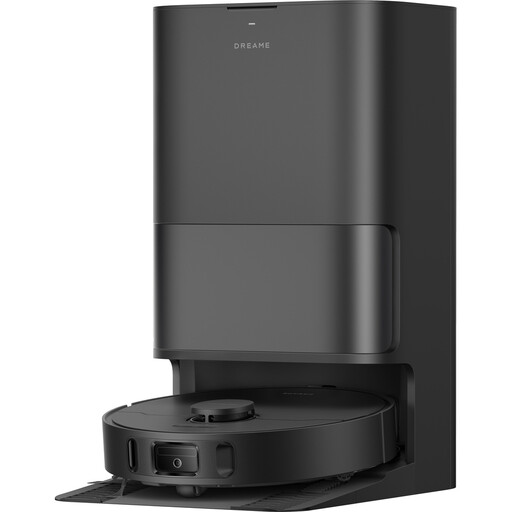
Dreame D30 Ultra robot vacuum and mop with base station

Dreame D30 Ultra robot vacuum and mop, 25.000 Pa, self-emptying and self-cleaning base, 50 °C hot-air drying

For vacuuming and mopping floors; if you’re planning to clean multiple floors, factor in moving the robot manually and the location of the station.

The product name lists 25.000 Pa, a self-emptying and self-cleaning base, and hot-air mop drying at 50 °C.

View at Joybuy
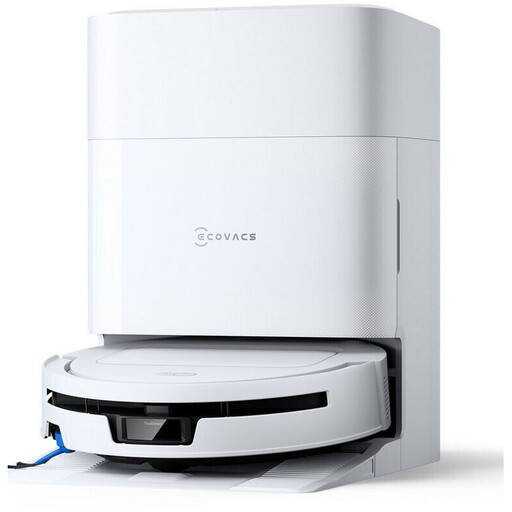
ECOVACS DEEBOT T90 MAX OMNI robot vacuum and mop

ECOVACS DEEBOT T90 MAX OMNI robot vacuum and mop, 30.000 Pa, 257 min runtime, White

For vacuuming and mopping floors; before scheduling a clean, check whether the robot can reach the area you want to clean from the station.

The product name lists 30.000 Pa, a self-emptying base station and a runtime of 257 min.

View at Joybuy
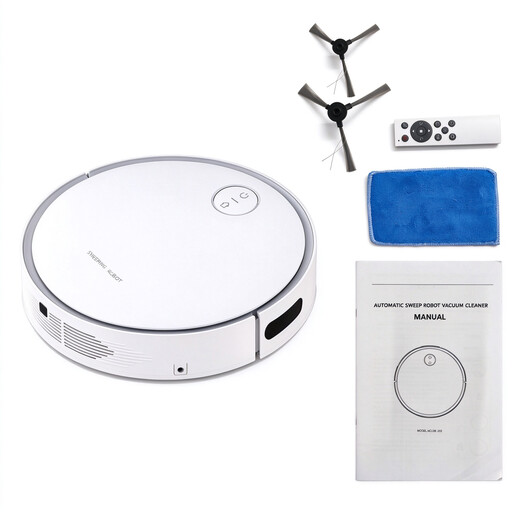
3-in-1 robot vacuum with mopping function, remote control and accessories

3-in-1 robot vacuum with mopping function and remote control, side brushes and mop cloth accessories, White

The remote control is listed as one way to operate the device. If you want it to clean while you’re at work, check that the controls and the way it works suit your routine.

According to the product description, this device isn’t designed for deep-pile carpets.

View at Joybuy

Eureka E20 Plus robot vacuum with station

Eureka E20 Plus robot vacuum, 8.000 Pa, station, 180-minute runtime, DuoDetect AI, Black

A schedule can be useful for the floor you use most; if you have multiple floors, you’ll still need to plan the station’s location and whether the robot can reach each area.

The product name lists 8.000 Pa, a station and a runtime of 180 minutes. According to the product information, the app is compatible only with 2,4-GHz Wi-Fi.

View at Joybuy
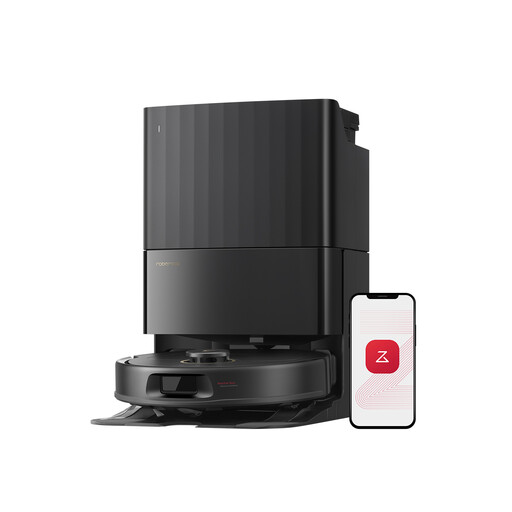
Roborock Qrevo S5V Black robot vacuum with station

Roborock Qrevo S5V Black with station, 12.000 Pa, FlexiArm Mops

For cleaning floors with a station; if you want it to run while you’re out, check whether it can reach the floor you want to clean from where the device is placed.

The product name lists 12.000 Pa and FlexiArm Mops.

View at Joybuy

Frequently asked questions

Will a robot vacuum with multiple maps clean both floors while I’m at work?

No. The mapping feature alone won’t let the robot move between floors. eufy Support says you need to intervene manually, so plan to start it on the floor you want it to clean while you’re out.

How do I set up multiple floors on the eufy X10 Pro Omni?

According to eufy Support, enable the option to save multiple maps in the app under “Manage Maps” before setting up additional floors. eufy says you can save up to five maps; if the feature isn’t enabled, a new map may replace the existing one.

What should I check before the first clean near a staircase?

Check the cliff sensors and the manual for your specific model, then test the robot in place before running it unattended. If a relevant DEEBOT error message appears, ECOVACS Support recommends wiping the dusty cliff sensors.

What labels and information matter for a device sold in Germany?

For retailers, the German Federal Network Agency lists checks for electrical and electronic devices including the correct CE marking, required manufacturer details and, where applicable, EU importer details, a device identifier, and a German-language instruction manual for non-professional users. Check the information provided for the specific product listing.

What should I know about app and cloud features?

Check the privacy information and the app permissions required for your specific model. The Verbraucherzentrale notes that data from app-controlled devices can often end up on third-party servers or in the cloud; this doesn’t mean that every robot sends data in this way.