What should you look for when buying?
Portable wireless microphone with USB receiver
A good fit if: you walk around the room and move the camera while speaking.
Things to consider: The receiver connection, recording app and charged transmitters all need to suit your particular setup.
USB condenser microphone for your desk
A good fit if: you speak from a fixed position or record a voiceover later, and can position the microphone close to you.
Things to consider: The microphone stays on your desk; according to the manufacturer, the dial on the RØDE NT-USB Mini doesn’t adjust the recording level.
Dynamic USB microphone for close-miked speech
A good fit if: you stay in one place to narrate, speak close to the microphone and can point it in the right direction.
Things to consider: If you move away from the microphone, you lose the benefit of close positioning; an XLR output isn’t needed for USB-only recording.
For a room tour, your choice mainly depends on whether you move around while speaking or record the audio from a fixed position. The percentages refer to consumers with this use case.
| Priority |
What to check before buying |
Who is this important to? |
| Clear speech while walking |
Check that the receiver matches your smartphone’s connection and that your recording app accepts USB audio. |
If I speak while walking around, the microphone needs to stay with me rather than being left on the desk. Consumers who prioritise freedom of movement come to about 36%. |
| Room echo and background noise |
Check the polar pattern and the speaking side for the specific model; test the position with a short recording. |
If I can record from a fixed position, I want to position the microphone close to my voice and point it away from noise sources. Consumers who are most concerned about room noise come to about 29%. |
| Level and monitoring from a fixed position |
Know the difference between input gain, headphone volume and mix controls; check whether you can monitor the recording through headphones. |
For a voiceover at my desk, I want to check the recording level and hear my own voice. Consumers who value on-mic controls most come to about 21%. |
| Suitable items included |
Compare the stated contents with your recording device’s connections and your planned setup. |
If I record at my desk, I want a setup that works with my device and doesn’t require unnecessary extras. Consumers who prioritise a simple overall setup come to about 14%. |
Portable microphones at Joybuy
The Joybuy products below are portable wireless and lavalier microphones for recording speech while walking. Before buying, check that the receiver connection, recording device and app you use are compatible.
 No image available
DJI Mic Mini 2S (2 TX + 1 RX + Charging Case)
A portable transmitter system for a room tour where you move around as you speak.
Set with two transmitters, one receiver and charging case.
View at Joybuy
 No image available
Moman M1CT Wireless Lavalier Microphone, USB-C, 1TX+1RX
A lavalier microphone for recording speech on the move, provided your recording device supports the USB-C receiver.
USB-C, one transmitter and one receiver; the product name gives the range as 150m.
View at Joybuy
 No image available
SYNCO P1XT USB-C Wireless Microphone
A portable USB-C microphone for recording on the move, if your recording device and app support the connection.
According to the product description, Android devices need to support OTG.
View at Joybuy
 No image available
Moman MS1X(C) Wireless Lavalier Microphone, 2TX+1RX
A set for a room tour with two people speaking, when used with a compatible USB-C Android phone.
Two transmitters and one receiver; the product title lists USB-C Android phones as compatible devices.
View at Joybuy
 No image available
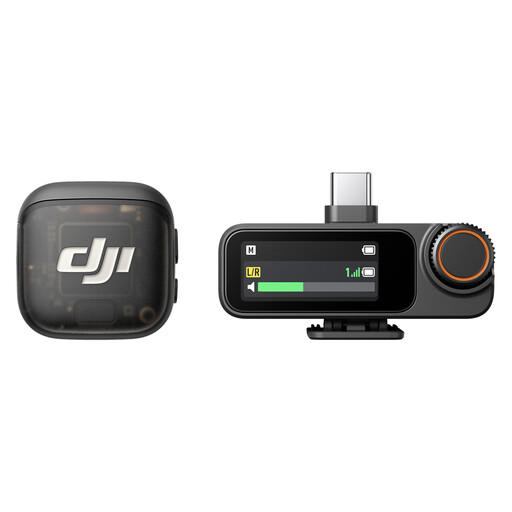
DJI Mic 3 (2 TX + 1 RX + Charging Case)
A portable microphone system for recording speech during a room tour.
Set with two transmitters, one receiver and charging case.
View at Joybuy
Frequently asked questions
Can I leave a USB desktop microphone on my desk for the whole room tour?
That isn’t a reliable setup for consistent narration while walking: Sennheiser and RØDE describe their desktop microphones as designed for a fixed setup. Speak from your recording position, add a voiceover to the footage later or consider a portable microphone with a receiver that suits your recording device.
How can I check my microphone setup before recording?
Select the connected microphone as the input source on your device or in your recording app, then listen back to a short test recording. According to the manufacturer, the dial on the RØDE NT-USB Mini adjusts headphone volume, not the recording level.
Do I need an audio interface or a microphone arm for a USB microphone?
Not necessarily. The Sennheiser Profile is described as including a desktop stand and USB-C cable; the RØDE NT-USB Mini comes with a desktop stand and a USB-C-to-USB-A cable. Check what’s included and which connections your device has. An arm may be useful for a different positioning, but it isn’t a general requirement.
What are my rights regarding returns and faulty goods when buying online?
The Verbraucherzentrale explains that many online purchases generally come with a 14-day right to cancel, although exceptions may apply. Cancelling because you’ve changed your mind is different from making a claim about faulty goods. Also check who the seller is and which terms apply to the specific offer.
Can I record my housemates speaking or show them in a video during a room tour without asking?
There’s no blanket yes to this. Under § 201 StGB, as published by the Federal Ministry of Justice and the Federal Office of Justice, secretly recording another person’s private conversation is covered by the law. For distributing or publicly displaying identifiable images, § 22 KunstUrhG generally requires consent; § 23 sets out exceptions, and whether they apply must be assessed on a case-by-case basis.


