First, check your internet connection and the signal at your TV and where you make calls. A new router won’t fix a broadband connection that’s too slow, or automatically improve weak Wi-Fi in rooms further away. Netflix recommends a stable download speed of at least 15 Mbit/s for a single 4K stream. Video calls also need upload capacity, and the amount depends on the type of call and your settings, as Zoom explains. If your broadband connection is fast enough, choose a router that suits your connection type. If the signal is weak in certain spots, an additional Wi-Fi access point or a wired connection may be a more targeted solution.
Who is this guide for?
Households with multiple streams and calls
If you’re making video calls while watching a film, your devices share the internet connection. Bitkom notes that the broadband speed you pay for is shared by everyone in the household; Netflix and Zoom publish requirements for their respective services.
Households with rooms far from the router
If your TV or workspace is a long way from the router, or separated from it by walls, what matters is the signal in those exact locations. If you need coverage in several places, a mesh system or wired connection may be an option.
Households considering a new router
If you’re looking for a device for DSL, cable or fibre broadband, check that the connection and your existing equipment are compatible with the specific router model. The Bundesnetzagentur explains your right to choose a suitable router for your connection.
What should you consider when choosing?
First, compare the connection at the router with the signal at your TV and where you make calls. Then work out whether the bottleneck is your broadband connection, the router or Wi-Fi coverage.
| Topic |
What to check before buying |
Who it matters most to |
| Simultaneous streaming and calls |
Check your internet connection, including download and upload speeds. Consider the number and desired quality of simultaneous calls. |
If I want to watch a film while several people in the household are on calls, a stable shared connection matters more to me than a high peak Wi-Fi speed. Around 36% of consumers put simultaneous streaming and calls first. |
| Signal in rooms further away |
Compare the connection near the router and in both places where you’ll use it. Check possible locations for additional Wi-Fi access points and how they’ll connect. |
If the TV or the place where I make calls is a long way from the router, I need a reliable signal there, not just a strong one next to the router. Around 29% of consumers prioritise coverage in locations further away. |
| Connection compatibility |
Check your broadband plan, wall socket, existing modem or ONT, and the ports on the specific router model. |
If I’m looking for a router for DSL, cable or fibre broadband, I want to avoid buying a device that isn’t compatible with my connection. Around 21% of consumers put connection compatibility first. |
| Security and updates |
Check whether your devices support WPA2 or WPA3 and whether firmware updates are available. |
If my router is always on at home, I want to be able to use security features and keep its firmware up to date. Around 14% of consumers prioritise security and updates. |
Common buying mistakes
-
Confusing the advertised Wi-Fi speed in Gbit/s with the speed available for streaming
A router’s advertised Wi-Fi speed doesn’t automatically reflect the speed you’ll get on your device. What’s more, all the devices in your household share the internet connection.
Check your broadband connection and compare the signal in both places where you’ll use it before choosing router features.
-
Choosing a model based on Wi-Fi 7 alone
DSL, cable and fibre connections need different connection features. A router without a suitable built-in modem may need to be connected to a separate device.
Check your broadband plan, wall socket and existing equipment against the specifications of the exact model.
-
Trying to fix a weak signal by replacing a router that otherwise suits your needs
If the problem is mainly in a room further away, the Wi-Fi connection may be the bottleneck. Additional Wi-Fi access points also need a suitable connection to the main router.
First, compare the signal where you use your devices. Then check whether moving the router, adding an access point or using a wired connection would work best.
Brands worth considering
FRITZ!
The range includes routers for different types of connection.
- According to FRITZ!, the 5690 Pro offers Wi-Fi 7, including 6 GHz; the 6690 Cable is specified with DOCSIS 3.1 and Wi-Fi 6.
- These specifications apply to the models named, not to every FRITZ!Box. Check which model suits your connection.
TP-Link
The range includes standalone routers and separate mesh systems.
- TP-Link specifies dual-band Wi-Fi for the Archer AX55 and optional Ethernet backhaul for the Deco X50.
- These specifications confirm features, not how well a product will perform in a particular home. Make sure the connection equipment and mesh setup are suitable.
ASUS
According to ASUS, the RT-AX58U offers features for different home network setups.
- The German specifications include access point mode, AiMesh, Adaptive QoS, and Gigabit WAN and LAN ports.
- ASUS distinguishes between V1 and V2 processors. Check the hardware version; QoS can’t replace a sufficiently fast internet connection.
Telekom
The Speedport Smart 4 Plus is designed for a compatible Telekom fibre connection.
- Telekom lists a built-in fibre modem and an expandable mesh solution for this model.
- These features apply to the Speedport Smart 4 Plus and don’t necessarily apply to other Speedport versions.
NETGEAR
The Nighthawk RAX50 is a Wi-Fi 6 router option.
- NETGEAR provides German-language product documentation and firmware downloads for this model.
- The support information doesn’t demonstrate better performance in this scenario or compatibility with a particular connection.
Joybuy products for home networking and Wi-Fi
This selection includes routers and mesh systems for multiple connected devices, rooms further from the router and different types of home network connection. For each model, check that its connection type suits your existing setup.
 No image available
TP-Link Deco BE22 (2-pack) mesh Wi-Fi 7 system
The two units are designed for a home network with Wi-Fi in multiple locations. Check that the connection between the units suits the layout of your home.
Wi-Fi 7, dual-band, Gigabit Ethernet and two units.
View at Joybuy
 No image available
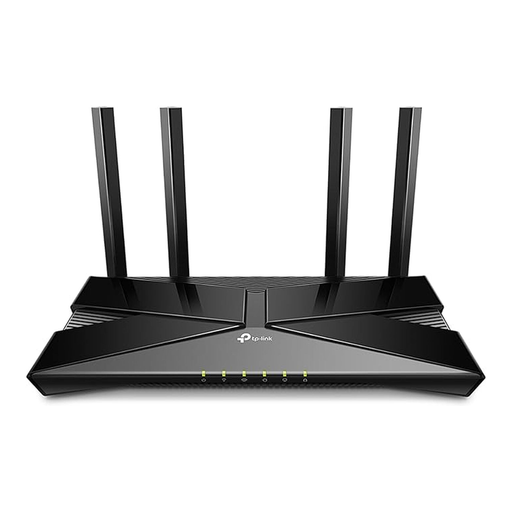
TP-Link Archer AX23 AX1800 dual-band Wi-Fi 6 router
Designed for a home network with multiple Wi-Fi devices; a stationary device can be connected via LAN. This model doesn’t support DSL and needs a separate DSL modem.
Wi-Fi 6; 1,201 Mbit/s at 5 GHz and 574 Mbit/s at 2.4 GHz, according to the product specification; four Gigabit LAN ports; WPA3.
View at Joybuy
 No image available
FRITZ!Box 7530 AX Wi-Fi 6 router
For a compatible DSL connection; mesh support gives you the option to extend your Wi-Fi. Check that the DSL requirements match your connection.
VDSL Supervectoring 35b up to 300 Mbit/s, according to the product specification; dual-band; Wi-Fi up to 2,400 Mbit/s, according to the product specification; four Gigabit LAN ports.
View at Joybuy
 No image available
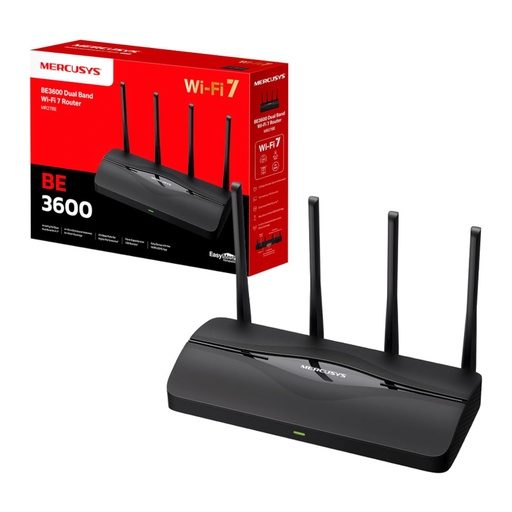
MERCUSYS MR27BE Wi-Fi 7 dual-band router BE3600
Designed for a home network with an Ethernet connection to a separate modem. Check that your connection equipment and the LAN connections you need are suitable.
Two 2.5 Gbit/s ports and two Gigabit ports; EasyMesh and WPA3.
View at Joybuy
 No image available
TP-Link Deco S4 mesh Wi-Fi system, 3-pack
This three-unit system is designed to provide Wi-Fi in multiple areas of your home. Actual coverage depends on the building and where you place the units. Also check how they’ll connect to your existing router.
Wi-Fi 5, not Wi-Fi 6; dual-band and Gigabit ports. The product name states coverage of up to 370 m².
View at Joybuy
Frequently asked questions
What broadband speed do I need for a 4K stream and simultaneous video calls?
Netflix recommends a stable download speed of at least 15 Mbit/s for a single 4K stream. Zoom lists additional download and upload requirements depending on the type of call and resolution. Your actual needs depend on the number of calls and your settings. These service requirements aren’t a one-size-fits-all threshold for a household, and they don’t describe your router’s Wi-Fi performance.
How can I tell whether my broadband connection or Wi-Fi is too slow?
The Bundesnetzagentur’s broadband measurement tool helps you compare your connection’s actual data rate with the rate agreed in your contract. Also compare the connection near the router with the signal at your TV and where you make calls. If it’s weaker only in a place further away, the Wi-Fi connection in that location may be the bottleneck.
Where should I put my router, and how should I secure it?
Choose a location that provides a connection to the rooms you use, then check the signal on your devices. The Federal Office for Information Security recommends keeping your firmware up to date. WPA3 offers a higher level of security than WPA2 on compatible devices.
Can I use my own router in Germany?
Yes, as long as the device is suitable for your connection. The Bundesnetzagentur explains your right to choose your own router and confirmed on 22 January 2025 that this right also applies to passive optical fibre networks. Before buying, check that the model suits your DSL, cable or fibre setup.


