First, measure the space available for your mouse and check whether you can reach across the game screen without constantly repositioning it, using a sensitivity setting you can control. Then decide whether a few easy-to-reach extra buttons or a large thumb panel better suit your commands and your hand. Wireless removes the cable from your desk, but depending on the model, you’ll need to charge it or replace its batteries. Manufacturers’ claims about buttons and battery life don’t prove an RTS performance advantage.
Which mouse is right for you?
RTS players with limited mouse space
If there’s barely any room to move your mouse alongside your keyboard and monitor, consider your available space, sensitivity and mouse shape together. Razer Germany explains that a lower DPI setting requires more mouse movement to cover the same distance on screen; Logitech describes how higher sensitivity shortens the distance the pointer travels.
RTS players with lots of mouse commands
If you want to trigger frequent commands using your mouse, the key is choosing extra buttons you can reliably reach with your grip. Razer, Logitech G, SteelSeries and Corsair offer models with different button layouts; whether a particular mapping is allowed depends on the game’s rules.
Players with limited cable space
If a cable gets in the way on your small desk, a wireless mouse can remove it without giving you any extra room to move. Power and fit in your hand also matter: Logitech G says the G305 uses an AA battery, while CHERRY XTRFY lists both wireless and wired connections for the M50 Wireless.
What should you look for when buying?
| What you’re looking for |
What to check |
Who is this most important to? |
| Room to move and control |
Measure the available width and depth. With your game and system settings, test whether you can control both long pointer movements and small targets. |
If mouse space is tight on your small desk, being able to cover the distance you need with control is what matters most; around 36% of consumers put room to move and pointer control first. |
| Commands within reach |
List your most frequent commands and check which buttons your thumb can reach securely. Also check which button mappings the game allows. |
If you want to trigger frequently used RTS commands directly from your mouse, extra buttons that suit you and are within reach are essential; around 29% of consumers prioritise button mapping. |
| Hand shape and grip |
Consider the mouse shape, your grip and thumb position together. A compact mouse won’t necessarily fit your hand. |
If the shape and button reach don’t work for your hand, having lots of buttons won’t help much; around 21% of consumers look first at hand fit and grip. |
| Cable and power |
Check whether you can route the cable freely. With wireless models, consider whether they use batteries or need charging. |
If a cable restricts your movement or you want to avoid changing batteries, the connection and power supply matter; around 14% of consumers prioritise these factors. |
Common buying mistakes
-
Confusing maximum DPI with the right setting
Higher sensitivity reduces the mouse movement needed, but it doesn’t automatically make small movements easier to control. At lower sensitivity, you need more space to cover the same distance on screen.
Before buying, measure the space you actually have and test sensitivity settings in your own gaming setup. Razer Germany and Logitech explain how sensitivity affects pointer movement.
-
Choosing a large thumb panel just because it has lots of buttons
Extra programmable buttons are only useful if you can reach them with your grip and the game allows you to use those mappings.
Start by checking your most frequent commands and how far your thumb can reach. A mouse with fewer buttons may suit you better if you don’t need a large side panel.
-
Assuming wireless means maintenance-free
According to Logitech, the Logitech G305 needs an AA battery. With wireless mice, remember to check the power supply and whether you’ll need to replace or recharge the battery.
Check the power supply and what’s included with the specific model. The German Environment Agency recommends separating removable batteries before disposing of a device.
-
Assuming similarly named G502 models are the same product
The Logitech G502 HERO is wired; the G502 LIGHTSPEED is a separate wireless model.
Compare the full model name and connection type rather than choosing based on “G502” alone. Logitech G lists HERO and LIGHTSPEED as different products.
Key brands at a glance
Razer
The Cobra, Naga V2 HyperSpeed and Basilisk V3 35K offer different shapes and button layouts.
- Razer describes the wired Cobra as compact and designed for right-handed users; according to the manufacturer, the Naga V2 HyperSpeed has twelve thumb buttons.
- The Cobra has a cable, while the Naga V2 HyperSpeed requires battery changes. These features don’t prove an RTS performance advantage.
Logitech G
The G203 and G305 have straightforward button layouts, while the G502 HERO offers more programmable buttons.
- According to Logitech G, the G203 has six buttons, the G305 uses an AA battery and the G502 HERO has eleven programmable buttons.
- The G502 HERO and G502 LIGHTSPEED are different models. The number of buttons and stated battery life alone don’t prove that a mouse is suitable for RTS.
SteelSeries
The Aerox 9 Wireless is a wireless mouse with plenty of programmable buttons.
- SteelSeries lists 18 programmable buttons for this model, including twelve on the side panel, and a weight of 89 g.
- The manufacturer positions this model for MMO and MOBA games. For RTS, check whether the side buttons and shape suit your hand and available desk space.
Corsair
The Scimitar Elite Wireless is designed for users who want to assign lots of commands to an adjustable side panel.
- Corsair lists 16 programmable buttons and an adjustable block with twelve side buttons.
- These features don’t prove that the buttons are easy for every hand to reach or make RTS inputs easier.
CHERRY XTRFY
The M50 Wireless offers several connection options.
- CHERRY XTRFY lists 2.4 GHz wireless, Bluetooth and wired operation for this model.
- The connection options don’t tell you whether the shape and buttons suit your hand or the way you play RTS games.
Gaming mice at Joybuy
This selection includes wired and wireless gaming mice with different shapes and button layouts, suited to limited mouse space and RTS commands.
 No image available
HyperX Pulsefire Haste 2 Wired, White
If you want to try different sensitivity settings on a wired mouse, the product description lists six buttons and DPI presets.
The listed settings are 400, 800, 1600 and 3200 DPI, and the weight is approximately 52–53 g without the cable. The cable is listed as 1.8 m long.
View at Joybuy
 No image available
AJAZZ AJ159 APEX Wireless with magnetic charging dock
If you want to switch between wireless, Bluetooth and wired connections, the product description lists three connection options and a symmetrical shape for small to medium-sized hands.
Listed features include a weight of 56 g, a PAW3950 sensor and up to 42,000 DPI. The product title also lists an 8KHz polling rate.
View at Joybuy
 No image available
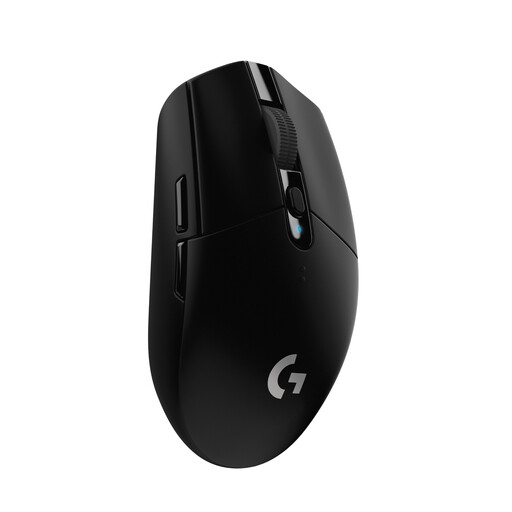
Logitech G305 LIGHTSPEED Wireless, Black
If a cable gets in the way and you want extra buttons, this model combines wireless operation with six programmable buttons.
The product description lists up to 12,000 DPI, a weight of 99 g and an AA battery. Remember to factor in battery changes.
View at Joybuy
 No image available
Logitech G G502 HERO
If you want to assign several commands directly to your mouse, the product description lists eleven programmable buttons.
The sensitivity is listed as 200 to 25,600 DPI. This is a wired model, with a USB cable listed as 2.1 m long.
View at Joybuy
 No image available
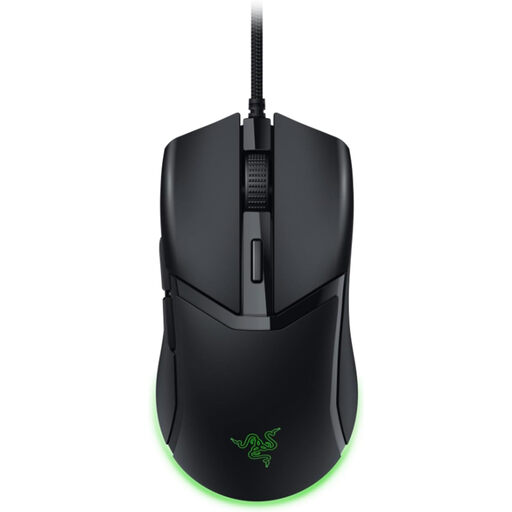
Razer Cobra Wired, Black
If you’re looking for a compact wired mouse, Razer describes the Cobra as compact and designed for right-handed users.
The product title lists a weight of 57 g. According to the product description, sensitivity can be adjusted in 50-DPI increments; this is a wired model.
View at Joybuy
Frequently asked questions
Which DPI setting should I use when space is limited?
There’s no single DPI setting that suits every RTS player. Test whether you can control both long pointer movements and small targets within your available mouse space. At lower sensitivity, you need to move your mouse further to cover the same distance. Razer Germany and Logitech explain how this works.
How do I set up a mouse with extra buttons?
Start by assigning frequently used commands to buttons you can reach securely, then test the mapping in the game itself. Logitech G says the G502 HERO lets you assign buttons using G HUB and save profiles. Check the rules of the specific game to see whether macros are allowed.
What ongoing costs and rights should I consider when buying online?
If you choose a mouse powered by an AA battery, remember to factor in replacements; according to Logitech, the Logitech G305 uses an AA cell. The Verbraucherzentrale distinguishes between the statutory warranty you have with the seller and a voluntary guarantee. In Germany, online purchases generally come with a 14-day right of withdrawal from the date you receive the goods; exceptions and the terms of your specific purchase apply.
What are the rules in Germany for wireless mice and their disposal?
The EU Radio Equipment Directive 2014/53/EU sets the framework for placing radio equipment on the market, including wireless mice. The Bundesnetzagentur lists CE marking, manufacturer details and German-language instructions among the areas covered by market surveillance; a retailer’s product description alone doesn’t prove that a specific offer complies. Don’t put old mice in household waste. The German Environment Agency recommends separating removable batteries before handing in a device.


