
Lieferung heute & morgen

Qualitätsgarantie

Willkommens-Angebote freischalten: KOSTENLOSE Lieferung | Bis zu 80 % RABATT | Kostenlose 30-Tage-JoyPlus-Testphase
App herunterladen
Choosing a new graphics card is often the most critical step in upgrading or building a new PC. However, faced with a deluge of technical specs, marketing terms, and constantly changing prices, it's easy to fall into common traps. An uninformed choice can lead to disappointing performance, compatibility issues, or an unnecessarily high price tag. This guide focuses on the objective criteria that will help you make an informed decision and find a graphics card that precisely matches your needs.
Before we dive into the technical details, it's important to recognise two prevalent marketing traps that often lead to poor purchasing decisions:
To avoid these traps, focus on three fundamental technical parameters. These determine the real-world performance and compatibility of your new gaming graphics card.
Video Memory (VRAM) and Memory Interface: Don't just look at the capacity in GB. The memory type is critical. GDDR7 is the current standard for new graphics card generations like the NVIDIA GeForce RTX 50-series, offering significantly higher data transfer rates than older standards. Combined with a wide memory interface (e.g., 256-bit or more), this provides the necessary bandwidth to run a 4K graphics card without bottlenecks.
Interface and Power Supply: To unlock the full potential of a modern graphics card, a PCIe 5.0 interface on the motherboard is recommended. Although the cards are backward compatible, only PCIe 5.0 offers the maximum bandwidth for future applications. Equally important is the power supply. Check the manufacturer's recommended minimum power supply unit (PSU) wattage and ensure you have the correct power connectors, especially the newer 16-pin (12V-2x6) connector used by many high-performance NVIDIA graphics cards and AMD graphics cards.
Physical Dimensions and Cooling Concept: Measure the available space in your PC case. Note the maximum length, height, and width (expressed in "slots") for a graphics card. A powerful card can easily occupy 3 slots or more and be over 30 cm long. Also, check the cooling concept: air-cooled cards are the most common, while models with a pre-installed water block (like the INNO3D iChill GeForce RTX 5090 FROSTBITE) offer superior cooling performance for enthusiasts but require an existing custom water-cooling loop in the system.
Here are some recommendations tailored to different user profiles and their specific requirements.
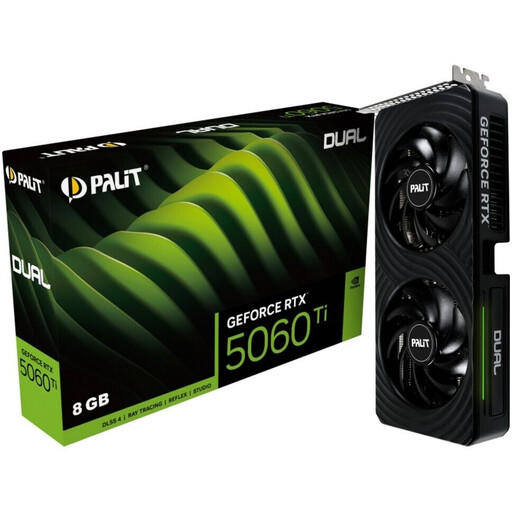
Why this model fits: It offers a solid entry point into the current generation of graphics cards. The combination of 8 GB of fast GDDR7 memory and support for PCIe 5.0 creates a future-proof foundation for smooth 1080p and 1440p gaming without breaking the bank.
Instead of focusing on a high GB count with old memory, this model prioritises the efficiency of modern GDDR7 memory, which is more relevant for performance.
The compact dual-fan design ensures high compatibility with most PC cases and provides solid cooling performance for its intended use case.
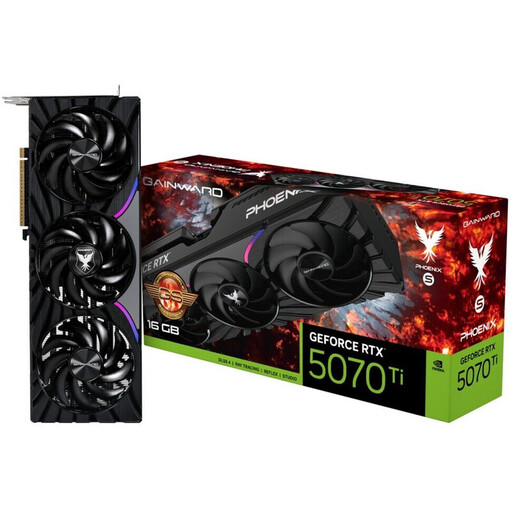
Why this model fits: This RTX 5070 Ti delivers the necessary power for high frame rates in WQHD and 4K resolutions. The 16 GB of GDDR7 VRAM provides generous overhead for high-resolution textures in future games and demanding creative applications.
The cooling system, featuring a "Mega Copper Base" that the manufacturer claims covers both the GPU and DRAM, indicates a thoughtful thermal design rather than just aesthetics.
Offers a great balance of high computing power, generous and fast memory, and a functional cooling system for stable performance.
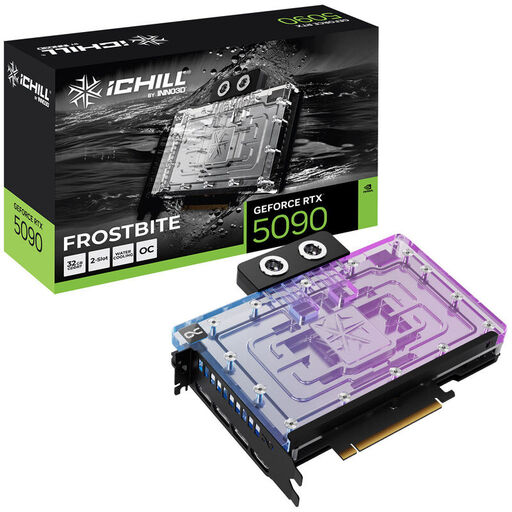
Why this model fits: This GeForce RTX 5090 offers maximum performance for 8K gaming and compute-intensive tasks like 3D rendering or AI applications. The massive 32 GB of GDDR7 memory and 512-bit interface are specifically designed for professional workflows that process large datasets.
The integrated water block is a purely functional solution for extreme performance. Its compact 2-slot design avoids the compatibility problems of oversized air coolers.
Enables extremely powerful systems (even with multiple GPUs) to be built in space-constrained cases where massive air coolers would not fit.
We have compiled a complete, real-time updated list of products that fully meet these strict selection criteria and safety regulations.
1. How much VRAM does a gaming graphics card really need in 2026? For smooth 1080p (Full HD) gaming, 8 GB to 12 GB of VRAM is generally sufficient. If you want to play at 1440p (WQHD) with high details, 12 GB to 16 GB is a good target. For demanding 4K gaming, content creation, and to be ready for future titles, 16 GB or more provides a solid, future-proof foundation.
2. Do I need to upgrade my power supply when I buy a new graphics card? Most likely, yes, if you are making a significant performance upgrade. Modern high-end cards like a GeForce RTX 5080 or a Radeon RX 9070 XT have a high power consumption (TDP). Always check the manufacturer's recommendation for the minimum PSU wattage (e.g., 750W, 850W, or more). Also, make sure your PSU provides the necessary power connectors, especially the 16-pin (12V-2x6) connector required for many new models.
3. Will any graphics card fit on my motherboard and in my case? Technically, any modern graphics card will fit into a PCI-Express x16 slot, which has been the standard for years. However, to get the full performance of a PCIe 5.0 card, you also need a motherboard with a corresponding slot. More importantly, check for physical compatibility: before buying, measure the maximum available space in your case (length, height, and width in slots) and compare these dimensions with the graphics card's specifications.