
Lieferung heute & morgen

Qualitätsgarantie

Willkommens-Angebote freischalten: KOSTENLOSE Lieferung | Bis zu 80 % RABATT | Kostenlose 30-Tage-JoyPlus-Testphase
App herunterladen
A new RTX 50 graphics card is designed to deliver high frame rates, ray tracing and modern AI features. However, an expensive card is not automatically the right purchase. Resolution, power supply, case and intended use are the key factors.
A higher boost clock speed sounds like an obvious advantage, but it only describes one technical specification. Actual performance also depends on the GPU model, memory capacity, cooling, power limits and the particular game or programme. A GeForce RTX 5080 remains in a distinctly different performance class from a GeForce RTX 5060, even if individual model variants quote similarly high clock speeds.
Many current models occupy several slots and are over 30 centimetres long. As a result, a card may not physically fit inside the case despite having a compatible PCIe slot. More powerful variants also place greater demands on the power supply. For example, several RTX 5080 models specify a power consumption of 360 watts and recommend an 850-watt power supply.
Check the following before buying:
A GDDR7 graphics card offers high memory bandwidth, but capacity is a separate factor. 8 GB may be sufficient for 1080p and many 1440p scenarios. With high-resolution textures, 4K gaming, video editing or local AI applications, 12 GB or 16 GB can provide more headroom. However, memory capacity alone does not guarantee a particular frame rate.
For Full HD and 1440p gaming, models such as the GeForce RTX 5060 or GeForce RTX 5060 Ti are worth considering. The GeForce RTX 5070 is aimed at users who want to play at 1440p with high settings and, depending on the game, at 4K too. The GeForce RTX 5070 Ti and GeForce RTX 5080 come with 16 GB of GDDR7 in the listed offers, making them interesting for more demanding 4K scenarios and as a graphics card for content creation.
8K outputs do not automatically mean that current games will run at 8K with a high frame rate. Maximum display resolution mainly describes signal support. Game performance also depends on the engine, settings, drivers and upscaling technologies.
Pay attention to three specifications:
The RTX 5080 models in this selection offer 16 GB of GDDR7, a 256-bit interface and, according to the product data, bandwidth of 960 GB/s. The GeForce RTX 5070 comes with 12 GB of GDDR7 and a 192-bit interface in the variants listed. For compact gaming PCs, smaller 8 GB models with dual-slot cooling may be more practical.
A PCIe 5.0 graphics card can be used in compatible systems with the corresponding interface. What matters is whether the motherboard, processor and power supply provide a suitable foundation for the rest of the system. Depending on the model, the NVIDIA Blackwell graphics cards in this selection support features such as ray tracing, DLSS 4, Reflex and G-Sync.
DLSS 4 can affect image quality and frame rates in supported games. Its precise impact depends on the game, the selected mode and the native resolution. A graphics card with ray tracing requires more processing power when these effects are enabled than when using traditional rasterisation.
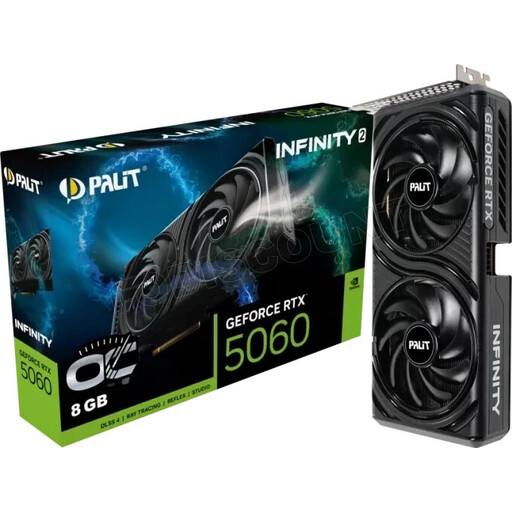
Why this product suits the profile: This card combines 8 GB of GDDR7 with compact dual-fan cooling, making it suitable for desktop PCs with limited space and 1080p to 1440p gaming.
The product data specifies 8 GB of memory, two fans and a maximum resolution of 3840 × 2160 pixels. This makes it easy to assess the capacity and design before buying.
8 GB of GDDR7, two fans, plus HDMI and DisplayPort connections.
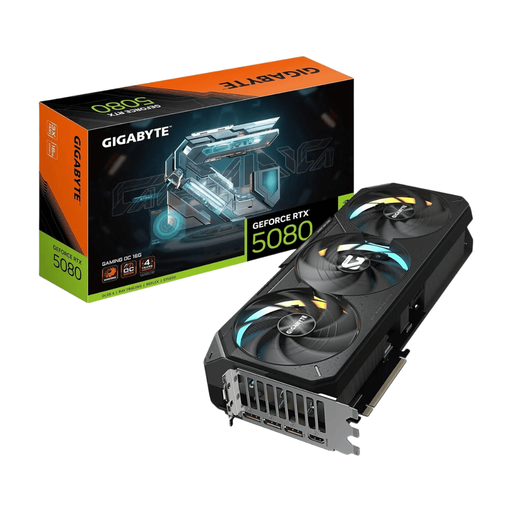
Why this product suits the profile: This card is designed for users with a powerful system who want to combine 4K gaming, ray tracing and creative applications.
The dimensions of 340 × 140 × 70 mm, the 4-slot format and the recommended power supply capacity of 850 watts are clearly specified. This allows you to check system compatibility before ordering.
16 GB of GDDR7, a 256-bit memory interface, PCIe 5.0 and three fans with RGB lighting.
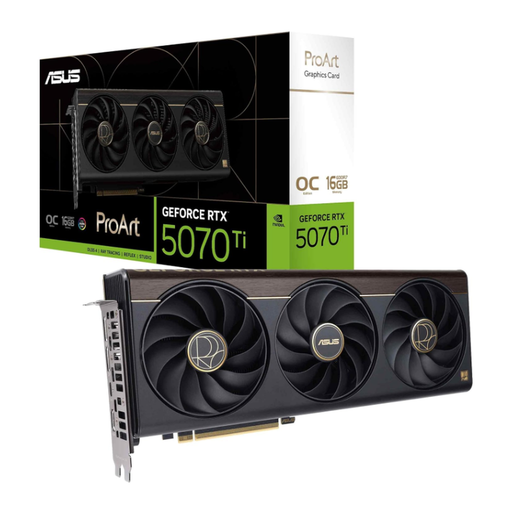
Why this product suits the profile: With 16 GB of GDDR7, a 2.5-slot design and an additional USB-C connection, it is built for gaming and content creation workflows.
The 2.5-slot design is more compact than many cards with extensive cooling. Even so, you should check your PC’s dimensions, power supply and airflow in advance.
16 GB of memory, a 256-bit interface, DLSS 4 support and a USB-C connection.
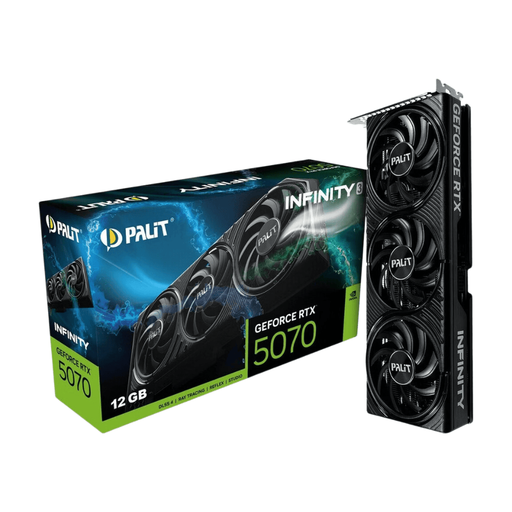
Why this product suits the profile: The SFF-Ready designation and 2-slot format make it easier to choose a card for more compact cases without compromising on 12 GB of GDDR7.
At around 292 mm long with a 2-slot design, checking the available space is more straightforward. The manufacturer nevertheless recommends a 650-watt power supply.
12 GB of GDDR7, PCIe 5.0, three fans and support for up to four monitors.
We have put together a complete, regularly updated list of products that fully meet these strict selection criteria and the safety regulations applicable in the EU.
Depending on the game and quality settings, the GeForce RTX 5060 Ti, GeForce RTX 5070 or GeForce RTX 5070 Ti may be suitable for 1440p. The key factors are the ray-tracing effects used, texture quality and desired frame rate.
That depends on the model and the rest of the PC. For example, the listed product data recommends 550 watts for certain RTX 5060 models, 650 to 750 watts for various RTX 5070 variants and 850 watts for several RTX 5080 cards. The specific manufacturer’s recommendation should always take priority.
Up-to-date drivers, suitable frame-rate limits and an appropriate power profile can reduce consumption in less demanding scenarios. A well-ventilated case and cooling that does not need to run at maximum fan speed continuously can also help. Actual power consumption varies depending on the game, application and settings.