
Lieferung heute & morgen

Qualitätsgarantie

Willkommens-Angebote freischalten: KOSTENLOSE Lieferung | Bis zu 80 % RABATT | Kostenlose 30-Tage-JoyPlus-Testphase
App herunterladen
An RTX 5060 8GB graphics card combines the NVIDIA Blackwell platform with fast GDDR7 memory, modern connections and features such as ray tracing and DLSS 4. For many PC gamers, it is a suitable class for 1080p gaming and – depending on the game, detail settings and upscaling – 1440p gaming too. However, the available models vary considerably in terms of cooling, size, boost clock and power supply requirements.
If you focus solely on the name GeForce RTX 5060 or a high boost clock, you may overlook important details. The following criteria will help you put marketing claims into perspective and choose a graphics card that suits your system.
An RTX 5060 OC is supplied from the factory with an increased boost clock. Depending on the model, the stated figures may be 2.497, 2.527 or 2.640 MHz, for example. However, the actual clock speed also depends on temperature, workload, case ventilation and the power limit.
A higher boost figure can be one selection criterion, but it does not replace checking the cooling system, dimensions and power supply. With similar GPU specifications, these factors can be more important for stable everyday operation.
Many cards offer DisplayPort 2.1b and HDMI 2.1b and, according to the product data, support output of up to 8K. This describes the possible signal transmission and monitor support. The frame rate actually achievable in games also depends on graphical detail, the game engine, ray tracing and technologies such as DLSS.
For most buyers, it is therefore more important whether the card can connect the desired 1080p or 1440p monitors at the appropriate refresh rates.
The RTX 5060 GDDR7 variants presented here feature 8 GB of video memory, a 128-bit memory interface and memory bandwidth of up to 448 GB/s. GDDR7 increases memory bandwidth compared with older memory generations. However, capacity remains a factor to consider when using very high-resolution textures and demanding games.
For creative software, streaming and games with extensive texture packs, you should check whether 8 GB suits your intended usage. If you plan to work with particularly high texture detail over the long term, it is also worth considering graphics card classes with more memory.
The RTX 5060 models are based on the NVIDIA Blackwell architecture and offer 3,840 CUDA cores, depending on the product description. They support ray tracing, NVIDIA Studio, Reflex and DLSS 4, provided the relevant game or programme integrates these features.
DLSS can change the internal rendering resolution and use suitable processes to generate an output image for the monitor. This is a software-dependent feature and does not guarantee a particular frame rate. When choosing a card, you should therefore also check compatibility with your preferred games.
A PCIe 5.0 graphics card can be operated in a compatible PCIe slot. The Palit GeForce RTX 5060 Dual OC is specified with PCIe 5.0 x8; other models mention PCI Express 5.0 without the same level of detail. The key requirement is that the motherboard has a suitable, physically unobstructed PCIe x16 slot.
Power requirements vary within this product group:
The specific manufacturer recommendation for the model you choose should take priority. You will also need a suitable 8-pin PCIe power connector, a certified power supply and sufficient headroom for the processor, drives and fans.
Before buying, compare the card’s length, height and slot width with the available space in your case. Compact dual-fan cards are often suitable for standard cases, while triple-fan or 3.125-slot models require more room.
For modern monitors, 3 × DisplayPort 2.1b and 1 × HDMI 2.1b provide versatile connectivity. This allows you to connect multiple displays, although the maximum possible resolution and refresh rate depend on the monitor, cable and signal standard used.
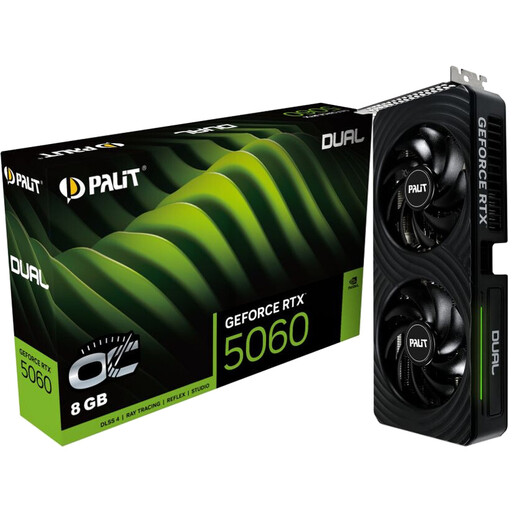
Why this product suits the profile: This dual-fan card combines 8 GB GDDR7, a 2-slot design and a stated boost clock of 2.497 MHz. It is designed for a classic gaming PC with a 1080p monitor and selected 1440p settings.
The technical specifications list more than just the boost clock: they also state 145 W TDP, an 8-pin connector and the 2-slot design.
3 × DisplayPort 2.1b, 1 × HDMI 2.1b and 448 GB/s memory bandwidth.

Why this product suits the profile: This card is aimed at buyers who value comprehensive cooling, reinforced construction and customisable lighting.
The dimensions of 302 × 133,5 × 62 mm make it clear that you need to check the available space before buying.
Boost clock of up to 2.640 MHz, OC mode of up to 2.677 MHz and triple-fan cooling.
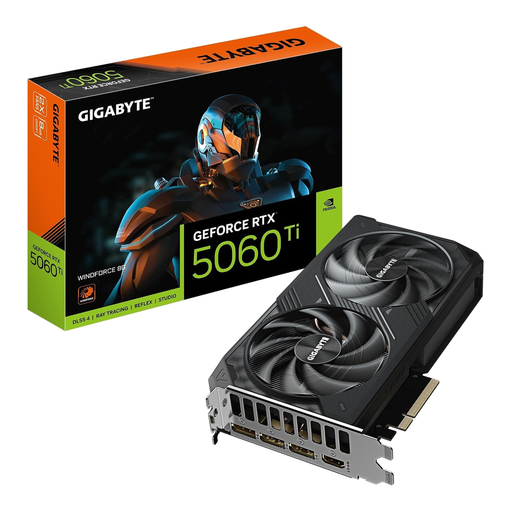
Why this product suits the profile: The RTX 5060 Ti 8GB, with 4,608 CUDA cores, GDDR7 memory and WINDFORCE cooling, is aimed at users who plan to use their PC for creative applications or extended periods of heavy workloads as well as gaming.
The 281 mm length, two slots and 650 W power supply recommendation must all be taken into account before buying.
Three fans, 8 GB GDDR7, 448 GB/s bandwidth and 3 × DisplayPort 2.1b.
We have put together a complete, regularly updated list of products that fully meet these strict selection criteria and the safety regulations applicable in the EU.
It can be suitable for 1440p gaming. The achievable frame rate depends on the game, graphical settings, ray tracing and whether DLSS 4 is used. With particularly demanding titles, reducing texture or ray-tracing settings may be advisable.
The recommendation varies by model. The product data provided lists figures from 300 W to 550 W for RTX 5060 cards. The specific manufacturer’s recommendation is the deciding factor. A suitable 8-pin PCIe connector and a certified power supply are also required.
This depends on the resolution, texture quality, games and your personal requirements. For 1080p and many 1440p scenarios, 8 GB may be sufficient. If you regularly use very high texture detail, extensive mods or professional creative software, you should check the memory requirements of the relevant programme.