
Lieferung heute & morgen

Qualitätsgarantie

Willkommens-Angebote freischalten: KOSTENLOSE Lieferung | Bis zu 80 % RABATT | Kostenlose 30-Tage-JoyPlus-Testphase
App herunterladen
Choosing a new graphics card is a critical investment for any PC builder. Buyers face unique challenges, especially when curating an aesthetically pleasing, all-white system. Marketing buzzwords often obscure technical shortcomings that only become apparent after purchase. Before you decide on a white gaming graphics card, you should know the three most common pitfalls that lead to disappointment and unnecessary expense.
To avoid these mistakes, you should carefully examine three technical aspects. These parameters are crucial for a satisfying and stable long-term experience.
Physical size is not a secondary concern. Pay close attention to the card's exact dimensions (Length x Width x Height) and compare them with the maximum available space in your PC case. The "2.5-slot design" specification means the card occupies the height of 2.5 expansion slots on the motherboard. This is a good compromise between cooling performance and compatibility, but you must ensure adjacent slots are free. A graphics card for compact PCs, like the ASUS Dual series, is often specifically engineered to deliver high performance in a smaller footprint.
An efficient cooling system is the foundation for stable performance. Look for these features:
Modern graphics cards use new standards that are critical for achieving full performance.
Here are some recommendations tailored to different requirements and budgets, all of which meet the criteria mentioned above.

Why This Fits Their Persona: Ideal for users aiming for a clean, all-white PC build who want strong performance for 1080p/WQHD gaming without compromising on compatibility in smaller cases.
The compact 2.5-slot design (228 mm length) is explicitly engineered for broad case compatibility, avoiding the size trap. The 0dB Technology and Dual BIOS directly address the issues of noise and heat.
An excellent balance of cooling performance, silent idle operation, and factory-overclocked power. The white colour scheme (model DUAL-RTX5060-O8G-WHITE) is perfect for themed builds.
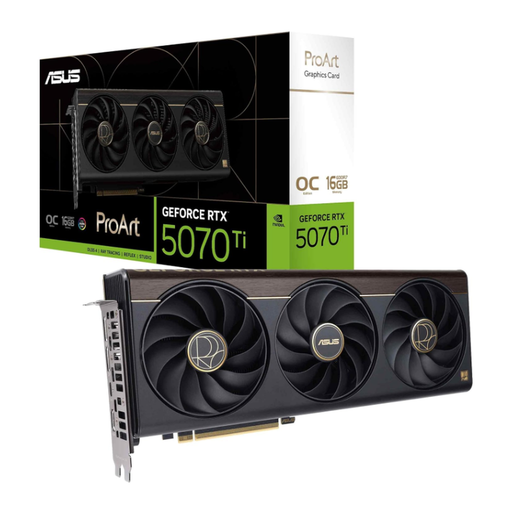
Why This Fits Their Persona: For users who tackle demanding creative tasks like 3D rendering or video editing in addition to gaming, and therefore require more VRAM and raw compute power.
Despite its higher performance, this card maintains a slim 2.5-slot design, ensuring compatibility. The advanced cooling system with a vapour chamber manages the higher thermal output efficiently and quietly.
16 GB of GDDR7 memory provides ample headroom for high-resolution textures and complex projects. The high AI performance and DLSS 4 accelerate both games and professional applications.
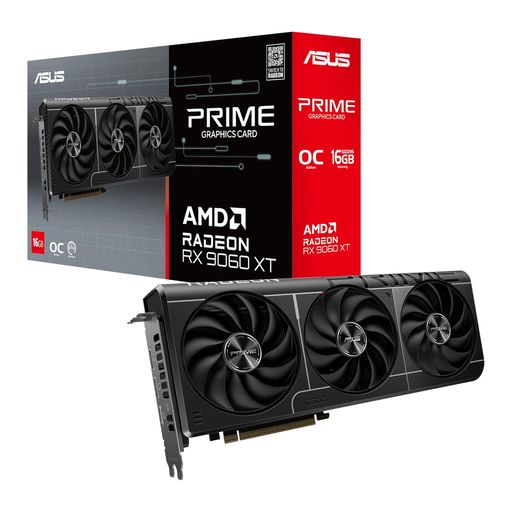
Why This Fits Their Persona: A strong option for users looking for an alternative to Nvidia who value a large VRAM pool for future games without breaking the bank.
This model also uses a compact 2.5-slot design and features 0dB Technology and a Dual BIOS, effectively solving the common problems of size and noise.
The very generous 16 GB of GDDR6 memory offers plenty of buffer for memory-hungry games and applications. The card represents competitive performance in the mid-range segment.
We have compiled a complete, real-time updated list of products that fully meet these strict selection criteria.
The card's dimensions are 228 x 123 x 50 mm. This makes it shorter than many other models in its performance class, and it was designed for high compatibility with Small Form Factor (SFF) cases. Before buying, measure the available space in your case (especially the maximum graphics card length) to be certain.
A power supply with a minimum output of 550 watts is recommended for the ASUS Dual GeForce RTX 5060 OC Edition. You will also need a free 8-pin PCIe power connector from your PSU. Check your power supply's specifications to ensure stable power delivery.
0dB Technology is an intelligent fan control system. As long as the GPU's temperature remains below a certain threshold (50°C, according to ASUS), the fans stop spinning entirely. This allows for completely silent operation under light loads, such as browsing the web, watching videos, or playing less demanding games. The fans will only turn on automatically under heavy load.